
Why NYC Remote Tools Are Redefining How Tech Professionals Work in 2026
The best NYC remote tools aren’t just software — they’re the difference between landing a well-paid, equipment-provided IT role and missing out entirely.
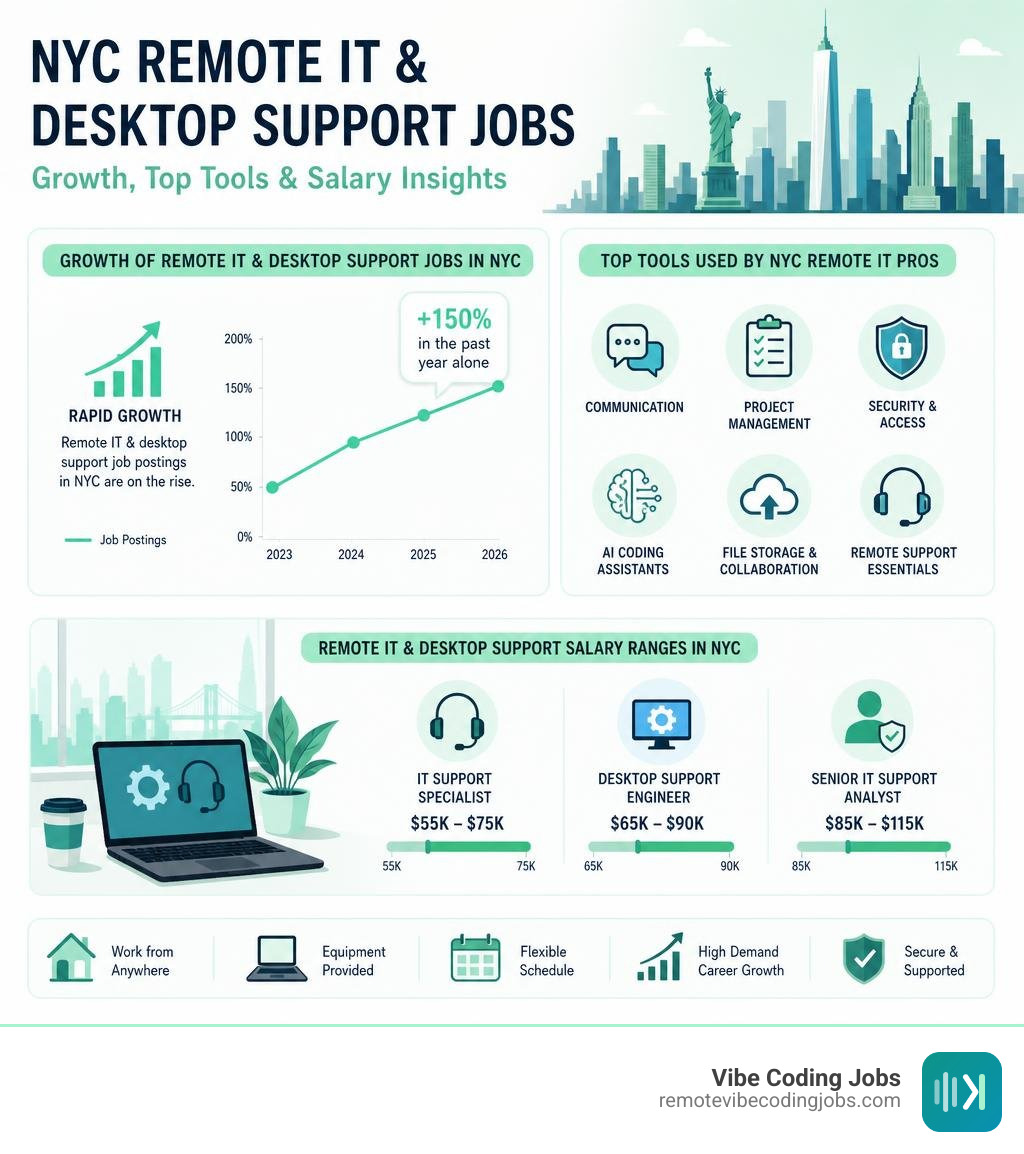
Here’s a quick look at the most-used remote tools among NYC tech professionals right now:
| Category | Top Tools |
|---|---|
| Communication | Zoom, Slack, Microsoft Teams |
| Project Management | Asana, Trello, Notion |
| Security & Access | VPN, RSA Tokens, MFA |
| AI Coding Assistants | Cursor, Claude, GitHub Copilot |
| File Storage & Collaboration | Google Workspace, Dropbox, GitHub |
Remote work in NYC has exploded. Over 40% of the city’s workforce is now working remotely, and remote job postings in NYC’s tech sector have surged by 150% in the past year alone. That’s not a blip — it’s a structural shift in how New York’s economy operates.
For IT and desktop support professionals, this shift has created a specific and growing opportunity: equipment-provided remote roles where companies ship you a laptop, headset, and everything else you need to do the job from home.
These roles exist across finance, healthcare, and tech — and they’re multiplying fast.
I’m part of the RVCJ Editorial team, covering AI-assisted development, remote hiring trends, and the tools that matter most for developers and IT professionals — including the evolving landscape of NYC remote tools. We’ve tracked thousands of remote roles across async-first companies so you can skip the noise and find what actually fits your stack and experience level.
Learn more about nyc remote tools:
The Rise of Equipment-Provided Remote IT and Support Roles in New York
There was a time when starting a new IT support job in Manhattan meant navigating the subway at rush hour, finding your cubicle, and waiting for the hardware team to hand over your physical workstation. Today, that entire experience has been packed into a cardboard box and delivered straight to your doorstep.
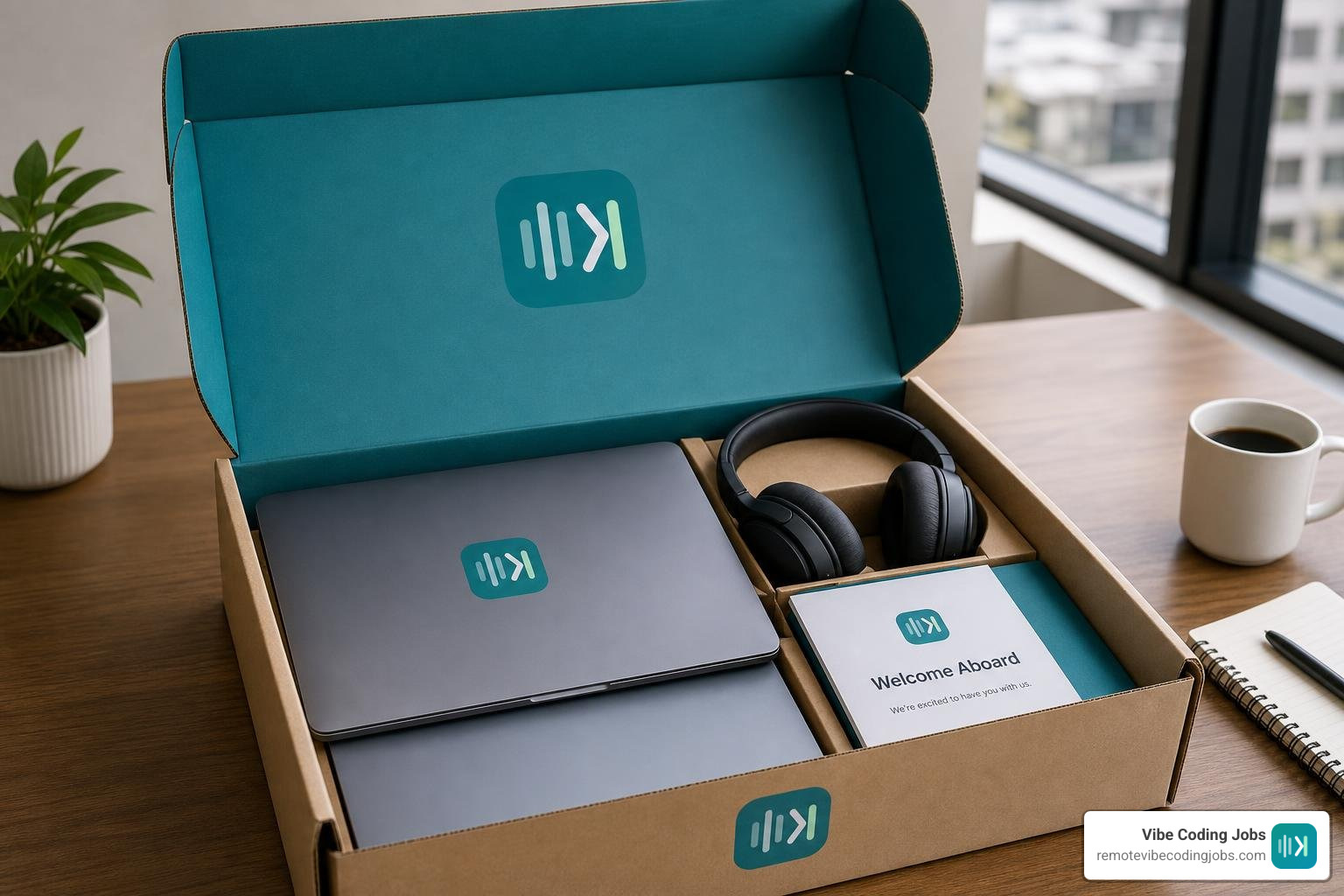
In 2026, the demand for remote desktop support specialists who can manage complex networks from home has reached an all-time high. NYC’s tech sector currently has an estimated 4,000 open positions, many of which are fully remote or hybrid. Because security and system standardization are paramount, the most competitive employers do not expect you to use your personal computer. Instead, they ship pre-configured, enterprise-grade hardware directly to your home.
This trend is driven by two main factors: security compliance and employee onboarding efficiency. When an organization provides your hardware, they ensure that every security patch, virtual private network (VPN) client, and monitoring agent is pre-installed. For you, it means a seamless Day 1 experience. You open the box, connect to your home Wi-Fi, authenticate your identity, and you are ready to work.
If you are currently looking for these kinds of roles, you can explore curated opportunities on platforms like Best Remote Jobs in NYC, NY 2026 | Built In NYC. Additionally, keeping a close eye on active listings via Remote Help Desk jobs in New York, NY – Indeed will help you spot companies actively shipping hardware to new hires.
Leading Industries and In-Demand Roles
While tech startups are famous for their remote-first cultures, traditional industries in New York City are rapidly catching up. The sectors leading the charge in remote job opportunities with provided equipment include:
- Finance and Fintech: NYC’s financial core has embraced remote work out of necessity and efficiency. Interestingly, the finance sector has seen a massive 30% spike in AI-related job listings recently, creating a parallel demand for IT support professionals who understand high-security financial systems and AI infrastructure.
- Healthcare and Healthtech: With strict HIPAA regulations, healthcare companies must control the hardware their staff uses. This makes equipment provisioning mandatory for any remote help desk or systems administrator role in this sector.
- High-Growth Startups: Fast-growing companies rely on distributed teams to scale. To hire the best talent without geographical limits, they utilize platforms like Employer of Record & Payroll Services | New York to compliantly manage payroll, benefits, and hardware logistics for workers based anywhere in the state.
The most in-demand roles within these industries include Help Desk Technicians (Tier 1-3), Systems Administrators, and Identity & Access Management (IAM) Specialists. These professionals are responsible for keeping the digital wheels turning, troubleshooting network errors, and provisioning access using modern cloud directories.
Salary Trends and Compensation Packages
Salaries for remote IT and desktop support roles in NYC remain highly competitive, often matching or closely trailing their in-office counterparts. Because NYC has a high cost of living, local employers frequently offer premium compensation packages to attract top-tier talent.
- Junior Support & Help Desk Roles: Typically range from $80,000 to $115,000 annually.
- Mid-Level Systems Engineers & Desktop Support Specialists: Range from $114,000 to $150,000 per year.
- Senior IT Managers & Infrastructure Engineers: Can command salaries between $170,000 and $240,000+, depending on the complexity of the systems they manage.
In addition to base salaries, remote compensation packages in 2026 frequently include home office stipends (ranging from $500 to $1,500 to upgrade your desk and chair), internet reimbursement, and comprehensive wellness benefits. For professionals relocating to or within the metropolitan area to take on hybrid roles, services like RELO NYC – Onboarding next generation New Yorkers help manage the entire transition, from finding short-term housing to coordinating movers.
Essential NYC Remote Tools for Desktop Support and IT Professionals
To succeed in a remote IT support role, you must master the digital toolkit that keeps distributed teams connected and secure. In NYC’s corporate environments, downtime is incredibly expensive. Consequently, IT departments rely on a specialized stack of NYC remote tools to monitor performance, deploy software, and resolve technical issues in real time.

Modern remote support relies heavily on Mobile Device Management (MDM) platforms like Jamf, Microsoft Intune, and Kandji. These platforms allow IT administrators to push security updates, install software, and even wipe lost or stolen corporate laptops remotely. Understanding how these tools integrate with cloud infrastructure is a core requirement for modern IT roles. If you want to dive deeper into how modern developers and IT teams structure their digital environments, check out our guide on the Remote Developer Tools Stack 2026.
Security and Compliance Protocols Powered by NYC Remote Tools
Security is the single biggest concern for companies employing remote workforces. With over 90% of cyber breaches involving compromised credentials, organizations must implement zero-trust security architectures.
When working in a remote IT capacity, you will frequently configure and troubleshoot security protocols such as:
- Multi-Factor Authentication (MFA): Ensuring users verify their identity through secondary devices before accessing corporate resources.
- Virtual Desktop Infrastructure (VDI) and VPNs: Creating encrypted tunnels so remote workers can securely access sensitive internal databases without saving data locally.
- RSA Tokens and Soft Tokens: Generating time-sensitive codes to prevent unauthorized access to critical systems.
For an excellent example of these protocols in action, we can look at the public sector. The New York State government outlines strict security standards, including the use of SSL VPNs, Host Checker applications, and data hygiene rules on its Remote Work | Office of Information Technology Services portal. These guidelines ensure that state employees do not download sensitive data to personal devices, clearing browser caches and saved passwords after every session to maintain strict data integrity.
Collaboration and Productivity Tech: Must-Have NYC Remote Tools
Beyond security, remote teams need robust collaboration platforms to maintain productivity. As an IT support professional, you will not only use these tools daily, but you will also be the person troubleshooting them when a high-priority meeting goes silent.
The core productivity stack for NYC remote workers includes:
- Instant Messaging & Channels: Slack and Microsoft Teams serve as the virtual office watercooler and primary dispatch center.
- Video Conferencing: Zoom and Webex host everything from daily standups to client presentations.
- Ticketing & Project Tracking: Jira, ServiceNow, and Asana ensure that technical issues are logged, prioritized, and resolved systematically.
Managing these systems can be overwhelming for small businesses and busy entrepreneurs. This has led to a growing market for local virtual administration and consulting services. For instance, teams like Remotely Done LLC provide specialized virtual assistance, administrative support, and Salesforce database maintenance, helping businesses organize their digital workflows and save hundreds of hours of manual labor.
How AI and Emerging Technologies are Transforming NYC Remote Support
The remote IT landscape is undergoing a massive transformation driven by artificial intelligence. In 2026, tech support is no longer just about answering phone calls and resetting passwords manually. AI-powered diagnostic tools are shifting the industry from a reactive model to a predictive one.
AI agents can now monitor system health logs, detect anomalous behavior, and automatically resolve minor software glitches before the end-user even notices a performance drop. When a ticket is escalated to a human IT professional, AI assistants provide real-time troubleshooting recommendations, pull relevant documentation, and draft rapid responses.
This rise in automated systems has contributed to a massive surge in AI-related employment. In NYC alone, AI-related job postings have skyrocketed by 250% over the past five years. To understand how these changes are impacting engineering and support roles, you can read our analysis on Cursor Copilot Developer Jobs Remote AI Growth.
Additionally, developers and IT administrators are using mobile-friendly development tools to manage systems on the go. Platforms like RemoteAI — AI coding tools, anywhere allow professionals to run secure, encrypted terminal sessions and coordinate AI agents directly from their mobile devices, eliminating the need to be chained to a physical desk to solve critical infrastructure bugs.
The Shift to AI-Assisted Development and Vibe Coding
For technical professionals, the integration of AI has birthed an entirely new way of building and maintaining software: vibe coding.
Vibe coding refers to a development methodology where professionals use natural language prompts to guide advanced AI models (like Claude or GPT-4) to write, test, and deploy code. Instead of spending hours writing boilerplate code manually, the developer sets the “vibe”—the architecture, logic, and goals—and lets the AI handle the execution.
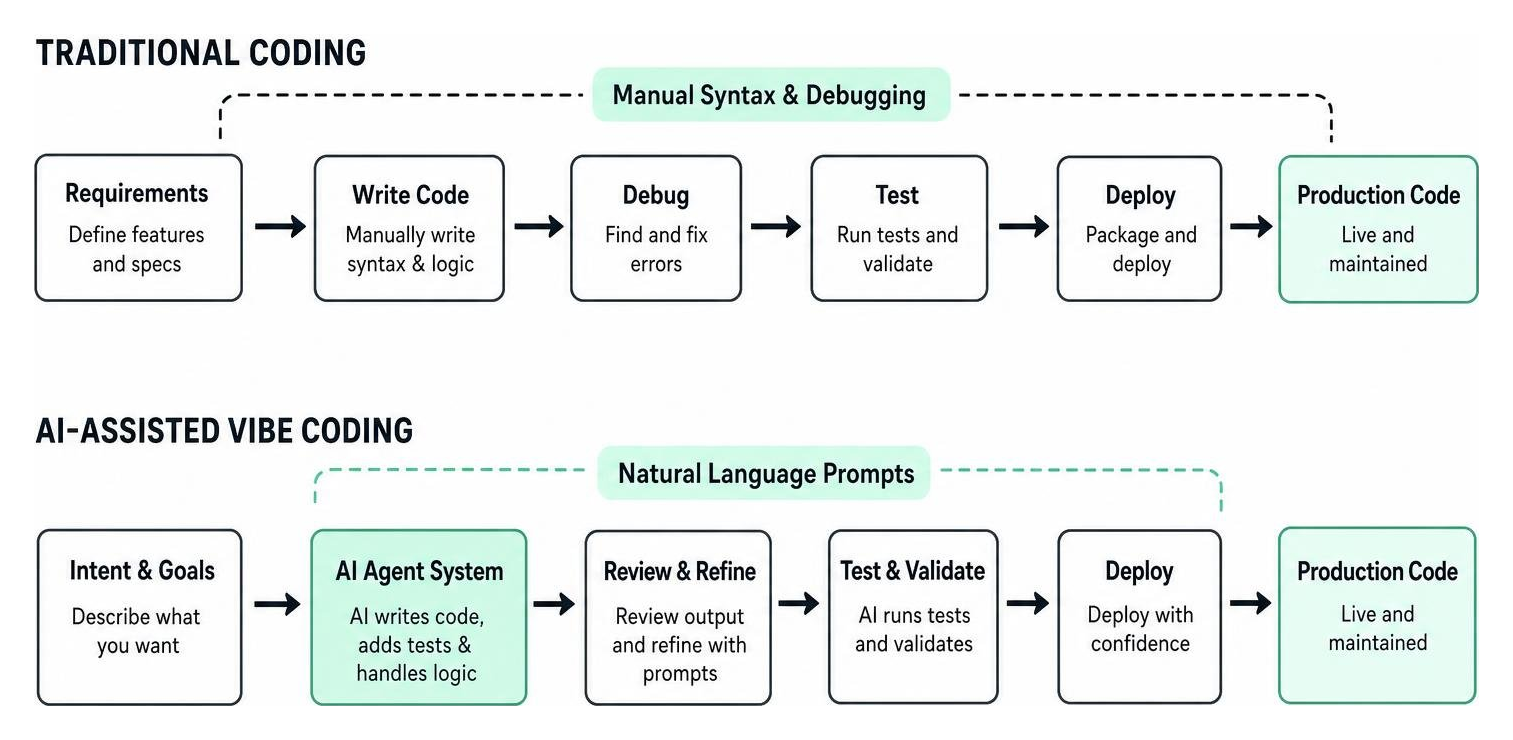
This shift has created a high demand for developers who are proficient with modern AI editors. Tools like Cursor, Windsurf, and Claude Code are now standard in many remote tech stacks. If you want to stay ahead of the curve, check out our resources on AI Coding Tools Vibe Coders and explore our detailed comparison of the Best Cursor Alternatives for Remote Developers in 2026.
Upskilling and E-Learning for Remote Tech Careers
With technology evolving at breakneck speed, continuous learning is the only way to remain competitive in NYC’s remote job market. Employers are looking for professionals who possess both foundational IT knowledge and hands-on experience with modern AI tools.
Popular e-learning platforms used by the NYC tech community include Coursera, Udemy, and edX. When building your resume, focus on obtaining highly regarded certifications such as:
- CompTIA A+ / Network+ / Security+ (for foundational IT support)
- AWS Certified Cloud Practitioner or Microsoft Certified: Azure Fundamentals
- ITIL Foundation Certification (for IT service management)
- Specialized credentials in prompt engineering and AI integration
While working from home is highly convenient, some professionals prefer a hybrid approach to avoid isolation and boost deep focus. Below is a comparison of how traditional home offices stack up against premium, focus-oriented workspaces in the city:
| Feature | Home Office Setup | Premium Private Workspace (e.g., Framework NYC) |
|---|---|---|
| Distraction Level | High (family, chores, pets) | Minimal (soundproof pods, total autonomy) |
| Internet Speed | Standard residential (50-300 Mbps) | Enterprise-grade (up to 2 Gbps Wi-Fi) |
| Access | 24/7 | 24/7/365 |
| Cost | Free (integrated into rent) | Monthly membership (starts around $925/mo) |
| Ergonomics | User-provided | High-end sit/stand desks, professional lighting |
If you find that working from your living room limits your productivity, exploring a dedicated, high-end desk space like Flexible Coworking Space NYC | Private Offices | Premium Amenities can give you the quiet, professional environment you need to tackle complex system deployments.
Frequently Asked Questions about NYC Remote IT Jobs
Do remote desktop support jobs in NYC typically provide equipment?
Yes, the vast majority of reputable remote desktop support and IT infrastructure jobs in New York City provide all necessary computer equipment. This typically includes a high-spec corporate laptop (Macbook Pro or Lenovo ThinkPad), dual monitors, a secure hardware security key or soft token, a professional headset, and a web camera. Companies do this to ensure strict adherence to security protocols and to make sure that their proprietary monitoring and virtual desktop software runs on standardized, authorized hardware.
What are the most critical security tools required for NYC remote workers?
Remote workers in NYC must be highly familiar with enterprise security tools. The core security stack generally includes:
- Virtual Private Networks (VPNs) and SSL VPN clients to establish encrypted connections.
- Multi-Factor Authentication (MFA) applications (like Duo, Okta, or Google Authenticator).
- RSA Hardware or Soft Tokens for high-security environments like finance and government.
- Mobile Device Management (MDM) software (like Jamf or Microsoft Intune) to ensure the device complies with corporate security policies before accessing the network.
How is AI changing the day-to-day tasks of remote IT support professionals in NYC?
AI is automating repetitive Tier 1 support tasks, such as password resets, basic software installations, and simple network troubleshooting. This allows remote IT professionals to focus on higher-value tasks, such as system architecture, security monitoring, cloud resource provisioning, and managing complex integrations. Rather than manually writing scripts, modern IT specialists use AI assistants to generate deployment code, analyze system logs, and diagnose network anomalies faster than ever before.
In fact, remote work flexibility has become so valued that even the public sector is adapting. For example, the city government recently announced a major update regarding workplace flexibility, which you can read about in detail via the Mayor Adams, DC 37 Executive Director Garrido Announce Extension of Remote Work Pilot for City Employees – NYC Mayor’s Office press release. This pilot extension highlights how deeply ingrained flexible and remote work arrangements have become across all sectors of New York’s workforce.
Conclusion
The landscape of remote work in New York City in 2026 is dynamic, highly secure, and increasingly powered by artificial intelligence. With over 40% of the local workforce operating remotely and tech sector listings up by 150%, there has never been a better time to transition into an equipment-provided remote IT or developer role.
By mastering essential NYC remote tools—from virtual private networks and secure RSA tokens to cutting-edge AI coding editors like Cursor and Claude—you can position yourself at the very front of the modern job market.
At RemoteVibeCodingJobs, we make this transition simple. We aggregate remote “vibe coding” and tech support roles at async-first companies, offering curated daily listings filtered by corporate culture, tech stack, and modern AI tools. If you are ready to ditch the daily commute, skip the application bureaucracy, and land a high-paying remote role with provided hardware, explore our curated listings today at RemoteVibeCodingJobs – Find Remote NYC Jobs.