
Why AI Code Completion Helps Developers Ship Faster
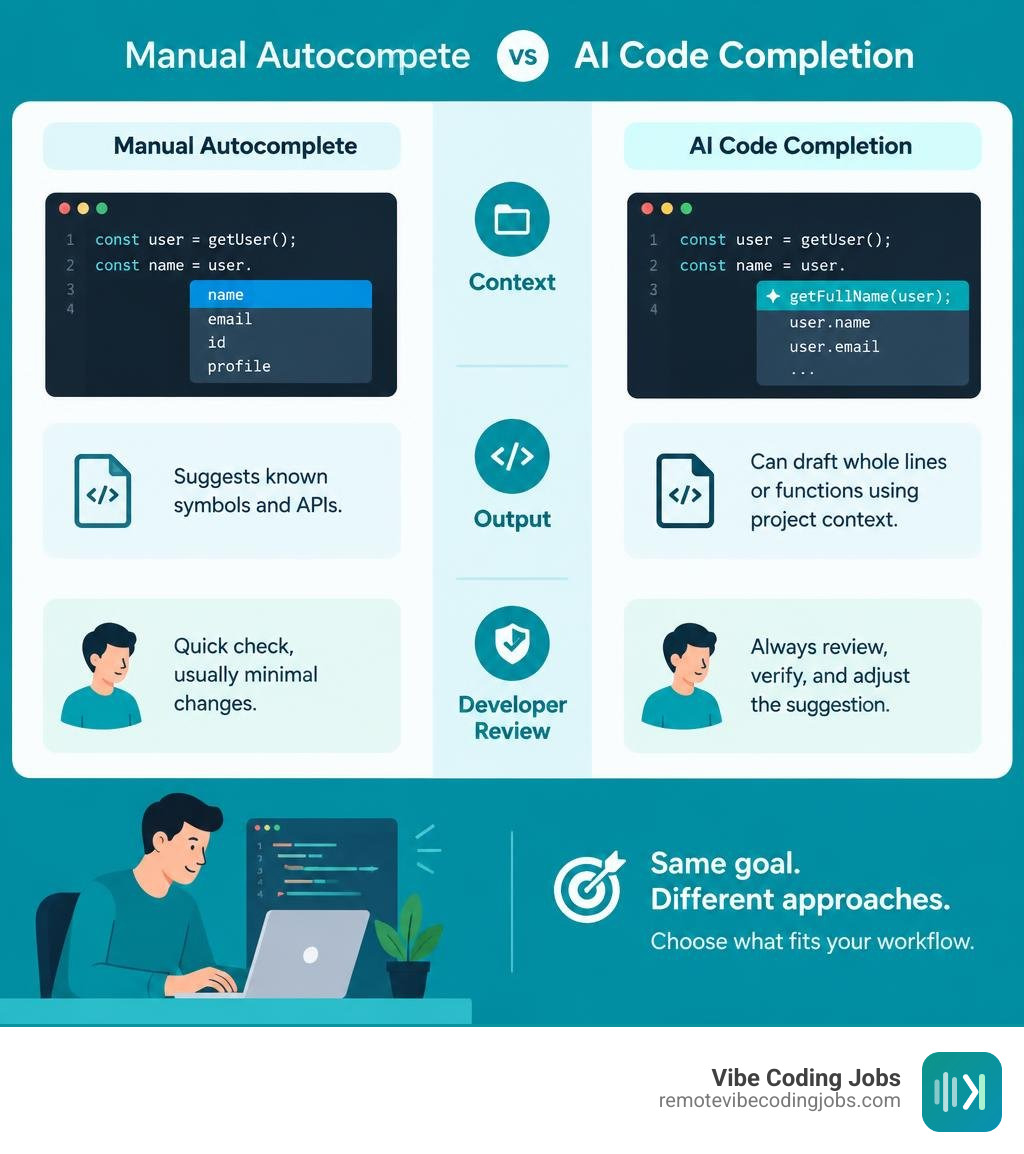
AI code completion predicts code as you type. Unlike traditional autocomplete, which mainly suggests known symbols and APIs, it can draft whole lines or functions using nearby code and project context. That makes it useful for boilerplate and routine tasks, but every suggestion still needs a developer’s review.
The right tool depends on your editor, budget, and privacy needs. GitHub Copilot, Tabnine, JetBrains AI Assistant, GitLab Duo, and Supermaven take different approaches to context, pricing, and where your code is processed. We’ll compare those trade-offs so you can choose a tool that fits how you work.
I’m Dominic Zijlstra. My background in data science, DevOps, and building automated systems shapes how I evaluate ai code completion: by whether it saves time without making code harder to trust.
Ai code completion glossary:
Evolution of Code Assistants: Traditional IntelliSense vs Modern AI Code Completion
Traditional code completion relied on static analysis. Editors built an Abstract Syntax Tree (AST) of your files, indexed explicit type signatures, and checked scoped variables to suggest alphabetical lists of methods or properties. While accurate, static IntelliSense could only complete symbols that already existed in your code or imported libraries.
Modern neural code assistants use large language models trained on billions of lines of code. Instead of matching tokens against rigid compiler tables, modern engines predict entire logical blocks based on the semantic intent of your file. This shift represents a fundamental upgrade in the remote developer tools stack in 2026.
| Feature / Capability | Traditional IntelliSense | Modern AI Code Completion |
|---|---|---|
| Context Analysis | Local file AST & explicit imports | Open tabs, active repository, prompt intent |
| Output Unit | Single token, method name, or property | Whole lines, multi-line blocks, full functions |
| Generation Mechanism | Deterministic symbol table lookup | Probabilistic deep learning prediction |
| Boilerplate Creation | Static pre-defined snippets | Contextual custom code generation |
| Natural Language Support | None | Comment-to-code synthesis |
How AI Code Completion Transforms Context Recognition
The earliest neural autocompletes evaluated only the lines immediately preceding the cursor. Today’s assistants analyze open IDE tabs, imported dependencies, recent edit histories, and natural language descriptions. This contextual awareness is key when contrasting vibe coding vs traditional software engineering, where developer speed relies on the editor inferring high-level intent.
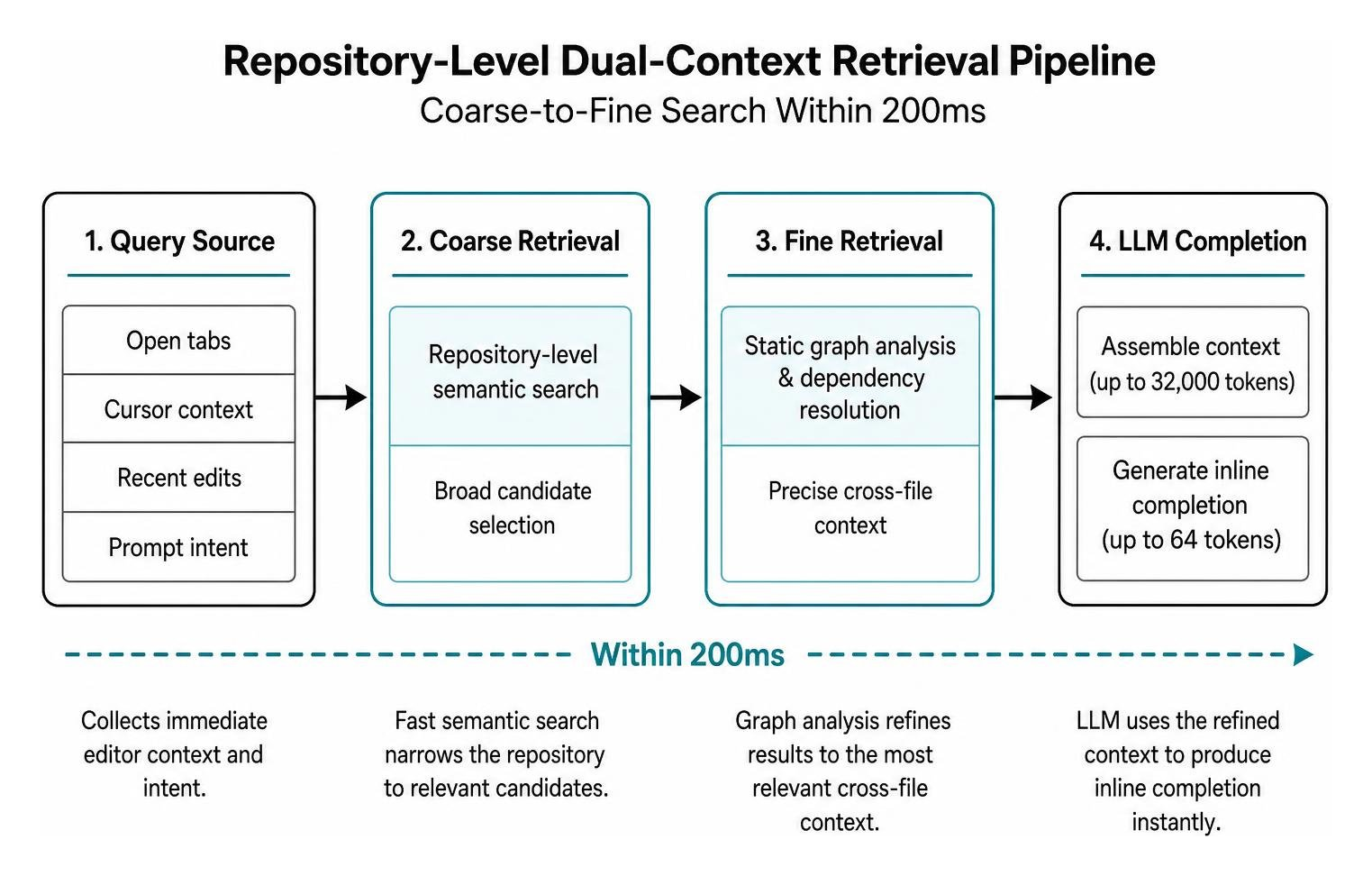
Assistant architectures allocate dedicated token budgets for local context. As detailed in the Code Suggestions context documentation, GitLab Duo allocates a context window of up to 32,000 tokens for code completion while generating up to 64 tokens per inline burst. For larger generation tasks, it scales context up to 142,856 tokens to produce up to 2,048 tokens of output. By ingesting surrounding variables, file structures, and active tabs, the assistant tailors its suggestions to match your project’s naming conventions and formatting habits.
Repository-Level Context and Latency Optimization
Scaling context across an entire multi-gigabyte repository introduces significant latency challenges. If an inline completion takes longer than 200 to 300 milliseconds, it disrupts typing flow.
To balance deep repository awareness with sub-200ms latency, modern architectures use two-stage retrieval pipelines. Breakthrough research on the RepoFuse dual-context architecture demonstrates how coarse-to-fine retrieval and static graph analysis can extract cross-file dependencies across codebases with over 50 million lines without slowing down the editor. Structuring your project with modular interfaces and clear naming makes it easier to implement building an agent-friendly codebase.
Top AI Code Completion Tools Compared: Features, Performance, and Pricing
Choosing an assistant requires balancing suggestion speed, context window capacity, enterprise privacy safeguards, and pricing. Developers evaluating modern workflows often look closely at how platforms compare, such as examining cursor and copilot developer workflows.
| Tool | Core Engine / LLMs | Key Strengths | Pricing Model | Ideal Use Case |
|---|---|---|---|---|
| GitHub Copilot | OpenAI custom models, Claude 3.5 Sonnet | Deep GitHub ecosystem integration, multi-file edits, CLI agent | Free (2,000 completions/mo), Pro ($10/mo), Pro+ ($39/mo) | General-purpose full-stack development |
| Tabnine | Proprietary models, customizable LLMs | Zero data retention, local hosting, enterprise isolation | Starter (Free), Pro ($15/mo), Enterprise custom | Regulated industries and private enterprise repos |
| JetBrains AI Assistant | Mellum LLM + OpenAI-compatible APIs | Deep IDE-native inspection, commit and comment generation | Included in JetBrains AI subscription plans | JetBrains ecosystem (IntelliJ, PyCharm, WebStorm) |
| GitLab Duo | Vertex AI Codey, Qwen2.5, Claude 3.5 Sonnet | End-to-end DevSecOps integration, pipeline awareness | Duo Pro add-on tier ($19/user/mo) | Teams standardizing on GitLab CI/CD |
| Supermaven | Custom Babble architecture | Ultra-fast 250ms latency, massive 1M token context window | Free tier, Pro ($10/user/mo or $5 chat credits) | Monorepos and speed-focused developers |
| Cursor | GPT-5.6, Claude 3.5 Sonnet, Gemini 3.1 Pro | Agentic multi-file orchestration, background execution | Free tier, Pro ($20/mo), Business ($40/user/mo) | Autonomous scaffolding and vibe coding |
Leading Cloud-Based AI Code Completion Engines
Cloud-based completion tools run larger models on remote server clusters to return detailed, multi-line code suggestions. Discovering how to master these tools opens up new avenues for AI assisted development career growth.

- GitHub Copilot: The most widely adopted coding assistant. Copilot offers a free tier limited to 2,000 completions and 50 chat messages per month, while the Pro tier ($10/month) provides unlimited completions. Developers using Copilot finish tasks up to 55% faster and report up to 75% higher job satisfaction.
- Tabnine: Focuses on privacy and predictable developer control. At $15/month for its Pro plan, Tabnine allows teams to switch underlying models, connect private repositories safely, and deploy in isolated environments.
- Supermaven: Built around low-latency response times. Supermaven reports a 250ms tool latency compared to common industry baselines near 783ms. Its Pro tier delivers a 1-million-token context window, making it effective for navigating large monorepos.
- JetBrains AI Assistant: Powered by JetBrains’ proprietary Mellum model along with configurable external APIs. As outlined in the JetBrains AI documentation, it supports over 30 languages and lets developers tune completion policies across Creative, Balanced, and Focused modes.
Local and Privacy-Preserving Alternatives
For teams subject to strict compliance rules or working in air-gapped environments, local code completion keeps all source code on the developer’s physical machine.
Using runtimes like Ollama paired with models such as Codellama 7B or Qwen 2.5 Coder, developers can run local inline completion via editor extensions without sending data over the network. Similarly, Microsoft Visual Studio IntelliCode uses locally executed machine learning models to provide whole-line autocompletions and repeated-edit detection for languages like C#, Python, and TypeScript without transferring proprietary logic to external clouds. These local configurations fit well within privacy-conscious async-first remote developer roles.
Security, Privacy, and Code Quality in AI-Assisted Workflows
Integrating automated code generation into production branches introduces potential risks regarding IP provenance, data protection, and vulnerability injection.

Using specialized AI code review tools for remote teams helps catch insecure suggestions before they reach continuous integration pipelines.
Preventing Vulnerabilities and Licensing Risks
Because language models train on vast corpuses of public software, they can occasionally suggest patterns containing known Common Weakness Enumerations (CWEs) or reproduce distinct open-source snippets.
Leading cloud providers mitigate this by incorporating real-time licensing filters and vulnerability checkers. GitHub Copilot and GitLab Duo include matching filters that flag completions identical to public code, letting developers block matching snippets or inspect their licensing terms. Teams must also treat all generated code as untrusted user input by running automated linters, static application security testing (SAST), and unit test suites before merging pull requests.
Enforcing Team Standards and Reducing Tech Debt
When used across large engineering organizations, code completion engines help standardize repetitive structures. Instead of different developers writing disparate implementations for logging, error handling, or API client calls, the assistant suggests the team’s established internal patterns.
Large enterprise deployments highlight these operational gains. For instance, Grupo Boticário documented a 94% increase in developer productivity after standardizing on Copilot for routine boilerplate and continuous documentation. Understanding these automation tools has become one of the core developer skills in demand for 2026.
The Future of AI Coding: From Autocomplete to Autonomous Agents
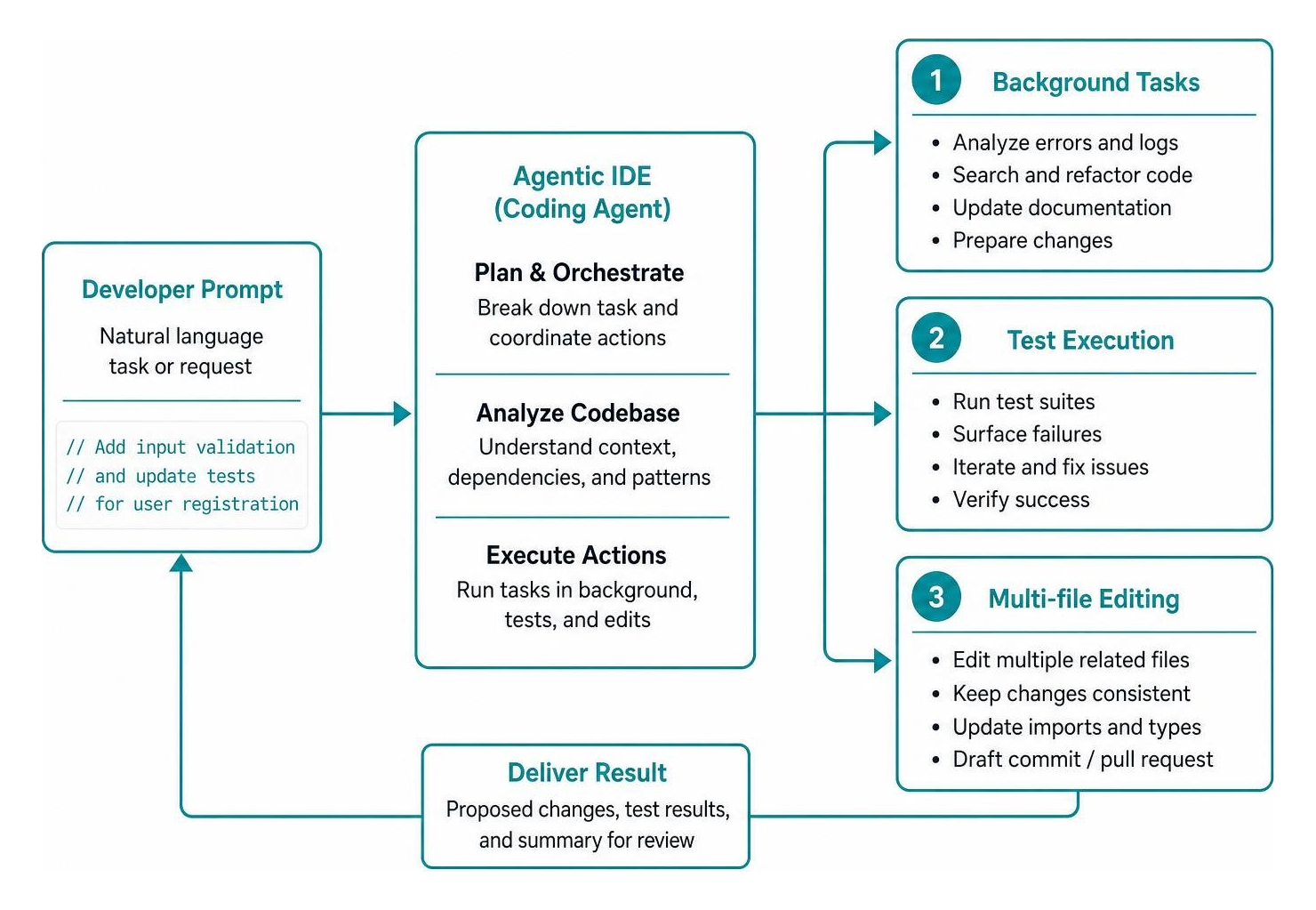
The industry is evolving from passive autocomplete toward proactive coding agents that handle tasks across multiple files. Tools like Cursor run background tasks that analyze terminal errors, execute test suites, and draft multi-file pull requests based on natural language prompts.
This shift marks a major evolution in developer responsibilities, accelerating the transition from writing code to managing AI agents.
Prompt Engineering Best Practices for Daily Development
Writing clear, contextual instructions inside your code comments improves the accuracy of neural code completion:
- Declare intent and technical constraints early: Specify the library, return types, and target error conditions in your opening comment (for example:
// Parse incoming Stripe webhook payload using express.raw() and verify signature). - Outline complex logic with step-by-step comments: Break down multi-stage algorithms into numbered steps (
// 1. Validate UUID format; 2. Fetch cache record; 3. Fallback to SQL query). - Use trailing blank lines to prompt generation: In tools like GitLab Duo and GitHub Copilot, leaving a clean blank line directly below a descriptive comment signals the model to begin generating the implementation.
- Keep relevant dependency files open: Modern assistants reference active tabs to resolve cross-file types and import paths.
- Provide concrete input/output examples: Including sample JSON structures or expected return payloads directly in docstrings helps guide the model toward the right output format.
Multi-Model Workflows and Model Context Protocol Integration
Modern IDEs let developers route specific coding tasks to the most suitable underlying model:
- Anthropic Claude 3.5 Sonnet: Excels at complex architectural refactoring, tricky debugging, and multi-file code generation.
- OpenAI GPT-5.6 / GPT-4o: Suited for rapid scaffolding, algorithmic tasks, and test suite generation.
- Google Gemini 3.1 Pro: Well-matched for ingesting large context windows and extensive legacy repositories.
Through emerging standards like the Model Context Protocol (MCP), editors can connect these LLMs directly to local databases, internal issue trackers, terminal environments, and API endpoints. This integrated tooling makes today’s entry-level AI coding career landscape dynamic and accessible for engineers who know how to work alongside AI assistants.
Frequently Asked Questions About AI Code Completion
Is the cost of paid AI code completion tools justified for individual developers?
For most working engineers, yes. With subscriptions ranging from $10 to $20 per month (such as GitHub Copilot Pro at $10/month or Tabnine at $15/month), saving even one hour of boilerplate coding or API lookup each month easily offsets the cost. The 55% average boost in task completion speed makes it a high-return investment for professional workflows.
How do AI code completion models handle proprietary code privacy?
Cloud-based enterprise plans (including GitHub Copilot Business/Enterprise, Tabnine Enterprise, and GitLab Duo Pro) include zero-data-retention agreements, ensuring your private code is never retained or used to train public foundation models. For teams requiring strict air-gapped isolation, local tools like Ollama with Codellama or on-premises Tabnine ensure that zero source code leaves your local infrastructure.
What are the main limitations and accuracy challenges of current tools?
Key limitations include hallucinated API parameters, out-of-date library syntax, subtle logical edge-case bugs, and occasional latency spikes over unstable network connections. AI assistants generate probabilistic suggestions rather than verified code, so human review, automated linting, and thorough unit testing remain essential parts of the development process.
Conclusion
AI-assisted code completion has evolved from simple token-level autocompletion into an essential engineering partner. By taking over repetitive boilerplate, surfacing cross-file repository context, and speeding up routine implementations, these tools help developers focus on architecture, system design, and product quality.
As engineering teams adopt this workflow, staying up to date on modern tools is key to building a resilient career. Take a deeper look into the modern ecosystem by exploring premier AI coding tools for vibe coding, and explore our curated listings at RemoteVibeCodingJobs to find remote, async-first teams building software with next-generation development stacks.