
How to Choose Pair Programming Tools
The best pair programming tool depends on what you need to share. For two developers editing together, look for live cursors, synchronized code, and a shared terminal. For remote interviews, choose a setup where candidates can run tests and debug real projects, such as CodePair. For AI-assisted work, compare how tools such as Cozea and The Pair let you direct agents and review their changes. In every case, check Git support and who can access your code or run commands.
Pair programming usually means one person writes code while another reviews and guides the work. A shared IDE makes that exchange easier when teammates are remote; AI agents add another kind of collaborator, but they do not replace human judgment.
I’m Di Su, a software engineer with over 10 years of experience building web products and developer workflows. I’ll use that background to compare pair programming tools by how well they support real work, not just a shared screen.
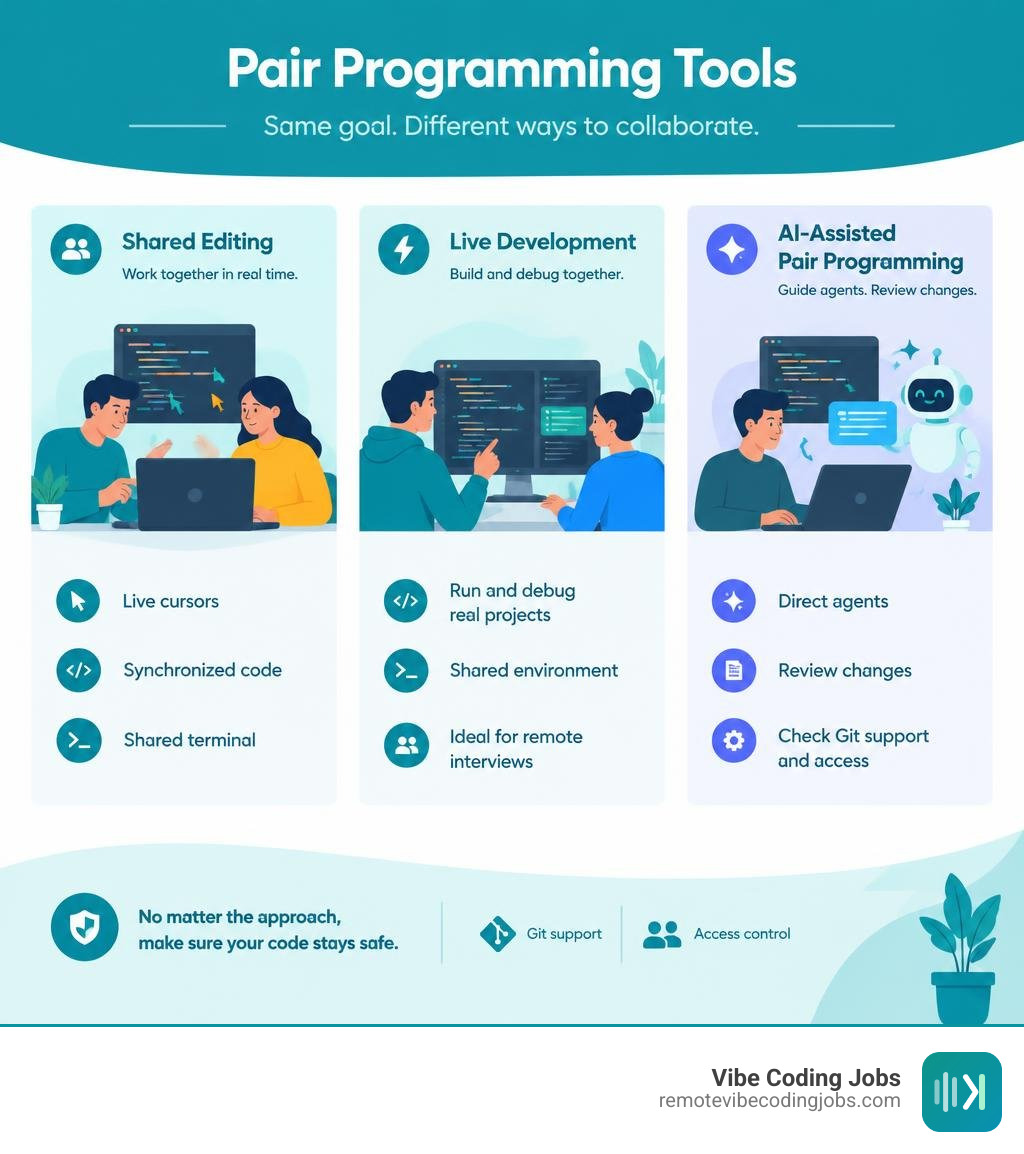
Pair programming tools word guide:
Core Architecture Behind Modern Virtual Collaborative IDEs
Building a reliable collaborative development environment requires solving challenging engineering problems: keeping multiple text cursors synchronized across high-latency networks, isolating untrusted code runs, and orchestrating state across distributed services.

At the heart of text synchronization are Operational Transform (OT) algorithms and Conflict-free Replicated Data Types (CRDTs). When two engineers type simultaneously in different parts of a file, the system must transform positional offsets so neither developer’s keystrokes overwrite the other. For instance, in the open-source Nexis collaborative IDE architecture, concurrent edits flow over persistent WebSocket connections to an API gateway. The backend acquires a workspace lock via Redisson distributed locks, applies Operational Transform to reconcile changes, updates the document version state, and broadcasts the transformed operation across nodes using Redis pub/sub.
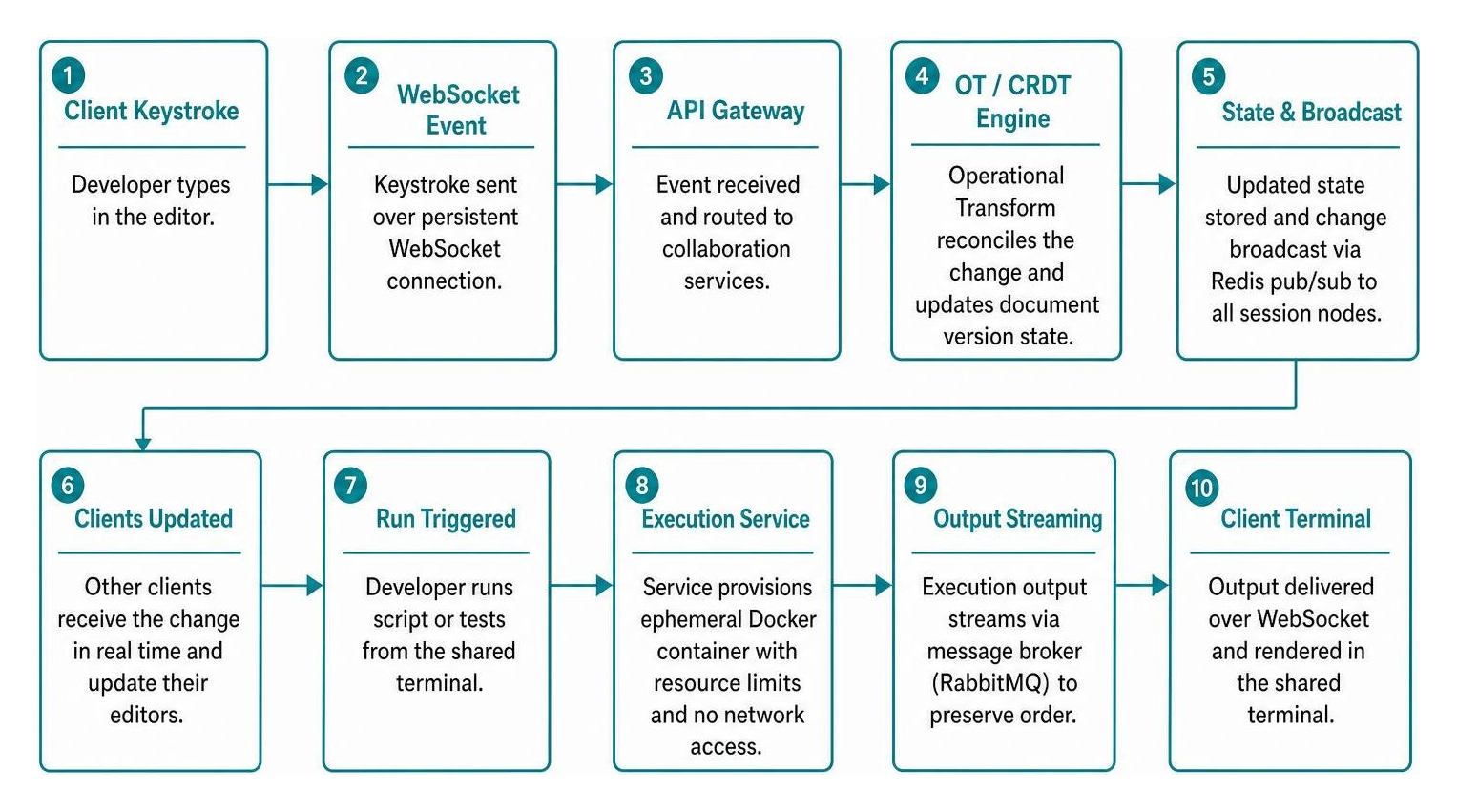
Beyond text synchronization, executing untrusted code collaboratively introduces significant infrastructure complexity:
- Microservices and Container Sandboxing: In systems like Nexis, which coordinates 6 Spring Boot microservices on Kubernetes, user code execution is completely isolated. When a developer triggers a script or test suite, the execution service provisions an ephemeral Docker container with strict CPU, memory, and timeout bounds, disabling network access to prevent host compromises.
- Zero-Polling Execution Pipelines: Instead of clients repeatedly polling an API for build outputs, execution results stream directly back through message brokers like RabbitMQ—using consistent-hash sharding to preserve message ordering per workspace—and pipe straight into the client terminal via WebSockets.
- Presigned Asset Handling: Collaborative workspaces avoid choking backend servers with large media or asset uploads by generating presigned URLs (such as via MinIO object storage), letting clients upload assets directly to storage buckets before updating session metadata.
Mastering these systems allows teams to maximize their output, a cornerstone discussed in our remote developer productivity tips guide.
Top Pair Programming Tools for Remote and AI-Assisted Teams
Modern collaborative coding platforms differ significantly in how they handle state, support agentic workflows, and isolate execution environments.
| Platform / Tool | Primary Focus | Concurrency & Sync Engine | AI & Agent Capabilities | Sandboxing & Execution |
|---|---|---|---|---|
| Cozea | Multiplayer Agentic & Vibe Coding | Real-time shared workspace & state sync | Multi-agent orchestration (Claude, GPT, Gemini) | DevApps, cloud workspaces, CLI tools |
| CodePair | Technical Interviews & Pair Coding | Real-time shared Monaco IDE & cursors | Foundation models & live agent assistance | Nix-based sandboxes, 100+ languages, live preview |
| The Pair | Dual-Agent Desktop Pair Programming | Local-first state engine (Tauri/Rust) | Mentor + Executor dual-agent cross-validation | Local runtime execution with manual approvals |
| Eva | AI Coworker & Live Sandboxes | Live cloud VM session synchronization | MCP-compliant agent, PR creation, batch tasks | Full cloud VM with browser automation and terminal |
| coder/mux | Parallel Agent Multiplexing | Git worktree and SSH workspace sync | Multi-model loops (Sonnet, Grok, GPT) | Local isolation, remote SSH compute |
| Nexis | Open-Source Collaborative IDE | Operational Transform + Redis pub/sub | Pluggable language server integrations | Sandboxed ephemeral Docker containers |
Multi-Agent Orchestration and Agentic Pair Programming Tools
The concept of a pair programming partner has evolved dramatically. Today, platforms support multi-agent orchestration where AI models act as specialized team members rather than simple autocompletion engines. Understanding vibe coding vs traditional software engineering illustrates this shift toward directing intelligent agents.
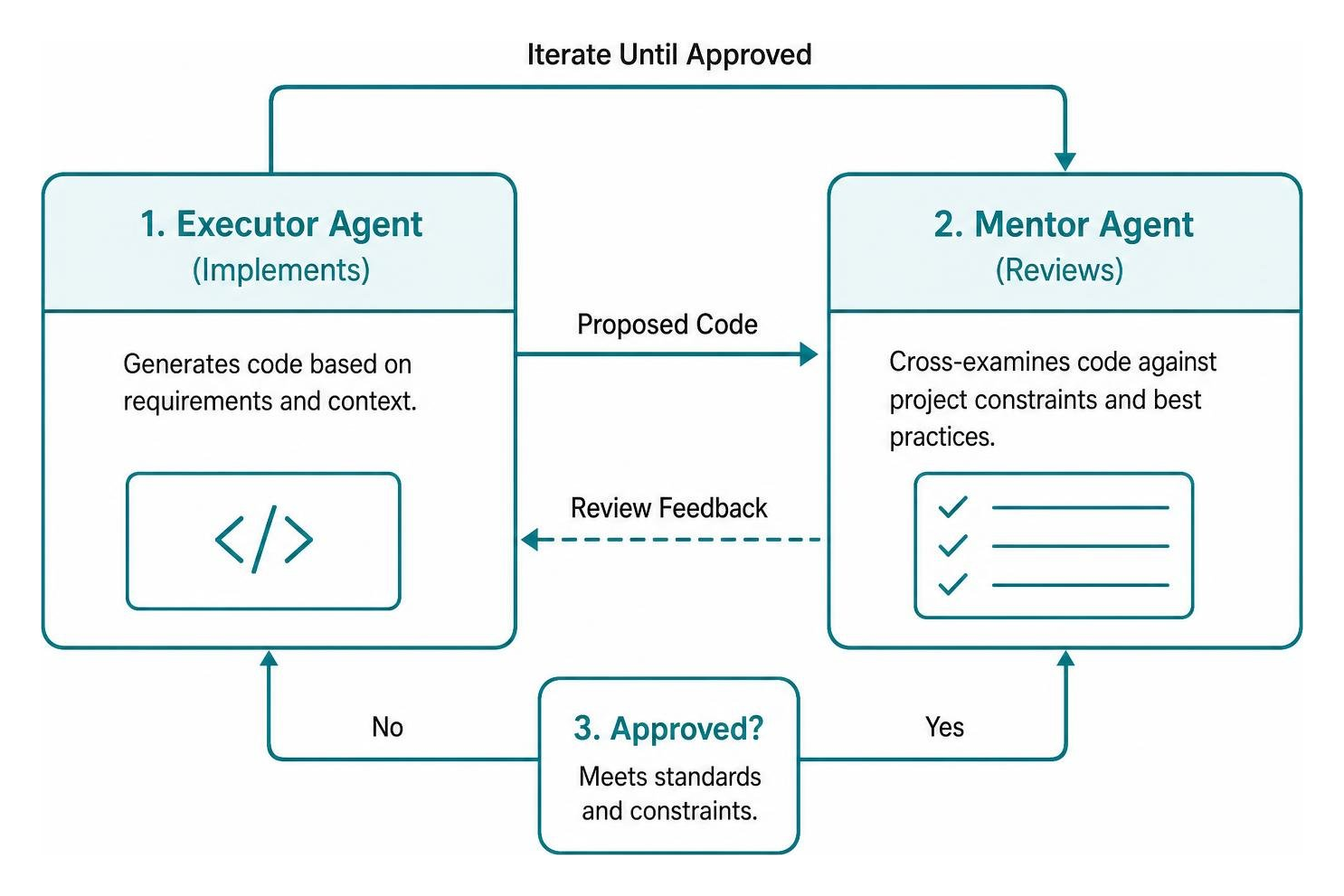
A major risk with single-model pair programming is hallucinations: an LLM generating buggy code will often validate its own logic when asked to self-review. Desktop platforms like The Pair dual-agent desktop application solve this by employing a dual-agent Mentor-Executor architecture. One agent generates the proposed implementation while a distinct mentor model cross-examines the code against project constraints before saving changes.
When orchestrating multiple external foundation models, workspaces like the Cozea multi-agent collaboration workspace allow developers to spin up squads of agents powered by diverse providers—such as Claude, OpenAI, and Gemini—coordinating them inside a shared multiplayer workspace. Similarly, the coder/mux agent multiplexer runs multiple parallel agent loops across local Git worktrees or remote servers via SSH, giving developers real-time token tracking and automated plan/execution modes. These workflows tie directly into our analysis of Claude Code vs Copilot for developers in 2026.
Live Coding Sandbox and Cloud VM Pair Programming Tools
Pair programming often requires running databases, background daemons, and hot-reloading frontend servers simultaneously. Traditional browser code editors fall short when developers need low-level terminal access.
Platforms like the CodePair interactive development platform bridge this gap by running on reproducible Nix environments. Holding a 4.9 out of 5 rating across engineering organizations, CodePair provides access to over 1,000 system packages, full bash/zsh shell access, and live full-stack app previews alongside foundation model pairing. This environment makes technical evaluations mirror everyday development, offering a great pathway for finding remote coding jobs without LeetCode.
For autonomous development, Eva AI coworker spins up complete cloud VMs containing the full project repository. Eva operates inside a live sandbox where it runs unit tests, navigates live web pages using an integrated browser, and executes routine background tasks like dependency updates and test coverage audits before drafting clean pull requests. For developers seeking versatile desktop tools, reviewing the best Cursor alternatives for remote developers offers additional setup ideas.
Dedicated Collaborative Platforms vs General-Purpose Collaboration Software
Engineers frequently attempt remote pair programming using general communication software like Zoom, Microsoft Teams, or Google Meet. While screen sharing works for quick walkthroughs, it creates severe friction during active software development.
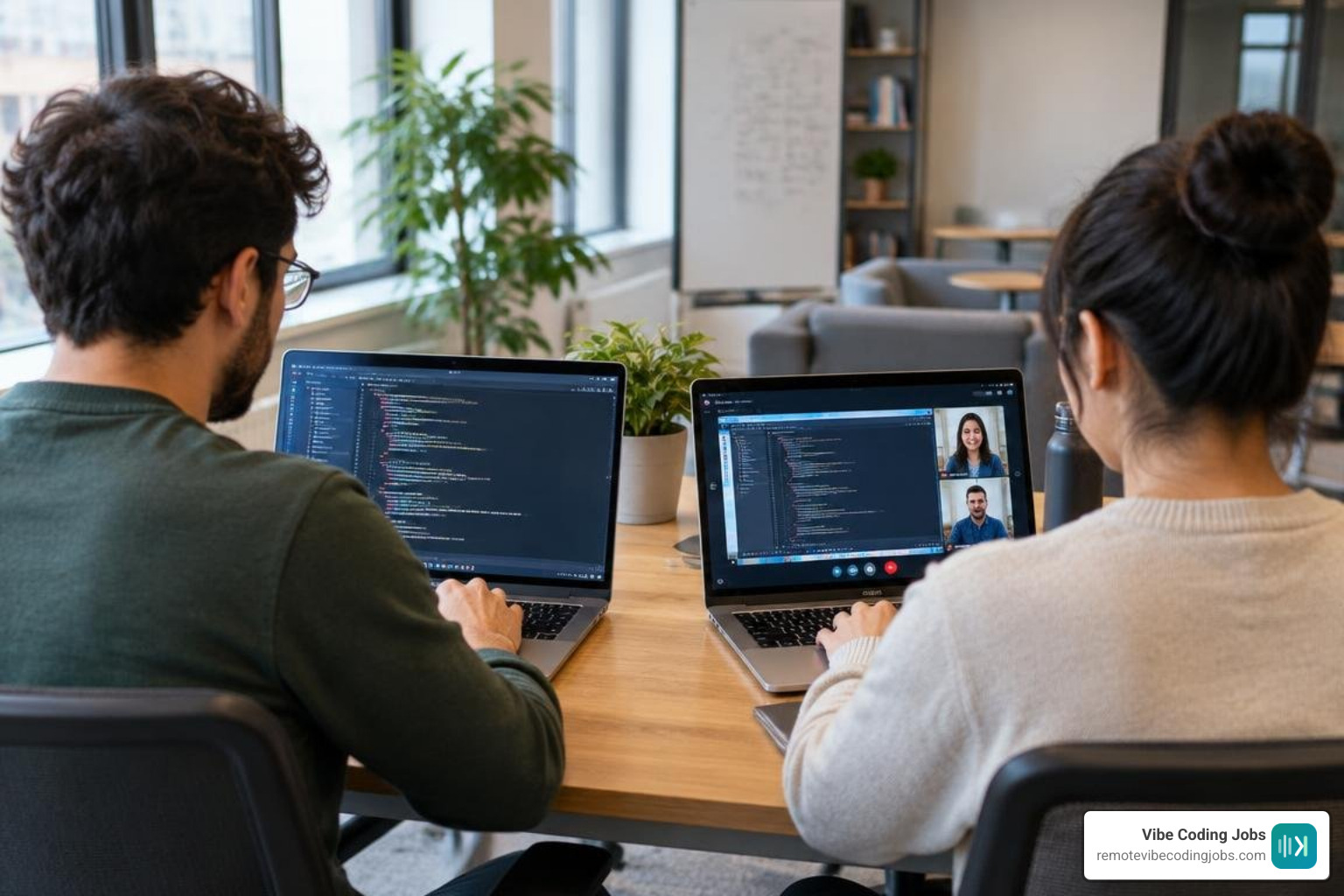
- Independent Navigation and Low Latency: In screen-sharing calls, only the host can navigate files, scroll through documentation, or trigger breakpoints. Dedicated pair programming platforms maintain independent viewports, allowing the driver to write code while the navigator searches definitions or checks database configurations asynchronously.
- Bandwidth and Visual Fidelity: Screen sharing encodes entire desktop monitors into video streams, introducing blurriness and input lag. Collaborative IDEs send lightweight text deltas via WebSockets, keeping data usage minimal and text razor-sharp.
- Integrated Toolchains and Multiplexed Terminals: General tools cannot share terminal sessions cleanly. Collaborative platforms let developers run commands, inspect logs, and debug test suites inside shared, permission-controlled terminal multiplexers.
Balancing real-time pairing with independent focus requires pairing synchronous sessions with the best async communication tools for dev teams. This balance protects team energy and reinforces a healthy deep work culture for developers.
Security, Sandboxing, and Trust in AI-Driven Pair Programming
Integrating autonomous agents and remote collaborators into local development environments introduces critical security considerations:
- Container and Compute Isolation: Code executed during pairing must run in isolated containers with restricted system calls and memory limits. Ephemeral containers should be destroyed immediately after execution to prevent data leakage across sessions.
- Human-in-the-Loop Confirmation: Autonomous tools should never execute arbitrary bash scripts or push Git branches without explicit human approval. High-impact operations—such as database migrations or modifying authentication modules—require manual confirmation steps.
- Model Context Protocol (MCP) Boundaries: Tools leveraging the Model Context Protocol define explicit JSON schemas for external tool invocation. Using strict schemas, rate-limiting API endpoints, and implementing role-based access control (RBAC) ensures agents only access pre-authorized endpoints.
- Session Auditing and NDJSON Replays: Platforms that record session events line-by-line as NDJSON streams (such as Nexis) allow security and compliance teams to inspect every keystroke, terminal input, and model suggestion retroactively.
Following these practices ensures teams can safely adopt automating coding tasks safely with AI.
Frequently Asked Questions about Pair Programming Software
How do modern collaborative coding platforms resolve concurrent edit conflicts?
Collaborative IDEs use Operational Transform (OT) or Conflict-free Replicated Data Types (CRDTs). When two developers type in the same file at the same time, the engine calculates the positional delta of each edit relative to the document version. A central coordinator (often backed by distributed locks) establishes an immutable sequence of operations, adjusts line and character indices accordingly, and broadcasts the resolved state to all connected clients over WebSockets.
Why are live coding environments superior to take-home challenges in technical interviews?
Take-home assignments are vulnerable to unverified solutions and demand excessive unpaid candidate time. Live environments like CodePair offer realistic sandboxes with real runtimes and interactive terminals. Interviewers can observe a candidate’s problem-solving process, architectural trade-offs, debugging style, and ability to collaborate with both humans and AI models in real time.
What is the Model Context Protocol and how does it enhance collaborative AI pairing?
The Model Context Protocol (MCP) is an open standard that enables language models to discover and interact with external systems using JSON-RPC messages. Rather than relying on rigid, pre-programmed integrations, MCP servers expose tools—such as database query runners, GitHub issue fetchers, or test suite runners—with defined JSON input/output schemas. This allows pair programming agents to safely query context and run commands across external developer tools.
Conclusion
Virtual pair programming has evolved from simple screen sharing into a rich ecosystem of real-time collaborative IDEs, cloud VM sandboxes, and multi-agent development workspaces. By choosing platforms tailored to your workflow—whether orchestrating dual agents with The Pair, evaluating engineering talent with CodePair, or synchronizing multi-agent projects in Cozea—teams can dramatically increase their software delivery velocity.
If you are looking to build modern software with cutting-edge tools at top remote companies, explore our curated roles and check out the best AI tools for coding to keep your development skills ahead of the curve.