Why Developers Are Letting AI Write Their Docs
Using AI to create documentation from code is now one of the fastest ways to turn an undocumented codebase into clear, professional technical docs — in minutes, not weeks.
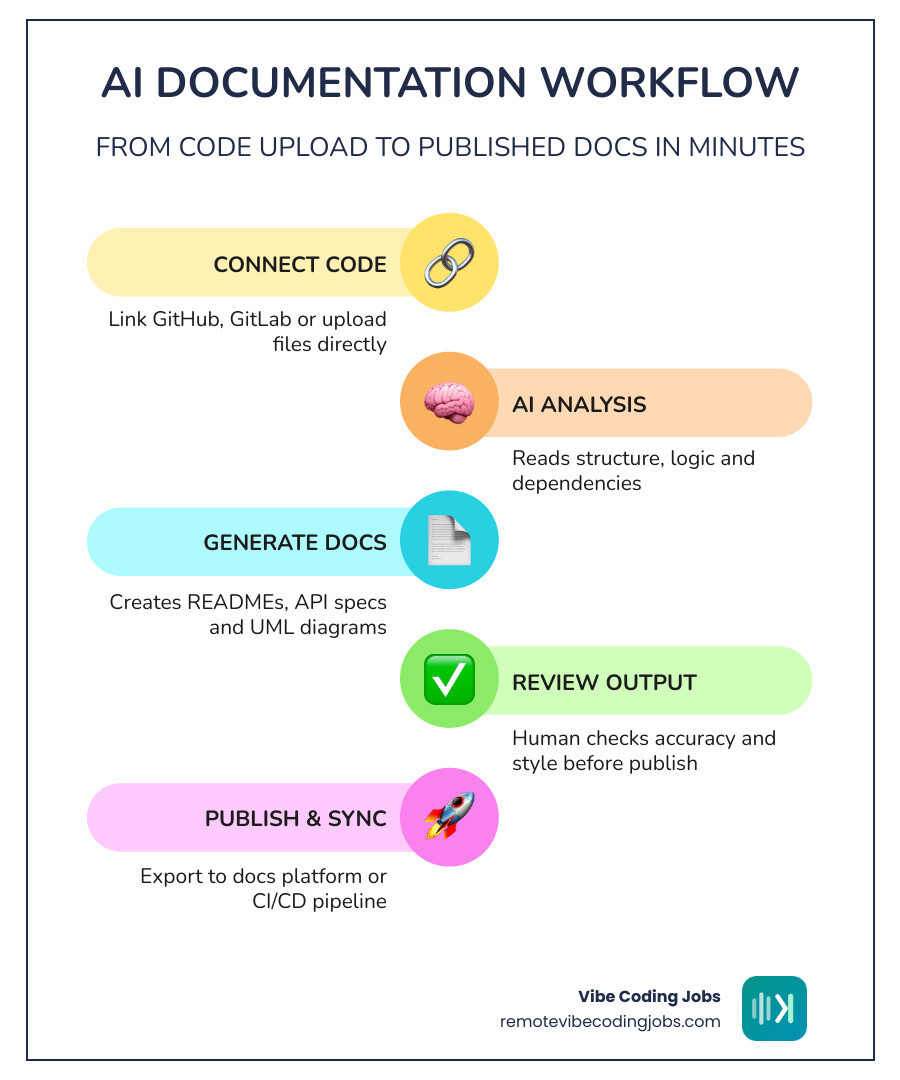
Here’s how it works at a glance:
| Step | What Happens |
|---|---|
| 1. Connect your code | Upload files or link a Git repo (GitHub, GitLab, etc.) |
| 2. AI analyzes the code | The AI reads structure, logic, and dependencies |
| 3. Docs are generated | Inline comments, READMEs, API specs, UML diagrams, and more |
| 4. You review and publish | Human checks output, then exports or syncs to your docs platform |
Most leading tools support this workflow directly inside VS Code, your terminal, or your CI/CD pipeline.
Nobody enjoys writing documentation. Most developers know it matters, but it always gets pushed to the end of the sprint — and then forgotten entirely. The result? Codebases that only the original author understands, onboarding that takes weeks, and technical debt that quietly compounds.
That’s exactly the problem AI documentation tools are solving right now.
According to the 2025 DORA report, 64% of software development professionals already use AI for writing documentation. And it’s not hard to see why — one internal IBM test found teams cut documentation time by an average of 59% after adopting an AI coding assistant.
The tools have matured fast. Whether you’re using a dedicated platform like DocuWriter.ai, an AI-native editor like Cursor, or a terminal agent like Claude Code, the core capability is the same: point the AI at your code, and get structured documentation back almost instantly.
I’m part of the RVCJ Editorial team at Remote Vibe Coding Jobs, where we cover AI-assisted development workflows — including how developers use tools that AI create documentation from code to ship faster and land better remote roles. We’ve tracked this space closely as it’s become a core skill for async-first engineering teams in 2026.
Terms related to ai create documentation from code:
The Benefits of AI Create Documentation from Code
When we talk about “vibe coding” or AI-assisted development, we often focus on the code generation itself. But the real unsung hero of the modern workflow is the ability to ai create documentation from code. This shift has moved documentation from a “nice-to-have” chore to an automated byproduct of the development process.

The most immediate benefit is the massive reduction in cognitive load. Instead of spending Friday afternoon trying to remember why you used a specific regex pattern three days ago, you can let an AI agent scan the logic and explain it for you. This isn’t just about being “lazy”; it’s about Remote Developer Jobs: AI Tools Benefits & ROI and maximizing the time spent on actual problem-solving.
Why teams use AI create documentation from code
The shift toward AI-driven docs isn’t just a trend; it’s a productivity revolution. Research shows that platforms using these technologies have helped developers save over 316,843 hours compared to manual writing. Here is why teams are making the switch:
- Consistency Across the Board: Humans are inconsistent. One developer might write detailed JSDoc headers, while another might leave a single cryptic comment. AI ensures every function, class, and module follows the same style and depth.
- Instant Knowledge Transfer: When a new engineer joins an async-first team, they don’t have to wait for a “knowledge transfer” meeting. They can use AI to generate a high-level summary of the entire repository.
- Eliminating Documentation Rot: Documentation usually dies the moment the code is refactored. AI tools with “Repository Sync” features watch for Git pushes and suggest updates immediately, keeping the docs alive.
- Contextual Reasoning: Modern LLMs don’t just parrot the code. As noted in recent reviews, AI can recognize that a complex math function is actually calculating the area of a circle or identifying a FizzBuzz logic pattern, providing context that “clean code” alone might miss.
Measurable efficiency in 2026
By May 2026, the metrics for AI-assisted documentation are staggering. We’ve seen reports of AI tools summarizing 1,000+ line files in approximately 12 seconds. For a human to perform a thorough review and write a similar summary, the estimated time is at least 3 minutes.
This efficiency gain is reflected in user satisfaction. Major platforms in this space boast 4.8/5 ratings from tens of thousands of members. By reducing the time spent on documentation, teams are effectively reducing technical debt in real-time. For more on how this impacts your career, check out AI-Assisted Development Career Growth.
How AI Analyzes Code to Generate Documentation
To understand how an ai create documentation from code, we have to look under the hood. It isn’t just “reading” text; it’s performing a deep structural analysis.

Modern tools use Large Language Models (LLMs) like Claude 3.5 Sonnet or GPT-4o, often combined with Abstract Syntax Tree (AST) parsing. This allows the AI to understand the hierarchy of your code—how a variable in file A impacts a function in file B. This level of Must-Have AI Tools for Vibe Coding is what makes the output so accurate.
How AI create documentation from code for legacy systems
One of the most powerful use cases for these tools is tackling “the monolith”—that massive, undocumented legacy repository that everyone is afraid to touch.
AI documentation agents can:
- Map Dependencies: Automatically identify which services rely on which legacy modules.
- Deduce Logic: Explain the intent behind poorly named variables or “spaghetti code.”
- Support Refactoring: By documenting the current state, AI provides a safety net for developers to begin refactoring without breaking critical (but hidden) functionality.
- Modernize Comments: It can take old, outdated comments and rewrite them into modern standards like OpenAPI or JSDoc.
Multi-language and framework support
In 2026, you aren’t limited by your tech stack. Leading platforms like DocuWriter.ai and SourceLens support over 20+ programming languages. Whether you are working with:
- Web: JavaScript, TypeScript (React, Vue, Node.js)
- Systems: Rust, Go, C++
- Data: Python (with full docstring support), SQL
- Infrastructure: Terraform, Ansible, Kubernetes YAML
The AI adapts its output to the conventions of the language. For instance, it will use Javadoc for Java projects and Google-style docstrings for Python, ensuring the documentation feels native to the ecosystem.
Core Documentation Types and Workflow Integration
The phrase “documentation” is broad. When you use ai create documentation from code, you aren’t just getting a single README.md file. You’re getting an entire suite of technical assets.
Automated technical assets
Today’s AI tools generate a variety of specialized documents that used to take hours of manual labor:
- API Specs: Automatically generating OpenAPI 3.1 (Swagger) files from REST controllers.
- UML Diagrams: Tools like DocuWriter.ai can turn code logic into PlantUML or Mermaid diagrams, including sequence and class diagrams.
- READMEs & Guides: High-level overviews that explain how to install, configure, and run a project.
- Unit Test Suites: Some tools even go beyond documentation to generate Jest, PyTest, or PHPUnit tests based on the documented logic.
- Release Notes: By analyzing Git diffs, AI can summarize exactly what changed between versions.
Seamless developer experience
The best AI tool is the one you don’t have to leave your editor to use. Integration is key to the “vibe coding” workflow. We see three main ways these tools live in your workspace:
- IDE Extensions: Tools like CodeGPT or Vibe Coder Tools: Copilot & Cursor allow you to highlight code and right-click to “Document.”
- Terminal Agents: Open-source tools like Aider or Anthropic’s Claude Code allow you to run a command like
claude "document this repository"and watch it work. - CI/CD Pipelines: Integrating documentation into your GitHub Actions or GitLab CI ensures that every time you merge a PR, the docs are updated automatically.
| Feature | IDE-Integrated (Cursor/VS Code) | Standalone Platforms (DocuWriter/Mintlify) |
|---|---|---|
| Best For | Real-time inline comments | Centralized team knowledge bases |
| Speed | Instant (on-the-fly) | Fast (bulk repository scan) |
| Output | Comments, small READMEs | Multi-page docs, UML, API Specs |
| Sync | Manual trigger | Automatic Repository Sync |
For teams orchestrating complex setups, Multi-Agent Workflows: How Top Engineers Orchestrate AI Coding Agents provides a deeper look at how to combine these tools.
Security, Accuracy, and Human Oversight
Whenever we discuss ai create documentation from code, the elephant in the room is security. Can you trust an AI with your proprietary source code?
Maintaining high reliability
While AI is incredibly smart, it isn’t perfect. We always recommend a “Human-in-the-Loop” approach. AI documentation should be treated like a Pull Request: the bot writes the first draft, and a senior dev reviews it for accuracy.
Tools often provide confidence scores to help with this. If the AI is unsure about a complex bit of legacy logic, it might flag that section for manual review. This ensures that Remote Developer Jobs: AI Tools Efficiency, Collaboration & Debugging doesn’t come at the cost of correctness.
Enterprise-grade compliance
For enterprise teams, security is non-negotiable. Leading platforms have adapted by offering:
- In-Memory Processing: Code is processed in volatile memory and never stored or used to train the global model.
- Zero-Training Policies: Ensuring your proprietary logic stays yours.
- Compliance Standards: Many tools are now SOC 2, ISO/27001, and GDPR compliant.
- Access Control: Integration with SAML SSO and role-based access ensures only authorized team members can generate or view documentation.
Frequently Asked Questions about AI Documentation
How accurate is AI-generated documentation?
It is remarkably accurate for structure and flow. Because LLMs have been trained on billions of lines of code, they understand common patterns and “best practices.” However, they can sometimes miss specific business context (the why behind a weird business rule). That’s why human review is still essential.
Does AI store my proprietary source code?
Most professional-grade tools (especially those with “Business” or “Enterprise” plans) do not store your code. For example, DocuWriter.ai processes code in-memory only. Always check the privacy policy of the tool you are using to ensure they have a “zero-retention” or “no-training” policy.
What is the cost of using AI for documentation?
Pricing varies. Open-source tools like Aider or AI Documentor are free, but you pay for your own API usage (usually $1–$5 per project). Dedicated platforms like Mintlify or DocuWriter.ai typically offer subscription models ranging from $20 to $40+ per month for pro features. When you consider the 15+ hours saved per week, the ROI is usually very high.
Conclusion
The era of manually “grinding” through documentation is over. By leveraging ai create documentation from code, developers can focus on what they actually love: building. Whether you are documenting a fresh startup project or trying to make sense of a decade-old legacy system, there is an AI tool ready to do the heavy lifting for you.
At RemoteVibeCodingJobs, we believe that mastering these AI-assisted workflows is the key to thriving in the 2026 job market. Companies are looking for “vibe coders”—developers who know how to use tools like Cursor, Claude, and automated documentation platforms to move at ten times the speed of traditional developers.
If you’re ready to find a role at an async-first company that embraces these tools, browse our curated listings and start your next chapter in AI Coding Tools for Vibe Coding.
Ready to ship faster? Let the bot write the docs while you write the future.