
How to Transition Your Tech Stack to AI Engineering
The DevOps Role Is Shifting — Here’s What an AI DevOps Engineer Actually Does
An AI DevOps engineer is a DevOps professional who operates, monitors, and optimizes AI-powered systems alongside traditional infrastructure — and in May 2026, this is one of the fastest-moving transitions in tech hiring.
Quick answer — what does an AI DevOps engineer do?
- Deploys and manages AI agents and LLM-powered services in production
- Monitors token usage, prompt costs, and model behavior (not just CPU and memory)
- Builds and maintains CI/CD pipelines that include AI-assisted automation
- Optimizes cloud spend for LLM workloads using caching and right-sizing
- Bridges the gap between traditional infrastructure and AI application layers
The shift is real and measurable. DevOps engineers who have adopted AI tools report up to a 75% reduction in deployment time. Teams using AI for cloud operations are cutting spend by around 30%. And engineers working with AI agents say they now spend 70% of their time on architecture and strategy — versus the reverse just a few years ago.
This isn’t a future trend. Companies are already hiring for it.
Traditional DevOps skills — Kubernetes, Terraform, CI/CD, observability — are still the foundation. But AI systems introduce new operational concerns that standard monitoring completely misses: hallucinations, non-deterministic outputs, rate limits, and runaway token costs. One unoptimized AI agent can generate a $4,300 weekly bill before anyone notices.
That’s the gap this guide is designed to close.
We’re the RVCJ Editorial team at Remote Vibe Coding Jobs — we cover AI-assisted development, remote engineering careers, and the tools DevOps engineers are using to transition into AI DevOps engineer roles at async-first companies. Everything in this guide is drawn from real hiring data, practitioner experience, and hands-on project examples so you can make the transition without guesswork.
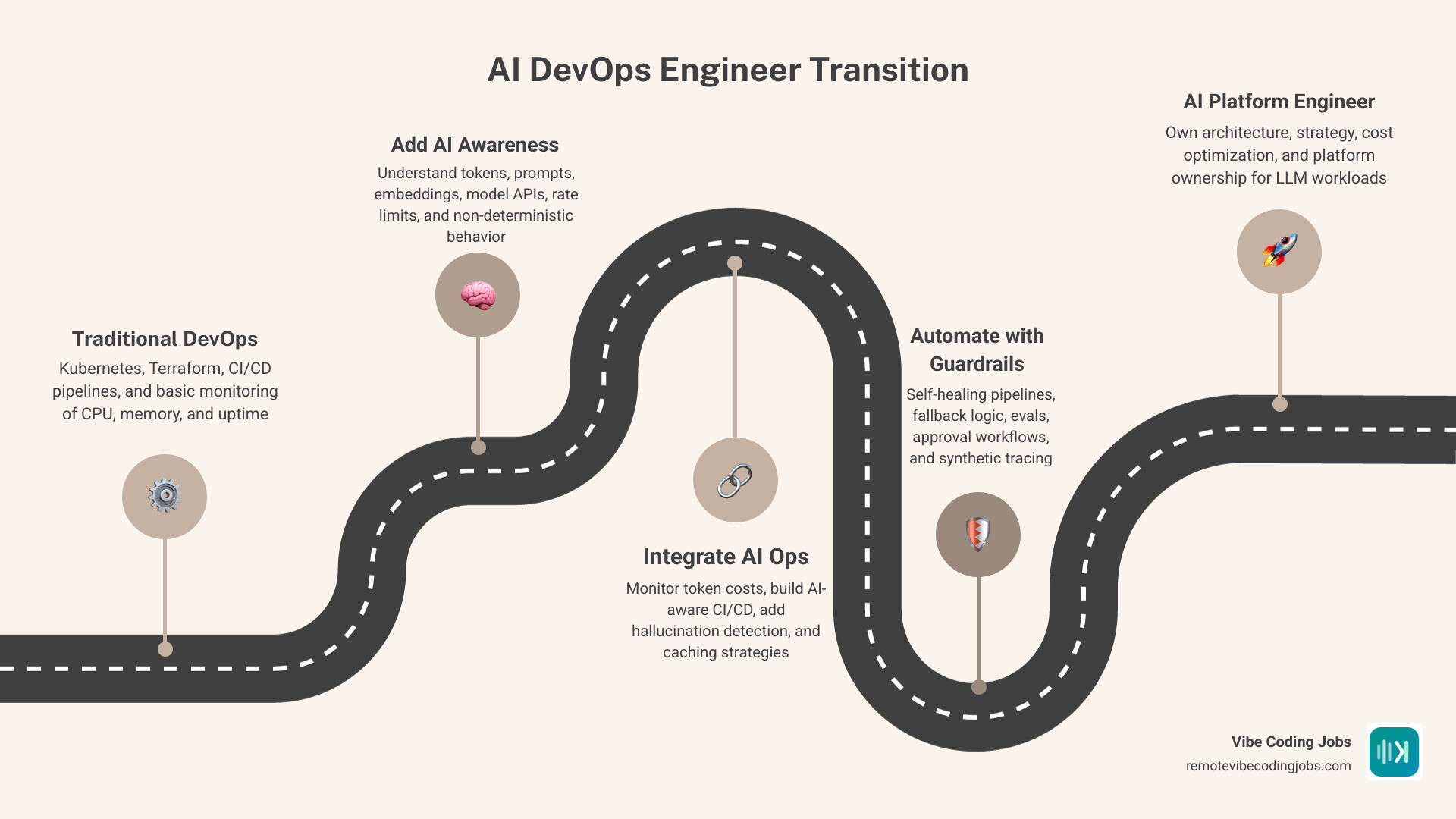
Quick look at ai devops engineer:
What an AI DevOps Engineer Actually Does in 2026
In simple terms, an AI DevOps engineer keeps AI systems reliable in production.
That includes familiar DevOps work like cloud infrastructure, CI/CD, containers, Kubernetes, secrets, observability, and incident response. But it also adds AI-specific operations:
- model API integration
- prompt and agent workflow deployment
- token and cost tracking
- rate-limit handling
- response quality monitoring
- rollback and guardrails for probabilistic behavior
This role sits near several related terms:
- DevOps focuses on shipping and operating software reliably
- AIOps uses AI to improve ops tasks like anomaly detection and event correlation
- MLOps handles machine learning lifecycle management
- LLMOps focuses on deploying and operating language model applications and agents
In practice, many teams blend these. A platform engineer may run Kubernetes and Terraform while also supporting internal AI agents. An SRE may own latency budgets and also add LLM fallback logic. Titles vary. Responsibilities are converging.

How the ai devops engineer role differs from traditional DevOps
Traditional DevOps usually deals with deterministic systems. If service A gets request B, it should return result C. When it does not, logs, traces, and metrics usually show why.
AI systems are messier.
The same prompt can produce different outputs. A provider may change model behavior without you changing your code. An agent may fail silently by giving a very confident wrong answer. You can have a production incident with no crash, no 500, and no obvious red line on a dashboard. Fun, right?
That changes the operational model in a few important ways:
- We monitor quality, not just uptime
- We track token usage and cost per workflow
- We design for rate limits and retries
- We add human approval steps for risky actions
- We build fallback paths when model output is weak or inconsistent
So while traditional DevOps asks, “Is the service healthy?”, AI operations also asks, “Was the answer useful, safe, on-budget, and consistent enough?”
The three knowledge layers DevOps engineers need for AI systems
Most DevOps engineers do not need to become ML researchers. We just need enough depth in three layers to operate AI systems safely.
- AI basics layer
This is the mental model layer. We should understand:
- what prompts are
- what tokens are and why they affect cost
- how embeddings support retrieval
- what context windows and rate limits mean
- why AI outputs are probabilistic, not guaranteed
- Application layer
This is where AI appears inside products and workflows. We should understand:
- API-based model calls
- prompt flows
- agent tools and function calling
- retrieval-augmented generation patterns
- conversation state and session handling
- Operations layer
This is still our home turf, but with new wrinkles:
- containers and Kubernetes for AI services
- CI/CD for agent apps and model integrations
- observability for cost, latency, and quality
- security controls for prompts, secrets, and data access
- rollback, canary testing, and approval gates
This three-layer model matters because it keeps learning focused. We do not need to master neural network math to support an AI service. We do need to understand enough to deploy it, watch it, debug it, and stop it from lighting money on fire.
When you need AI skills now and when you can wait
If your company is already deploying AI features, experimenting with internal agents, or asking platform teams to support model APIs, the time is now.
If you see job descriptions mentioning agent workflows, LLM infrastructure, AI-assisted CI/CD, or AI platform support, the signal is also clear. This is especially true for remote roles that expect broad leverage across tooling and automation. For a broader view, see more about AI career growth.
When can you wait a little?
- your work is fully isolated from AI adoption
- your team has no roadmap for AI systems
- your target roles remain strictly traditional infra-only
Even then, we would not wait too long. AI operations is becoming a useful signal of adaptability, especially for platform and remote engineering roles.
The Core Skills to Transition Without Becoming a Full-Time Developer
Good news: this transition does not require becoming a full-time software engineer.
What it does require is code literacy.
We need to read scripts, understand configs, follow stack traces, and make safe edits. Think of it as “enough coding to avoid getting trapped in AI-generated nonsense.”
Minimum coding knowledge for DevOps engineers working with AI tools
Here is the minimum practical baseline we recommend:
- variables, functions, and conditionals
- JSON and YAML structure
- basic Python or Bash scripting
- REST APIs, headers, and endpoints
- environment variables and secrets usage
- package managers like pip
- CLI usage and config files
- reading stack traces and common error messages
That baseline is enough to:
- wire up AI APIs
- test scripts locally
- review generated code
- troubleshoot broken dependencies
- automate routine ops tasks
You do not need to become a framework specialist. You do need to understand what the code is trying to do.
Why “just ask AI to write the code” usually fails
Because generated code still breaks in very human ways.
Without baseline knowledge, we can fall into a loop like this:
- ask the model for a script
- run it
- get an import error
- paste the error back into the model
- get a second script that breaks differently
- repeat until coffee loses morale
This fails for predictable reasons:
- missing dependencies
- wrong package versions
- bad environment variables
- incorrect API assumptions
- unsafe permissions
- generated fixes that ignore system context
AI can accelerate delivery, but only if we can validate what it produces. That is why basic code reading matters more than “write everything from scratch” ability.
The modern stack for an AI DevOps engineer
The core stack still looks familiar:
- GitHub Actions or similar CI/CD
- ArgoCD and GitOps workflows
- Kubernetes for orchestration
- Terraform for infrastructure as code
- Prometheus and Grafana for monitoring
- security scanning and policy gates
- cloud cost controls and tagging discipline
The difference is how we use them.
| Area | Traditional DevOps | AI-native operations |
|---|---|---|
| Monitoring | CPU, memory, uptime | latency, token cost, answer quality, rate limits |
| Deployments | app code and infra | app code, prompts, agent configs, model versions |
| Incidents | crashes and resource issues | hallucinations, provider failures, silent quality drops |
| Optimization | autoscaling and infra spend | autoscaling plus token budgets, caching, model selection |
| Governance | secrets, access, policies | all of that plus prompt safety and human approval flows |
If you want to map these skills to hiring demand, this guide on remote developer skills in demand for 2026 is a useful companion.
How AI Changes Monitoring, Cost Optimization, and Incident Response
AI systems do not remove ops work. They move it.
Instead of spending all day on repetitive deployment steps, we spend more time designing guardrails, monitoring quality, and controlling cost.
Research and practitioner examples point to major gains:
- up to 30% reduction in cloud spending through automated optimization
- self-healing and AI-assisted monitoring that can reduce manual incident response by 80%
- release cycles that can move up to 3x faster with AI integrated into delivery workflows

Monitoring AI agents beyond CPU, memory, and uptime
Traditional dashboards are not enough for AI workloads.
We also need:
- request and response latency by model
- token usage per conversation or workflow
- cost per task or customer action
- success rate for agent actions
- fallback frequency
- quality signals from user feedback or evals
- trace visibility across tool calls and agent steps
Synthetic tracing is becoming especially useful because raw traces can be noisy in agent systems. We care about the path the agent took, which tools it called, where it hesitated, and where it failed.
In other words, observability for AI is not just “is the pod up?” but “did the workflow deliver a good result at an acceptable cost?”
Cost optimization for LLM and agent workloads
This is where many teams learn expensive lessons quickly.
A common issue is oversized prompts. One real example from the research showed a long system prompt being sent with every interaction, producing roughly $1,800 monthly cost that was later reduced to around $340 by caching and optimization. Another case described an agent creating a $4,300 weekly bill before the team tightened controls.
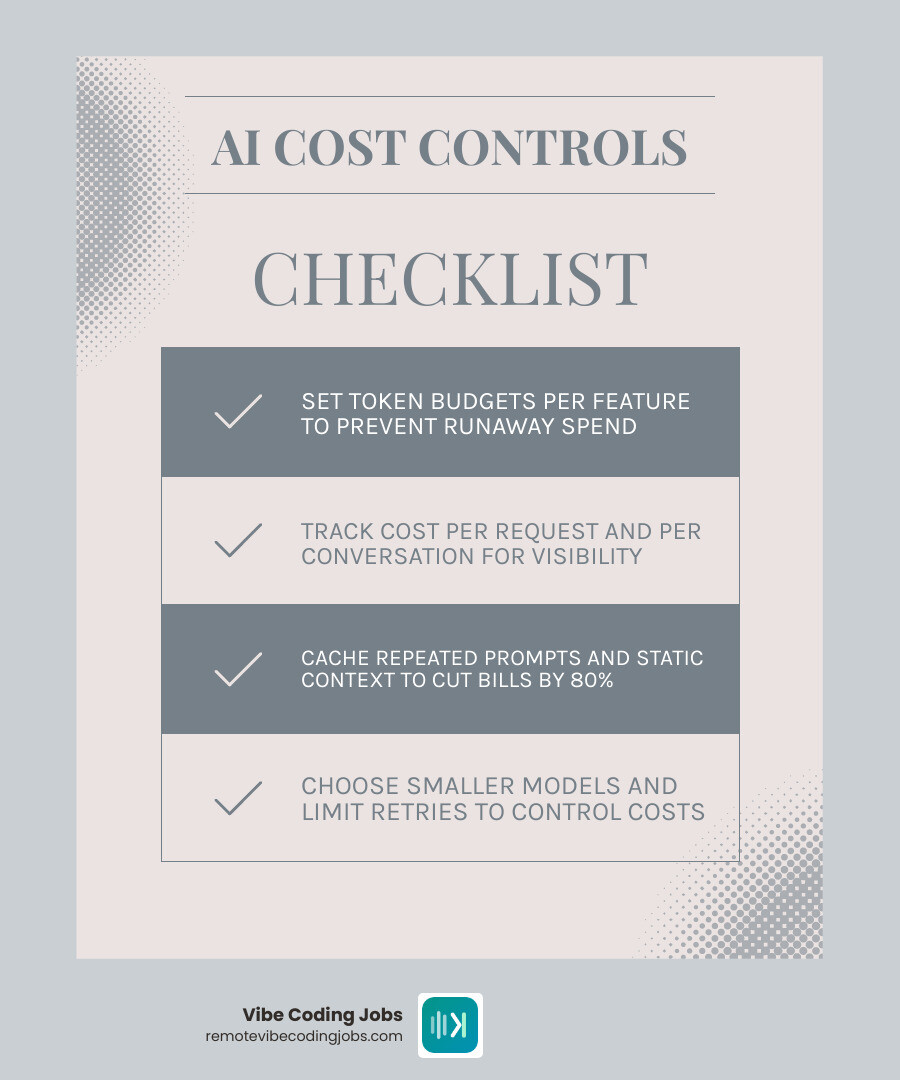
The practical controls are straightforward:
- set token budgets per feature
- track cost per request and per conversation
- cache repeated prompts or static context
- choose smaller models when quality allows
- limit retries and runaway loops
- watch provider rate limits
- right-size supporting infrastructure
This is also where FinOps thinking starts to overlap with DevOps. AI workloads are part infrastructure problem, part application behavior problem, and part vendor billing problem.
Troubleshooting non-deterministic systems with guardrails
Troubleshooting AI systems is different because “working” is not binary.
An agent may answer 8 out of 10 requests well enough, then fail in odd edge cases. So we need guardrails, not blind trust.
Best practices include:
- canary releases for prompt or model changes
- fallback logic to cheaper or safer paths
- automated evals for common scenarios
- rollback plans for prompt sets and agent configs
- approval steps for high-impact actions
- anomaly detection for cost or behavior spikes
- postmortems that include data, prompts, and provider responses
A good rule: if an AI agent can change infrastructure, it should not do so without limits, logs, and a human checkpoint somewhere in the loop.
Where AI Fits Into Daily DevOps Workflows
The fastest gains usually come from augmenting workflows we already own.
AI is not only for customer chatbots. It is increasingly useful inside delivery pipelines, documentation, infrastructure generation, incident triage, and change review.
AI in CI/CD, infrastructure provisioning, and release engineering
Here is where AI is already helping DevOps teams:
- generating starter pipeline YAML
- explaining failed builds and test output
- suggesting Terraform changes
- checking policy and security rules before deploy
- detecting configuration drift
- summarizing release notes and deployment risk
- assisting with rollback plans
This does not mean we hand production over to a cheerful autocomplete. It means we reduce repetitive work and speed up review cycles.
That is one reason teams using AI-enabled DevOps workflows are reporting significantly faster releases. For more context on how AI is changing engineering work broadly, read AI Revolution: How AI is Transforming Remote Software Development.
Practical AI projects DevOps engineers should learn in 2025
If we were advising a DevOps engineer on the best starter projects, we would focus on projects that combine real ops value with manageable complexity.
Good options include:
- Dockerfile generation with a local LLM
- log anomaly detection for noisy services
- a Kubernetes helper agent for common cluster questions
- an internal docs bot for runbooks and platform docs
- a cloud cost agent that flags waste or oversized prompts
Starter lab ideas:
- Build a script that sends logs to an anomaly detector and flags suspicious spikes
- Create a bot that explains a failed GitHub Actions run
- Add token and cost dashboards to a small agent app
- Build a Terraform review assistant that comments on risk areas
- Create a runbook Q&A assistant for your ops team
Two useful external resources for ideas are How AI is Changing DevOps Careers | What You Need to Know and 5 AI Projects for DevOps Engineers (Demo + Notes) – LinkedIn.
How to use AI agents for infrastructure tasks without losing control
This is the right mindset: trust, but verify.
AI agents can absolutely help with infrastructure tasks such as:
- drafting Terraform
- opening pull requests
- updating pipeline configs
- summarizing incident logs
- retriggering failed jobs
- generating docs from infrastructure state
But we should start carefully:
- use sandbox or non-critical environments first
- keep blast radius small
- require pull request review
- log every action
- maintain audit trails
- use approval workflows for changes with risk
- restrict credentials and tool access
The best pattern is not “agent replaces engineer.” It is “agent acts like a fast junior teammate with no production access unless we explicitly allow it.”
Risks, Job Security, and the Future of the Role
Any honest guide has to say this clearly: AI adds real capability, but also real risk.
Biggest challenges when integrating AI into DevOps
The biggest challenges we see are:
- data exposure through prompts and logs
- prompt injection against agent workflows
- hidden costs from oversized context and retries
- over-automation without approvals
- compliance gaps around data handling
- provider dependence and model behavior changes
- observability debt when teams skip AI-specific metrics
Security is a major one. If an agent has access to secrets, tickets, repos, and infrastructure tools, sloppy controls become dangerous quickly.
So the answer is not to avoid AI. The answer is to apply mature DevOps discipline to AI systems: least privilege, change control, monitoring, rollback, and documentation.
Will AI replace DevOps engineers or elevate them?
Our view is that AI is automating tasks, not removing the need for good operators.
The work is shifting from:
- manual YAML editing
- repetitive provisioning
- first-pass log digging
- writing boilerplate scripts
Toward:
- architecture and platform design
- reliability strategy
- governance and guardrails
- toolchain integration
- cost and performance optimization
That lines up with practitioner reports showing engineers using AI agents spending more time on strategic work and less on low-level execution. Human judgment still matters where systems are expensive, risky, customer-facing, or compliance-sensitive.
Career paths from DevOps to AI platform roles
A DevOps engineer moving into AI does not have only one destination. Common paths include:
- AI platform engineer
- LLMOps engineer
- MLOps engineer
- SRE for AI systems
- applied AI infrastructure engineer
- platform engineer supporting internal agents
If you are exploring how market demand is evolving, these guides on AI jobs market trends and remote AI job descriptions are helpful next reads.
Your 7-Day Transition Plan to Become an AI DevOps Engineer
The fastest way to learn this field is not endless theory. It is one week of focused, practical work.
Day 1–2: learn the AI operational basics
Focus on the concepts that affect operations:
- tokens and pricing
- prompts and context windows
- embeddings and retrieval basics
- API calls and authentication
- rate limits
- common failure modes like hallucinations and timeout chains
Goal: be able to explain how an AI request moves through an application and where cost and failure can appear.
Day 3–5: ship one small AI ops project
Pick one project and finish it.
Good choices:
- a chatops bot that summarizes alerts
- a token-cost dashboard
- a CI/CD assistant for failed builds
- a basic log anomaly detector
- a Kubernetes helper that answers runbook questions
Keep it small. Deployed beats perfect.
For a practical mindset around this transition, the article “I Taught 100 DevOps Engineers AI. Here’s the One Thing … – Medium is worth reviewing, and so is this guide to remote AI opportunities.
Day 6–7: package your skills for hiring managers
Now turn the project into proof.
Include:
- a GitHub repo
- a short architecture diagram
- notes on tradeoffs and guardrails
- screenshots of dashboards or outputs
- one metric improvement or cost insight
- a concise README explaining the problem solved
Hiring managers love evidence. A simple project with observability, budget alerts, and clean documentation says more than ten vague bullet points on a resume.
For the next step, review remote AI job boards and openings.
Frequently Asked Questions about ai devops engineer
Do I need Python to become an ai devops engineer?
You need basic Python literacy, yes. But you do not need deep software engineering expertise or ML research skills.
You should be able to:
- read a script
- edit variables and functions
- install packages with pip
- call an API
- understand stack traces
That is enough for most AI-enabled DevOps work.
What tools should I learn first for AI-enabled DevOps?
Start with the stack most likely to appear in real jobs:
- Kubernetes
- Terraform
- CI/CD tooling such as GitHub Actions
- observability with Prometheus and Grafana
- APIs and webhook basics
- cloud cost controls
- basic AI API integration
Once those are solid, add agent frameworks and eval tooling as needed.
What kind of projects prove I can do this job?
The best projects show that you can operate AI systems, not just talk about them.
Strong examples include:
- deploying a small AI agent with monitoring
- tracking token usage and request cost
- building a self-healing or AI-assisted pipeline flow
- creating a cloud optimization assistant
- adding guardrails and approval checks to agent actions
Conclusion
The transition from traditional DevOps to AI DevOps engineer is less about abandoning your stack and more about extending it.
Kubernetes, Terraform, CI/CD, observability, and security still matter. In fact, they matter more when AI systems are expensive, probabilistic, and capable of making mistakes very quickly.
If we were starting this transition this week, we would do three things:
- learn the operational basics of LLMs and agents
- ship one small AI ops project with monitoring and cost controls
- package that work into portfolio proof for hiring managers
That is how we move from curiosity to credibility.
If you are ready to explore remote roles in this direction, browse remote AI engineer roles. You can also keep building context with guides like AI coding jobs: entry level, growth and remote opportunities and Remote developer jobs and AI tools: trends and salary.
And if your current title still just says “DevOps Engineer,” do not worry. The title can catch up later. The skills are what move first.