
Copilot Open Source Options: Which Tool Fits Your Workflow?
Among copilot open source options, start with your workflow: Aider works in the terminal, ProxyAI brings AI assistance to JetBrains IDEs, and Flexpilot offers a native VS Code extension. Each can use models you choose, including local models. The tools may be free to install, but cloud API use or running a local model can still cost money.
GitHub also released its Copilot Chat extension under the MIT license. That does not make the whole Copilot service open source: its hosted AI services remain proprietary. If your goal is more control over models and where code goes, compare the alternatives before switching.
I’m Di Su, a software engineer with over 10 years of experience building web products, including work with Python and Svelte. I bring that hands-on view to this copilot open source guide, starting with the choices that matter most: editor fit, model control, and cost.
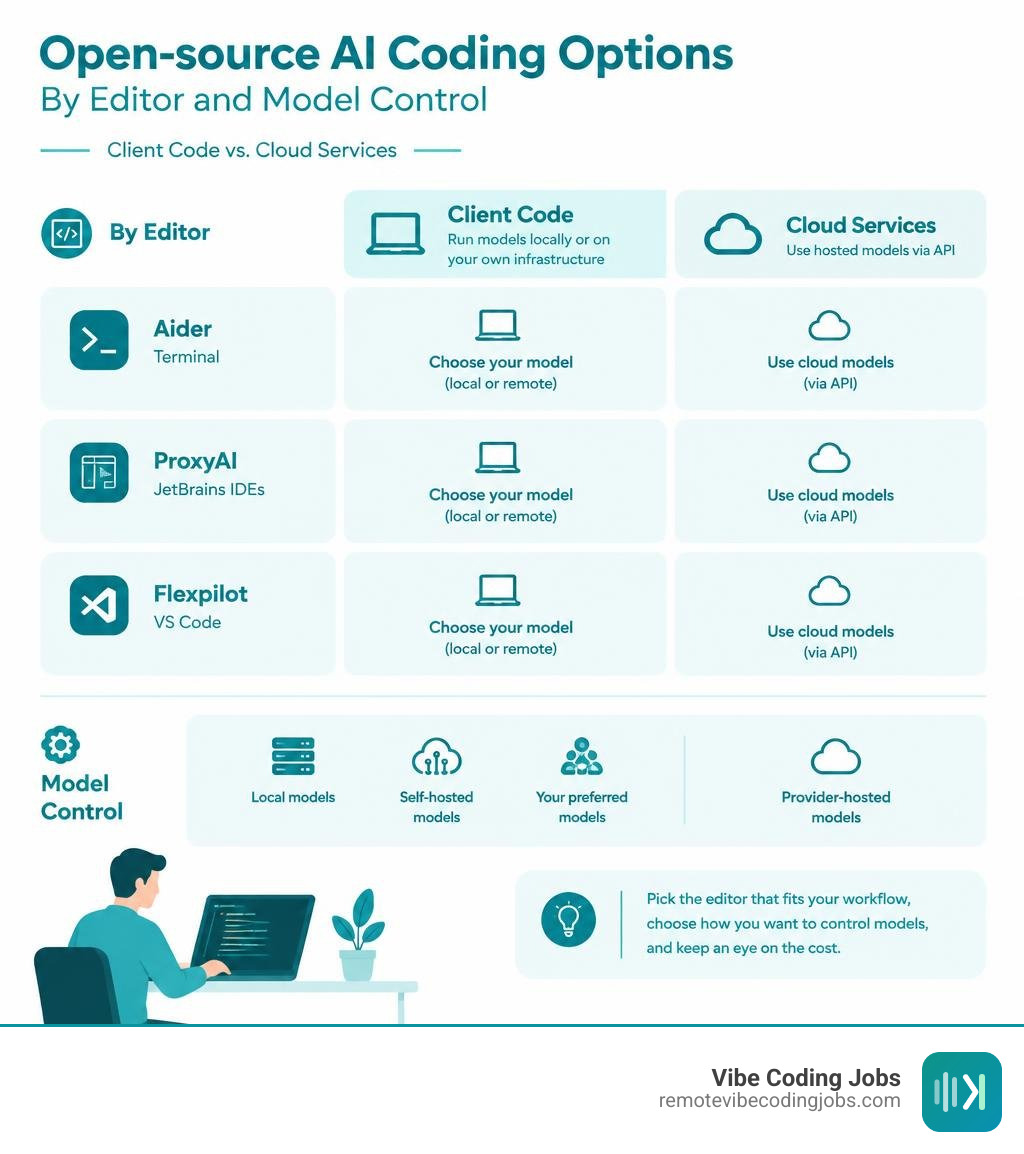
Copilot open source basics:
The Reality of Copilot Open Source: What Microsoft Actually Released
When Microsoft announced that it was open-sourcing GitHub Copilot Chat under the permissive MIT license, the developer community buzzed with excitement. For years, developers had requested transparency into how Copilot reads context, structures prompts, and runs autonomous actions. However, looking under the hood reveals important distinctions between client-side code and backend AI infrastructure.
Microsoft open-sourced the VS Code client extension codebase, which accumulated 9,957 stars, 2,029 forks, and 250 open issues before the team archived the standalone official Microsoft VS Code Copilot Chat repository and moved the functionality directly into the VS Code core repository. This milestone made the frontend integration, UI panels, custom agents, and prompt orchestration logic completely visible.
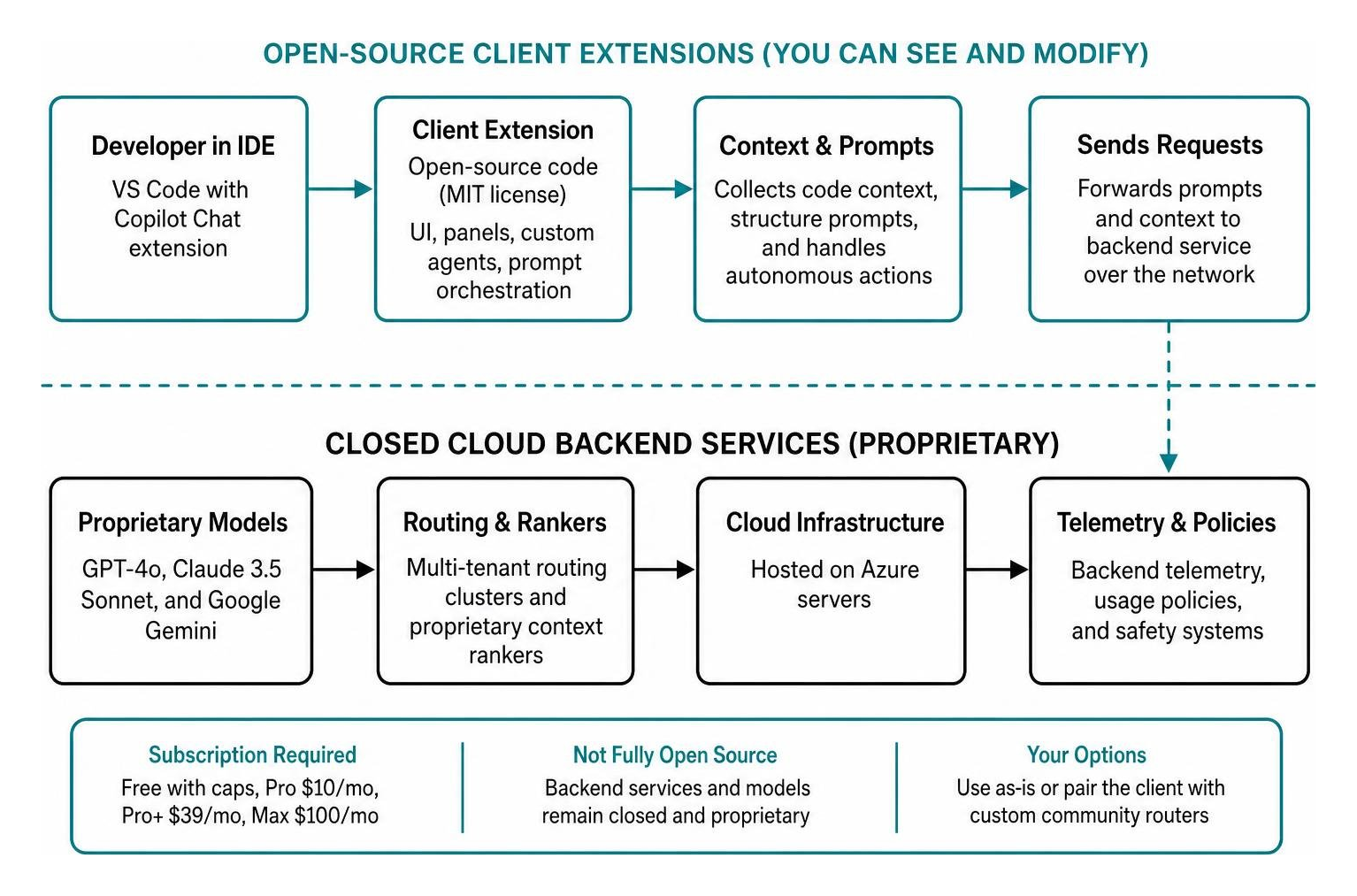
What remains entirely closed and proprietary is the backend service layer. The massive language models powering GitHub Copilot (such as GPT-4o, Claude 3.5 Sonnet, and Google Gemini), the multi-tenant routing clusters, the proprietary context rankers, and the backend telemetry infrastructure remain strictly proprietary software hosted on Azure servers. To use the official extension out of the box, you still need an active subscription, ranging from the GitHub Copilot Free plan with strict monthly caps to GitHub Copilot Pro at $10 per month, Pro+ at $39 per month, or the Copilot Max tier at $100 per month.
For teams embracing Vibe Coding with GitHub Copilot, this distinction matters. While you can audit the extension’s client-side behavior, modify its UI logic, or inspect how it collects telemetry data, you remain tethered to Microsoft’s cloud infrastructure and pricing tiers unless you pair the client with custom community routers.
Furthermore, historical tensions linger regarding how original models were trained on public GitHub repositories without explicit attribution, prompting many engineers to compare Cursor vs Copilot or seek community-driven, sovereign alternatives.
Top Open-Source Copilot Alternatives to Supercharge Your Editor

Developers tired of recurring subscription fees or mandatory cloud logging have built thriving open-source ecosystems. These tools embrace a “Bring Your Own Key” (BYOK) architecture or connect directly to local inference runtimes like Ollama and LM Studio.
| Tool | Primary License | Supported IDEs / Interfaces | Model Flexibility | Cost Model |
|---|---|---|---|---|
| Flexpilot | GPLv3 | VS Code, Flexpilot IDE | Cloud (Anthropic, OpenAI, Groq) + Local (Ollama) | 100% Free / Self-Hosted |
| ProxyAI | Apache 2.0 | JetBrains (IntelliJ, PyCharm, WebStorm) | Cloud (OpenAI, Claude, Azure) + Local Runtimes | 100% Free / Self-Hosted |
| OmniCopilot | MIT | VS Code / Copilot Chat Picker | 1,200+ models via OmniRoute (340+ providers) | Free Tiers / BYOK |
| Aider | Apache 2.0 | Terminal / CLI / Any Editor | Universal (Claude 3.5 Sonnet, GPT-4o, Local) | 100% Free (Pay API tokens or local compute) |
| open-cli-copilot | MIT | Zsh Shell Terminal | Google AI API, Hugging Face Transformers | 100% Free |
Flexpilot: Native VS Code AI Without Webviews
flexpilot-ai/vscode-extension stands out as an open-source alternative for engineers who love VS Code but want absolute control over their AI providers. Licensed under GNU General Public License v3.0, Flexpilot earned 813 stars and 26 forks by offering an uncluttered, lightweight implementation.
Unlike extensions that run embedded browser webviews for their chat interfaces, Flexpilot renders natively inside VS Code UI components. It supports a comprehensive roster of AI providers:
- Anthropic Claude
- OpenAI GPT models
- Azure OpenAI
- Groq high-speed endpoints
- Local models via Ollama and llama-cpp-python
Flexpilot provides inline completions, panel discussions, voice chat, smart context variables, and automated commit message generation. For developers evaluating AI code completion tools for VS Code, Flexpilot proves you do not need proprietary SaaS wrappers to enjoy seamless inline editing.
ProxyAI: A Leading Copilot Open Source Choice for JetBrains
If your primary development workspace centers on JetBrains IDEs like IntelliJ IDEA, PyCharm, WebStorm, or GoLand, carlrobertoh/ProxyAI is a premier open-source assistant. Distributed under the Apache License 2.0, ProxyAI has amassed 1,927 stars and 390 forks.
ProxyAI bridges the gap between enterprise security requirements and daily coding assistance:
- Multi-Provider Support: Seamlessly switch between OpenAI, Anthropic, Azure OpenAI, Mistral AI, and local self-hosted endpoints.
- Context-Rich Lookups: Pull context directly from open files, project Git commit histories, web documentation, and attached screenshots.
- Auto-Apply Diffs: Review multi-line suggested refactors directly inside the JetBrains editor before accepting changes to disk.
- Air-Gapped Privacy: Run ProxyAI completely offline with zero telemetry or outbound traffic, keeping proprietary intellectual property within private networks.
OmniCopilot and OmniRoute: Accessing 1,200+ Free and Custom Models
For developers who want to keep the official VS Code Copilot user experience without paying for proprietary subscription tiers, the OmniCopilot README documentation offers an ingenious workaround.
Operating under the MIT license, OmniCopilot pairs with the OmniRoute proxy daemon. It aggregates more than 1,200 AI models across 340+ providers—including over 90 providers with permanent free tiers.
Leveraging native language-model provider APIs, OmniCopilot injects custom models directly into the default Copilot Chat dropdown menu. You can route chat queries, agent tasks, vision image analysis, and reasoning controls through DeepSeek, Qwen, Claude, or local Llama instances without requiring an active GitHub Copilot paid plan. API keys are managed safely inside VS Code’s encrypted SecretStorage, ensuring security across remote and local configurations.
Aider and Open-CLI-Copilot: Terminal-First Pair Programming
Not every developer prefers sidebar panels and GUI popups. Terminal-first pair programming tools have evolved into powerful options for rapid engineering.
Aider is a premier open-source CLI assistant released under the Apache 2.0 license. Operating directly in your shell, Aider interfaces with your Git repository, automatically mapping your project structure, executing multi-file edits, running test suites, and creating clean Git commits with descriptive messages. Pairing Aider with high-reasoning models gives developers an agile workflow without editor-specific lock-in. Setting up your local environment alongside an AI coding infrastructure guide lets you build an autonomous terminal workstation at minimal cost.
For shell auto-completion, projects like open-cli-copilot bring real-time intelligence directly to the Zsh prompt. By hooking into zsh-autosuggestions, it streams intelligent bash commands, flags, and complex shell scripts right as you type.
Technical Insights into Copilot Open Source Architecture and Prompts
Examining the source code of the VS Code Copilot Chat extension reveals valuable architectural patterns for software engineers building their own AI extensions.

Declarative Prompt Construction with @vscode/prompt-tsx
Rather than relying on messy string interpolations, the Copilot Chat codebase pioneered @vscode/prompt-tsx. This TypeScript library lets developers compose prompts declaratively using JSX-like syntax:
- Prompts are defined as hierarchical components.
- System roles, user inputs, file contexts, and tool definitions are cleanly encapsulated.
- The library handles token budgets dynamically, prioritizing critical workspace instructions and gracefully trimming conversation history when approaching model context windows.
Precise Context Tagging with ${CURSOR_TAG}
One subtle challenge in AI code completion is communicating exactly where the user is looking. Copilot Chat addresses this by injecting a specialized ${CURSOR_TAG} token into the surrounding code context. When the language model parses the file payload, this designated token informs the model of the active caret location, resulting in relevant suggestions.
Agentic Tool-Calling Loops
The open-source repository details how Copilot executes autonomous agent workflows:
- Planning: The agent breaks high-level user prompts into structured dependency steps.
- Workspace Tool Calling: The agent executes specific tools across your workspace, such as searching file contents, listing directories, reading diagnostic error squiggles, or running terminal test commands.
- Self-Correction Loops: If an edit introduces syntax errors or fails a test runner, the diagnostic output feeds back into the prompt loop, enabling the assistant to self-correct before presenting the final diff to the developer.
Making the Switch: Cost, Privacy, and Workflow Integration
Choosing between proprietary services and open-source Copilot alternatives involves balancing subscription costs, data governance, and daily developer convenience.
Cost Predictability vs. Zero-Platform Baselines
Proprietary plans offer predictable monthly billing, which suits corporate budgeting. However, light-to-moderate coders often pay for unused capacity. Open-source solutions eliminate platform fees entirely. Using pay-as-you-go API keys (from Anthropic, DeepSeek, or Groq) typically costs solo developers between $2 and $8 per month for normal usage. Running local models through Ollama costs $0 in recurring fees once you have compatible GPU hardware.
Data Privacy and IP Protection
For enterprises working under strict compliance standards (such as healthcare, defense, or fintech), sending proprietary code to third-party multi-tenant servers presents regulatory hurdles. Open-source tools like ProxyAI and Flexpilot allow teams to host inference servers within private VPCs or on air-gapped on-premise hardware, preventing sensitive source code from leaking to public cloud endpoints.
Frequently Asked Questions About Open-Source Copilot Tools
Is GitHub Copilot fully open source now?
No. Microsoft open-sourced the VS Code Copilot Chat client extension under the MIT license, including its frontend UI, system prompt templates, and agent orchestration. The underlying AI models, backend routing services, and enterprise management servers remain proprietary closed-source SaaS products requiring an active GitHub account and subscription.
Can I run open-source Copilot alternatives completely offline?
Yes. Tools like Flexpilot for VS Code and ProxyAI for JetBrains connect directly to local inference runners such as Ollama, LocalAI, and LM Studio. When configured with open weights like Llama 3, DeepSeek-Coder, or Mistral, the entire coding assistant operates offline with zero internet access and zero telemetry.
How much can teams save by switching to open-source AI assistants?
Teams switching from enterprise plans ($19 to $39 per user/month) to open-source extensions paired with pay-as-you-go APIs or local models can reduce AI tooling costs by 60% to 90%. Developers who use local models eliminate per-seat licensing fees entirely.
Conclusion
The open-sourcing of the GitHub Copilot Chat client extension marked a major milestone for transparency in developer tooling. It demystified prompt construction, token management, and autonomous agent loops. Yet, the real revolution in AI-assisted development lies in the broader ecosystem of community-driven, open-source alternatives.
Whether you choose Flexpilot for a native VS Code experience, ProxyAI for JetBrains workflows, OmniCopilot to tap into 1,200+ models, or Aider for agile terminal pair programming, developers are no longer locked into proprietary ecosystems. You can build a personalized, private, and cost-effective development environment tailored to your exact workflow.
For software engineers mastering modern AI workflows, these tools provide complete autonomy. To discover remote roles where modern AI workflows are valued, check out our comprehensive guide to AI Coding Tools for Vibe Coding and explore top async opportunities at RemoteVibeCodingJobs today.
— Di Su, Software Engineer & Technical Contributor