
Choose an AI HTML Code Generator That Fits Your Workflow
The best AI HTML code generator depends on what you need to ship. Choose a browser-based tool for fast snippets, forms, email templates, or landing-page sections; choose an agentic or repository-aware tool when the AI needs to follow an existing codebase, component library, and Git workflow.
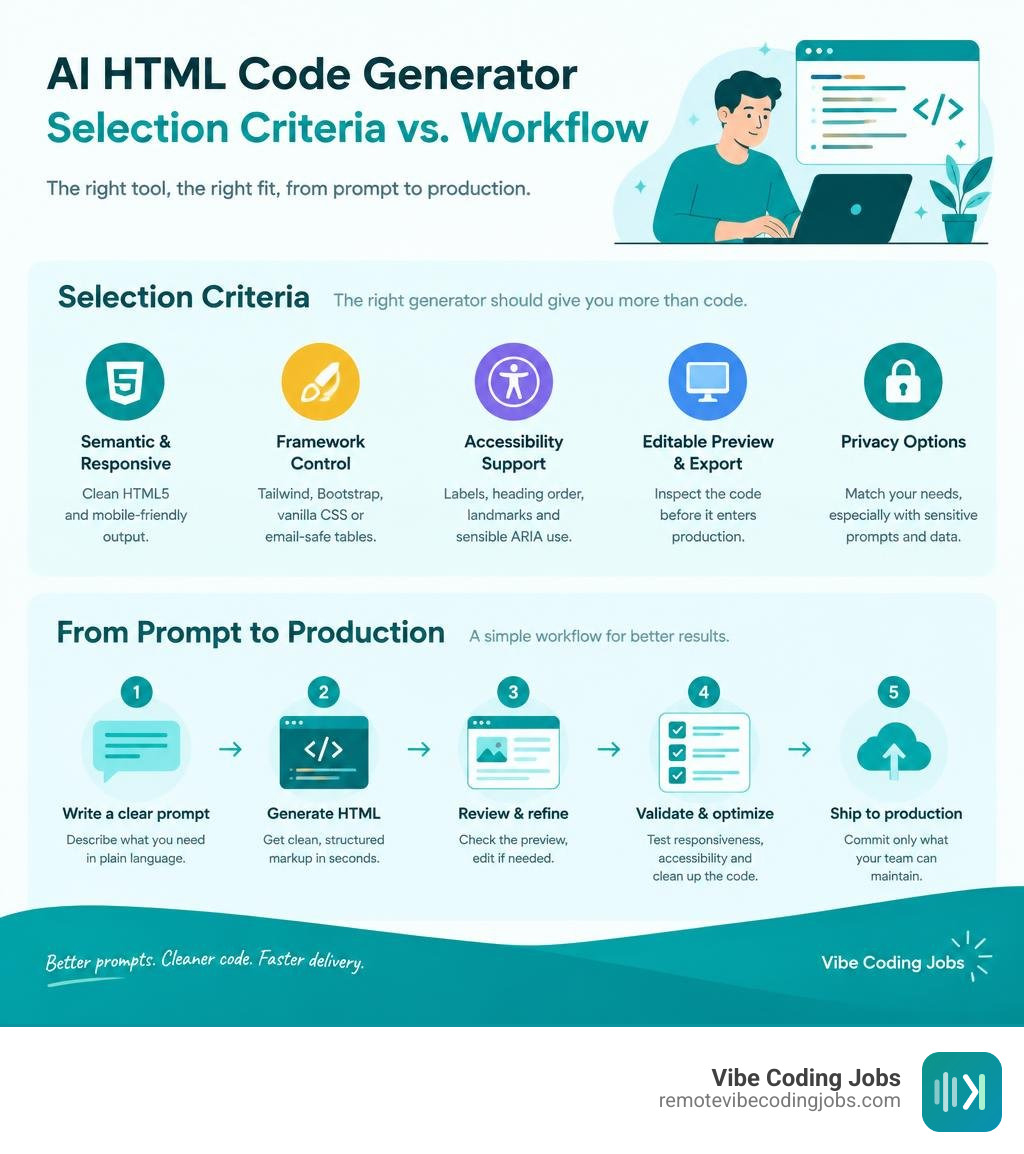
Look for these non-negotiables:
- Semantic HTML5 and responsive output for a solid starting point.
- Framework control for Tailwind CSS, Bootstrap, vanilla CSS, or email-safe tables.
- Accessibility support, including labels, heading order, landmarks, and sensible ARIA use.
- An editable preview and export path so you can inspect the code before it enters production.
- Privacy options that match your work, especially when prompts include client designs, source code, or internal data.
AI can turn a clear brief into useful markup quickly, but it is not a substitute for review. Treat its output as a strong first draft: test responsive states, validate forms, check accessibility, remove unused code, and commit only what your team can maintain.
I am Dominic Zijlstra, a technologist, data infrastructure practitioner, and DevOps engineer who has spent more than a decade building systems that make technical work faster and more reliable. In this roundup, I assess each AI HTML code generator through the lens that matters for working developers: useful output, workflow fit, and the checks needed before shipping.
Ai html code generator basics:
Understanding Modern AI HTML Generation: Beyond Static Snippets
Front-end web development has evolved past the era of manually typing boilerplates and boilerplate structural tags line by line. Modern web engineering requires building layouts that are responsive, accessible, cross-browser compatible, and deeply integrated with modern utility frameworks.
Modern generation engines leverage large language models fine-tuned on web standards. Instead of producing dead snippets that require heavy refactoring, current engines synthesize complete layout trees. They evaluate DOM depth, ensure nesting rules match HTML5 specifications, and bind layout logic directly to design constraints supplied in plain language.

How an AI HTML Code Generator Transforms Natural Language into Markup
When you submit a design description or wireframe to an AI generator, the underlying model parses user intent into an abstract semantic structure. The system determines layout regions such as headers, main landmark areas, article groupings, and sidebars before generating individual markup tags.
During this process, the engine automatically arranges:
- Proper heading levels descending logically from main headers to subsection titles.
- Semantic HTML5 sectioning landmarks that assistive readers rely on for page navigation.
- Accessible form controls where every field is bound directly to its explicit label.
- Native interactive elements that support keyboard navigation out of the box.
Understanding the shift between vibe coding vs traditional coding highlights why this workflow is so transformative. Rather than getting bogged down in syntax errors or misplaced closing tags, developers direct structural intent while the AI generates production-ready markup.
Framework Adaptation: Tailwind CSS, Bootstrap, and Vanilla Styles
A key advantage of modern generation tools is their ability to style markup across different design specifications without introducing bloated CSS code.
Whether you need rapid utility classes or self-contained styles, modern tools handle multiple targets:
- Tailwind CSS: Generates compact, utility-first classes utilizing responsive design prefixes and interactive pseudo-classes directly on the elements.
- Bootstrap 5: Assembles standard responsive containers, flexbox grids, cards, modals, and navbars relying on standardized component classes.
- Vanilla Modern CSS: Constructs clean CSS Grid and Flexbox declarations using responsive media queries without requiring external frameworks.
- Email-Safe Tables: Produces specialized nested table structures paired with inline styles and MSO conditional comments for complete rendering compatibility across email clients.
Selecting the right utility preset within AI coding tools for vibe coders ensures that generated components fit seamlessly into your existing build pipeline without requiring manual conversions.
Top AI HTML Code Generator Tools Compared for Modern Web Layouts
The market offers a range of tools, from browser-based snippet engines to agentic CLI tools that run directly against local repositories. Here is an overview comparing the top generation platforms available:
| Platform | Supported Models & Engines | Styling & Framework Presets | Key Capabilities | Deployment Mode |
|---|---|---|---|---|
| Taskade Genesis | Multi-Agent Orchestration | Tailwind, Custom CSS | Turns prompts into living apps with agents and automations | Cloud / Browser |
| Workik AI | GPT-5.2 Codex, Claude 4.6 Sonnet, Gemini 3.1 Pro | Tailwind, Bootstrap 5, Custom Classes | Reusable component library, wireframe-to-code ingestion | Cloud / Workspace |
| HTML Anything | Claude Code, Cursor Agent, OpenAI Codex (9 CLIs) | 75 Skill Templates across 9 Surface Modes | Zero-API key local execution, live SSE stream, multi-platform export | Local-First / CLI |
| Canva Code | Proprietary Visual LLM | Native Design Tokens, Responsive Embeds | Interactive widgets, data capture to Canva Sheets, no-code visual tweaks | Cloud / Embed |
| Free.ai | Qwen 3 Engine | 8 Presets: Tailwind, Bootstrap, Email, CMS | One-shot accessible HTML5, REST API for CI/CD pipelines | Browser / REST API |
| Kimi AI | Kimi K3 Open-Source Coding Model | Framework-Agnostic, Custom Conventions | Multi-agent plan mode, deep repository awareness, semantic refactoring | Web / Local CLI |
| AICreate | Gemma 4 E2B | Self-contained Vanilla CSS, Modern Presets | In-browser execution via WebGPU, zero data transfer, sandbox preview | Client-Side / WebGPU |
The open-source ecosystem has accelerated rapidly, as demonstrated by the nexu-io/html-anything repository with thousands of stars on GitHub, providing developers with powerful local generation capabilities.
Cloud-First Platforms: Taskade Genesis, Workik, and Canva Code
Cloud-based platforms focus on team collaboration, dynamic workflows, and integrated hosting solutions.
Taskade Genesis goes beyond static markup generation by converting a plain-English prompt into an interactive ops app. Instead of just exporting flat files, users can preview live landing pages, link interactive elements to automated backend agents, and clone full workspaces on a free tier.
Workik AI is engineered specifically for development teams looking to speed up user interface creation. The platform supports over 15 frontier models—including GPT-5.2 Codex, Claude 4.6 Sonnet, Gemini 3.1 Pro, and DeepSeek Reasoner. Using the FREE AI HTML Code Generator, teams can convert UI wireframe sketches into clean components, save elements into team-wide design systems, and export maintainable code directly to their codebases.
Canva Code offers an approachable, visual workflow for non-developers and product managers. It generates responsive, self-contained interactive components—such as ROI calculators, feedback widgets, and event countdowns—that can capture user submissions directly into integrated spreadsheets while maintaining enterprise security standards.
Local-First and Agentic Tools: HTML Anything, Kimi K3, and In-Browser WebGPU
For engineers who prioritize code privacy, offline generation, or direct IDE integration, local-first tools offer deep filesystem context.
HTML Anything integrates directly with installed terminal coding agents like Claude Code, Cursor Agent, and Copilot CLI. It streams JSON-line markup directly into an isolated iframe sandbox without requiring external API keys. This architecture allows developers to convert raw Markdown notes, CSVs, or sketches into production-ready web deliverables in seconds.
Kimi AI, driven by the Kimi K3 open-source coding engine, approaches front-end construction through conversational iteration and multi-agent planning. Rather than generating single-pass code, Kimi breaks complex UI scaffolding into distinct review phases, allowing developers to refactor legacy markup and maintain strict heading hierarchies across large template directories.
For developers seeking absolute data privacy directly in the browser, AICreate runs lightweight models like Gemma 4 E2B locally using browser WebGPU acceleration. The entire code generation sequence happens in device memory without sending prompt strings to external servers.
Developers interested in mastering these local workflows can dive into our vibe coding with Cursor tutorial to learn how to integrate agentic CLI generators directly into modern IDE environments.
Best Practices: Moving from AI Draft to Production-Ready Markup

AI-generated HTML provides an exceptional starting point for user interface development, but taking that code across the finish line requires systematic engineering verification.
When deploying generated interfaces into real-world applications, always apply a structured quality review checklist:
- Run an automated DOM validator to verify standard compliance and check that all tags are properly closed.
- Verify color contrast ratios on buttons, links, and card components to meet WCAG standards.
- Test interactive form controls to ensure validation rules function before deployment.
- Inspect responsive viewport breakpoints manually across mobile, tablet, and desktop viewports.
- Remove redundant utility classes to keep file sizes lean and optimize page loading speeds.
Following these review practices is central to building reliable software, as detailed in our guide on how to vibe code a full stack app.
Evaluating AI HTML Code Generator Accuracy for Production Systems
Modern front-end engines must produce code that performs reliably across browsers without degrading user experience or search indexability.
When evaluating generated output, watch for:
- Semantic Integrity: Confirm that container elements use meaningful tags like navigation, section, and article instead of generic nested divider wrappers.
- Search Metadata: Ensure meta descriptions, viewport settings, canonical tags, and Open Graph cards are configured properly.
- Asset Optimization: Check that all generated image tags include descriptive alternate text and standard lazy-loading attributes.
Comparing modern tools in guides like Claude Code vs Copilot for developers in 2026 demonstrates that evaluating code structure is a critical skill for modern software engineers.
Integrating Generated HTML into CI/CD and Team Workflows
To get the most out of AI code generation across engineering teams, embed generation tools directly into existing delivery pipelines.
Platforms offering REST APIs enable automated workflows where layout specifications in issue trackers automatically generate pull requests containing scaffolded components. Generated HTML can be converted into reusable template fragments for systems like WordPress, Hugo, or React component libraries.
As development workflows transition from writing code to managing agents: new developer career path, teams that establish structured pipelines for verifying AI-generated markup will ship user interfaces significantly faster than those relying solely on manual coding.
Frequently Asked Questions About AI HTML Code Generators
Can an AI HTML code generator create accessible and SEO-compliant markup?
Yes. Modern AI generation tools are trained on W3C specifications and semantic HTML5 standards. They regularly include structural landmark elements, explicit form label associations, descriptive image alt text, and logical heading hierarchies. However, you should always test color contrast ratios and keyboard navigation before deploying generated pages to production environments.
What is the difference between an AI HTML code generator and an AI website builder?
An AI HTML code generator creates raw, portable, and framework-compatible markup files that you can edit, export, or integrate into any codebase, content management system, or frontend repository without platform lock-in. An AI website builder typically locks you into a proprietary hosting ecosystem where the underlying code cannot be easily exported or modified outside their platform.
Are local-first AI HTML generators safer than cloud-based tools?
Local-first tools run their inference engines either in-browser via WebGPU or through local terminal CLIs, ensuring your layout briefs, private design tokens, and proprietary code never leave your local machine. Cloud-based generators send prompts to remote API servers, which may not comply with strict enterprise data privacy or non-disclosure agreements.
Conclusion
AI HTML code generators have evolved from simple snippet utilities into comprehensive interface scaffolding engines. By translating natural language specifications into accessible, semantic, and framework-ready markup, these tools allow front-end engineers to focus on architectural design, performance tuning, and delivering polished user experiences.
Whether you prefer the collaboration features of cloud tools or the privacy of local-first CLI tools, adopting AI-assisted development will help you prototype, build, and ship web layouts faster than ever before.
At RemoteVibeCodingJobs, we help developers discover remote career opportunities at forward-thinking companies embracing modern AI-assisted engineering workflows. To discover the latest tools shaping development teams today, explore our curated breakdown of the best AI coding tools for vibe coders in 2026.