
Why AI Tool Async Jobs Are the Future of Developer Work
AI tool async jobs are remote developer roles where you use AI agents to handle coding tasks in the background — while you move on to the next thing.
Here’s the quick version of what that means in practice:
- What they are: Jobs where AI runs background tasks (writing code, fixing bugs, opening PRs) without blocking your workflow
- How they work: You give the AI a high-level instruction, it returns a job ID, executes in the background, and delivers results when done
- Who they’re for: Developers who want to orchestrate AI agents rather than write every line manually
- Why they matter: You can run multiple agents in parallel, reviewing intent-level pull requests instead of line-by-line code
- Top tools used: Cursor, Claude Code, GitHub Copilot Agent, and platforms like Trigger.dev for durable background workflows
We’ve all used an AI copilot — it sits beside you and suggests the next line of code while you steer. But something bigger is happening now. Developers are shifting from writing code to orchestrating fleets of AI agents that work in parallel, submit pull requests, and solve problems while you sleep.
This isn’t a distant prediction. As of July 2026, job boards are filling up with roles that explicitly list async AI workflows, vibe coding, and agent orchestration as core requirements. The unit of developer work is moving fast — from individual lines of code to intent-verified pull requests reviewed at a high level.
GitHub’s internal research puts the productivity boost from AI coding assistants at up to 55%, and developers report saving an average of 2 hours per day on repetitive tasks. That’s not a minor efficiency gain — that’s a structural change in how software gets built.
I’m RVCJ Editorial, the team behind Remote Vibe Coding Jobs, where we cover AI-assisted development, async-first hiring, and career strategy for developers building with tools like Cursor, Claude, and Copilot — the exact skill set powering today’s AI tool async jobs. If you’re ready to stop manually grinding code and start running your own agent fleet, this guide will show you exactly how.
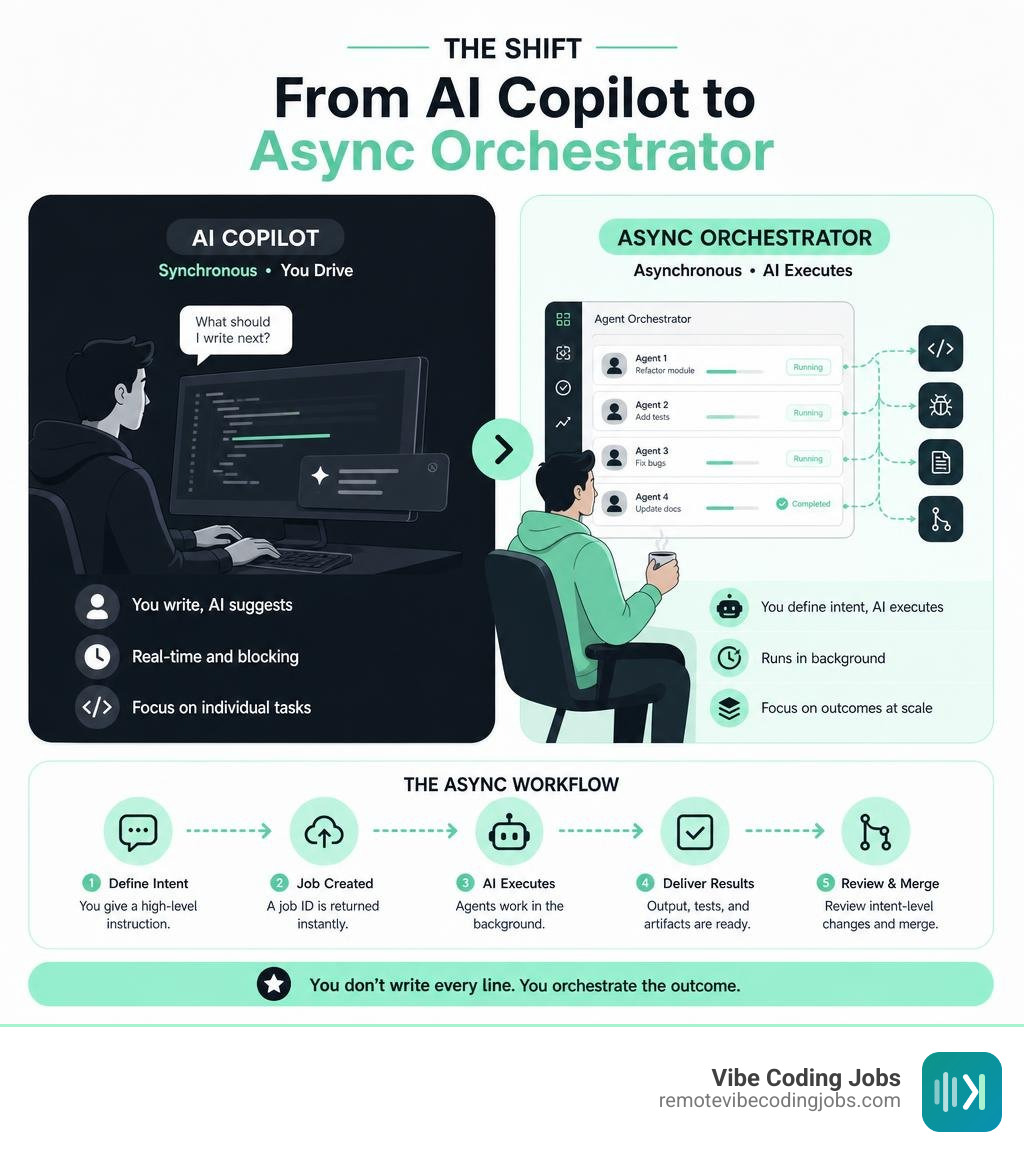
The Shift from Copilot to Autonomous Orchestrator
The transition from traditional AI copilots to autonomous background agents represents the defining paradigm shift of our current development era. In the early days of AI assistance, we used copilots as sophisticated autocomplete engines. You typed a function name, waited for a greyed-out suggestion, pressed Tab, and repeated the process. It was synchronous, highly localized, and required your constant, undivided attention.
Today, we are firmly in the era of the autonomous orchestrator. Instead of micro-managing a single AI assistant line by line, modern developers manage a fleet of parallel agents. This is what Andrej Karpathy famously coined as “vibe coding” in early 2025—a philosophy where the developer acts as a high-level systems architect, steering the creative and structural direction of a project while autonomous agents execute the underlying syntax.
In a multi-agent system, tasks are no longer sequential bottlenecks. If you need to build a new SaaS feature containing a user login, a reporting dashboard, and an automated invoicing system, you do not build them piece by piece. Instead, you delegate these tasks to specialized agents running in parallel. One agent spins up the front-end components, another configures the database migrations, and a third drafts the test suites.
This parallel processing changes the very nature of human review. The developer’s primary job is no longer syntax verification; it is intent validation. You review pull requests that contain natural-language summaries, complete inline code diffs, and visual before-and-after screenshots generated autonomously by your agent fleet. To understand how these workflows integrate into modern employment, you can Learn more about async remote developer jobs and see how teams are structuring their operations around this model.
Understanding Vibe Coding and Agentic Workflows
At its core, vibe coding relies on translating high-level instructions into production-ready software through rapid prototyping and iterative code generation. You do not spend your morning writing boilerplate configuration files or chasing missing semicolons. Instead, you write a clear, comprehensive design document or scope outline, feed it to your agentic workspace, and let the AI compile the codebase.
This approach allows developers to move from concept to functional prototype in a fraction of the time. For example, if you are tasked with fixing a complex UI bug across both desktop and mobile layouts, you instruct your agent to analyze the layout files, test the fixes in a headless browser, and present a completed pull request. The agent handles the tedious worktree manipulation, dependency updates, and basic debugging, leaving you to focus on the high-level architecture and user experience.
For developers looking to land roles that champion this exact philosophy, the job market has evolved rapidly. You can Explore async-first remote developer jobs to find teams that value rapid prototyping, high-level orchestration, and AI-native engineering over raw manual typing speed.
How to Leverage AI Tool Async Jobs for Maximum Productivity
To truly unlock the power of AI tool async jobs, you must master the art of background task execution. The greatest friction in traditional development is the waiting game. You run a test suite, and you wait. You trigger a deployment, and you wait. You prompt an LLM to generate a complex module, and you watch the characters slowly stream across your screen, unable to do anything else.

True workflow automation means turning these blocking moments into asynchronous background tasks. When you assign a task to an asynchronous AI agent, the agent immediately returns a job ID and frees up your environment. While the agent runs your tests, refactors your legacy modules, or builds out a new integration, you can switch branches, work on a different feature, or even step away from your desk entirely.
By leveraging async background execution, developer productivity scales non-linearly. Instead of a single human developer producing a linear stream of code, a single orchestrator can guide multiple background processes simultaneously. This shift is highly detailed in the engineering community; to understand the foundational principles of how these background tools communicate, check out How Async Tool Calling Makes AI Agents Feel Instant and watch the practical breakdown in Do async tool work??? to see these systems in action.
The Mechanics of AI Tool Async Jobs in Modern Workflows
How does an asynchronous AI tool actually perform its work without freezing your development environment? The magic lies in the transition from synchronous RPC (Remote Procedure Call) patterns to an asynchronous, message-based protocol.
In a traditional synchronous setup, when an AI agent needs to call a tool—such as searching a large database or running an external API call—the entire conversation freezes. The LLM protocol dictates a strict ordering of messages: System, User, Assistant, Tool Result, and back to Assistant. If a database search takes 30 seconds, the assistant cannot respond to you, and you cannot provide further instructions. The session is completely blocked.
Asynchronous tool calling solves this by introducing a “call-now, fetch-later” pattern:
- Tool Invocation: The AI agent triggers a long-running tool.
- Immediate Acknowledgment: The tool instantly returns a unique job ID (e.g., job_98234) and a status of “working” instead of waiting for the actual result.
- Context Freedom: The agent acknowledges the background execution to the user, allowing the conversation to continue. The user can ask follow-up questions, request separate tasks, or refine the prompt.
- Result Injection: Once the background task completes, the system injects the final payload back into the LLM’s context.
To prevent race conditions—such as a user asking a new question while a background tool completes—the system uses either eager resolution (instantly processing the tool result if the agent is idle) or a queuing approach (holding the result in a queue until the current conversational turn is complete). To master how these communications are structured in real-world engineering teams, you can Read about async communication workflows.
How Async Task Execution Prevents Conversation Freezes
At the protocol level, this asynchronous revolution is being standardized by frameworks like the Model Context Protocol (MCP). The late 2025 revisions to MCP introduced “Tasks” as an experimental primitive specifically designed to upgrade AI agents from synchronous RPC blocks to durable, long-running workflows.
An MCP Task operates as a durable request execution. When an agent initiates an async task, it can transition through five distinct lifecycle states: working, input_required, completed, failed, and cancelled. If a task requires human intervention—such as an approval gate to deploy code or clarify an ambiguous requirement—it enters the input_required state, emits a notification, and pauses safely without consuming unnecessary token budgets or timing out.
For developers building these complex, durable agentic workflows, relying on standard serverless functions is a recipe for constant timeouts and state loss. Platforms like Trigger.dev allow you to Build and deploy fully-managed AI agents that survive redeploys, crashes, and network blips, ensuring your background coding tasks run reliably to completion.
The Tech Stack Powering Asynchronous AI Development
The tooling ecosystem for asynchronous AI development has matured rapidly. Developers are no longer limited to basic chat sidebars; they now use deeply integrated coding environments designed specifically for parallel agent execution.
At the forefront of this stack are three major platforms:
- Cursor: Evolving from a popular VS Code fork, Cursor has pioneered the Composer model, which allows developers to edit multiple files in parallel. Cursor’s advanced agentic setups claim to enhance coding speed by up to 4x through parallel AI execution, letting you edit, test, and debug across your entire codebase simultaneously.
- Claude Code: Anthropic’s terminal-based interface provides a blazing-fast, agentic environment that can execute shell commands, read and write files, and run tests autonomously. It excels at deep refactoring tasks and command-line automation.
- GitHub Copilot Agent: Deeply integrated into the GitHub ecosystem, this agent doesn’t just suggest code; it takes high-level issues, creates a plan, executes the changes across a workspace, and submits complete pull requests with visual before-and-after documentation.
To see how these paradigms differ in practice, consider the following comparison:
| Execution Feature | Synchronous AI Tools (Copilots) | Asynchronous AI Tools (Agents) |
|---|---|---|
| User Interaction | Blocking (must wait for output to finish) | Non-blocking (run tasks in the background) |
| Scope of Action | Single file, line-by-line autocomplete | Multi-file, workspace-wide modifications |
| Task Management | Immediate response or timeout | Returns Job ID, status polling, and notifications |
| Human Involvement | Continuous steering and manual typing | High-level instruction and PR review |
| Parallelism | Sequential execution only | Multi-agent parallel processing |
| State Durability | In-memory (lost on connection drop) | Durable persistence (survives restarts/replays) |
Why Companies Are Hiring for AI Tool Async Jobs in 2026
In 2026, forward-thinking organizations have realized that the traditional “hands-on-keyboard” metric is an outdated way to measure developer value. Companies hiring for AI tool async jobs are looking for developers who can operate as system architects. They want individuals who can design robust testing suites, write precise prompt instructions, and audit AI-generated pull requests for security and architectural alignment.
This shift has given rise to a highly productive, async-first culture. When developers are freed from the necessity of manual syntax writing, they can spend their time thinking about system reliability, user experience, and product market fit. To explore how modern companies are structuring these high-velocity teams, you can Discover async roles and teams on our platform.
Furthermore, specialized platforms are emerging to manage these autonomous workflows. For instance, you can look at how Teeme — Where AI agents have careers is building an entire operating system for autonomous company execution, allowing teams to deploy pre-built agent networks that collaborate natively across communication channels like Slack and Discord.
To help freelancers and solopreneurs tap into this ecosystem, tools like UpHunt | AI-Powered Auto-Apply & Job Alerts for Upwork Freelancers | UpHunt and Vibeworker: AI Upwork Job Alerts for Freelancers | tryvibeworker.com use advanced AI matching engines to score client postings and draft tailored proposals, giving async developers an unfair advantage in securing high-value contracts.
Overcoming the Challenges of Agent-Driven Codebases
While the productivity gains of agentic development are undeniable, working with autonomous code generation introduces unique challenges. When agents can write hundreds of lines of code in seconds, the risk of introducing bugs, architectural drift, and security vulnerabilities increases exponentially.

A recent study by Lovable highlighted this reality, revealing that 170 out of 1,645 analyzed AI-generated applications contained notable security flaws or structural vulnerabilities. Without proper guardrails, an autonomous agent might successfully implement a requested feature while unknowingly introducing a SQL injection vulnerability or breaking an existing authentication flow.
To mitigate these risks, developers must establish robust failure recovery mechanisms, strict rollback procedures, and automated cost management protocols. When running a fleet of parallel agents, a runaway loop can quickly consume thousands of dollars in LLM API tokens. Implementing automatic budget caps, maximum token thresholds, and strict execution timeouts is essential for maintaining control over your agentic infrastructure. To see how companies are structuring autonomous operations safely, you can learn how to Run your company autonomously using governed, multi-agent frameworks.
Security and Reliability in AI-Generated Code
To build secure and reliable software with AI agents, you must implement a multi-layered verification pipeline. The most effective approach is to run automated peer reviews. In this setup, you deploy two separate AI instances: one agent acts as the primary builder, while a completely independent agent acts as the dedicated security auditor and code reviewer.
Additionally, developers should delegate test writing directly to their agents. Before any AI-generated code is merged, the agent must write corresponding unit and integration tests, run the test suite, and prove that the new code passes all verification checks.
The human developer remains the vital “human-in-the-loop.” You must establish clear approval gates where agents pause and request explicit authorization before performing sensitive actions, such as deploying to production, running database migrations, or modifying security configurations. Solopreneurs and small teams can leverage platforms like AI Agents for Solopreneurs | CREAO to build self-improving agents that run on a schedule, maintain a persistent memory of past mistakes, and continuously refine their execution based on human feedback.
Frequently Asked Questions about AI Tool Async Jobs
What is the difference between an AI copilot and an asynchronous AI agent?
An AI copilot is a synchronous assistant that operates primarily as an advanced autocomplete engine. It requires continuous human guidance, suggesting code line-by-line within your active editor window. If you stop typing, the copilot stops working.
In contrast, an asynchronous AI agent operates autonomously in the background. You provide a high-level goal, and the agent plans the execution, creates its own worktree, edits multiple files in parallel, runs tests, and submits a completed pull request. It runs non-blocking background jobs, allowing you to focus on other tasks while it works.
How do async tool calls improve the developer experience?
Async tool calls eliminate the frustrating “waiting room” experience of traditional AI tools. Instead of freezing your entire conversation while an agent performs a slow database search, API call, or test run, the system returns an immediate job ID. This non-blocking pattern keeps the interface responsive, allowing you to continue chatting, refining prompts, or working on other code while the background task executes within your latency budget.
What security risks are associated with asynchronous AI coding agents?
The primary risks include security vulnerabilities, code quality regression, and architectural drift. Because agents generate code at a rapid pace, they can easily introduce flaws like hardcoded credentials, insecure API endpoints, or outdated dependencies. Studies of AI-generated apps have shown that a significant percentage contain vulnerabilities. To counter this, developers must use automated testing, independent AI security auditors, and strict human-in-the-loop approval gates before merging any agent-generated code.
Conclusion
The era of manual, line-by-line coding is rapidly becoming a relic of the past. As we navigate 2026, the developers who thrive will not be those who type the fastest, but those who can effectively orchestrate fleets of autonomous, parallel AI agents. Mastering AI tool async jobs is the ultimate career flex, allowing a single software engineer to achieve the output of an entire traditional development team.
At RemoteVibeCodingJobs, we are dedicated to helping you navigate this career transformation. By curating daily job listings filtered by async-first culture, modern tech stacks, and cutting-edge AI tools, we connect forward-thinking developers with the companies leading this technological revolution.
Ready to transition from a manual code writer to a high-level system orchestrator? Start your vibe coding journey today and find the remote, async-first positions that match your skills.