
Why Cursor Assisted Remote Work Is Changing How Developers Build Software
Cursor assisted remote work has fundamentally shifted what it means to be a productive developer — you no longer need to be sitting at your desk for code to get written.
Here is a quick overview of what this means in practice:
- What it is: Using Cursor’s AI coding agents to run autonomous development tasks in the cloud or on a remote machine, while you monitor and steer from any device
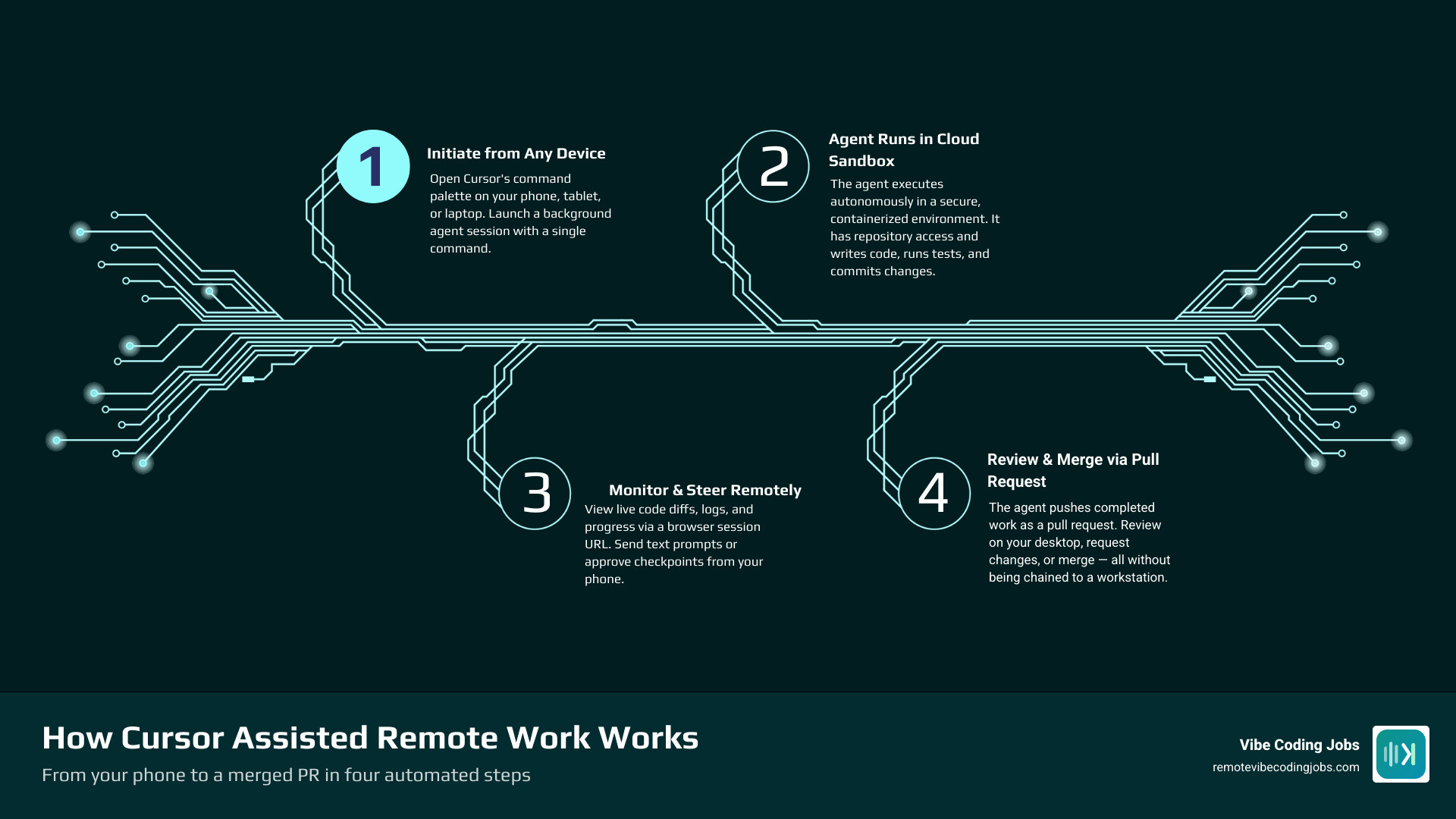
- How it works: Cursor’s background agents execute in sandboxed environments, push changes via pull requests, and expose a session interface you can access from a browser on your phone
- Key tools: Cursor’s native cloud/background agents, the open-source CursorRemote relay, and secure networking options like Tailscale
- Best for: Long-running refactors, overnight test generation, parallel task execution, and staying in flow without being chained to a workstation
- Main risk: The same accessibility that makes it powerful can blur the line between work and rest — knowing when to leave the agent asleep is the critical skill
The numbers reflect how seriously the industry is taking this shift. By 2025, Cursor had reached a $29.3 billion valuation and $1 billion in annual recurring revenue. Internally, more than 30% of PRs merged at Cursor itself are created by their own cloud agents.
As one developer put it after the Cursor iOS app launched: “Cursor just put a coding agent in my pocket, and my mental model of ‘work’ is quietly breaking.”
I’m Dominic Zijlstra, co-founder of Adaptify.ai and former data scientist and DevOps engineer — my background in automated systems and data infrastructure gives me a practical lens on cursor assisted remote work that goes beyond the hype. In this guide, I’ll break down exactly how these tools work, how to set them up securely, and how to use them without burning out.
Similar topics to cursor assisted remote work:
The Architecture of Cursor Assisted Remote Work
To understand how cursor assisted remote work operates, we have to look under the hood. Traditional development tools are designed around a highly localized model: you write code, your local machine runs it, and you stare at the screen waiting for the output.
Cursor breaks this model by separating the user interface from the execution engine. When we engage in remote AI-assisted development, we are interacting with a multi-layered system designed to keep the AI agent running smoothly, even if our laptop is closed and packed in a backpack.
The underlying architecture relies on three primary components:
- The Cloud-Provisioned Environment: Rather than running heavy AI processes on your local machine, Cursor can spin up isolated, containerized environments in the cloud. These environments host the agent runtime, clone your repository, and execute terminal commands natively.
- The Chrome DevTools Protocol (CDP) Relay: For local setups that you want to control remotely, Cursor utilizes its Electron-based foundation. Electron runs on Chromium, which natively supports CDP. By enabling a debugging port, an external relay server can programmatically inspect the IDE’s Document Object Model (DOM), extract the chat state, and simulate keyboard or mouse inputs.
- The Session Interface: This is the bridge to your mobile device. Whether through a secure web client or a custom integration (such as a Telegram bot), the live state of the agent is streamed to your phone, allowing you to monitor reasoning steps, accept terminal executions, and send new text prompts.
By combining these three elements, developers can transition between different workspaces seamlessly. To learn how this fits into the broader ecosystem of modern development setups, check out our Remote Work Tools for Developers Compared 2026 Guide.
How Background Agents Power Cursor Assisted Remote Work
The true magic of cursor assisted remote work lies in the background agents. Unlike simple autocomplete tools that suggest the next line of code, a background agent acts as an autonomous collaborator.
Once initialized, the agent operates inside a sandboxed environment with direct repository access. It can analyze multi-file structures, run local build commands, read error logs, and iteratively fix its own bugs.
If you are away from your desk, the agent doesn’t stop. It continues executing the task, pausing only when it hits a user-defined checkpoint or requires explicit human-in-the-loop approval. This shift from active line-by-line coding to high-level system supervision is explored in detail on Cursor Remote Agents: Control Dev From Any Device (2026).
Traditional SSH vs. Cursor Assisted Remote Work
It is helpful to contrast this workflow with traditional remote development. For years, developers have used SSH to connect to remote servers. While SSH is powerful, it is fundamentally synchronous and fragile. If your network connection drops, your active terminal session can hang, and you must remain actively connected to see what is happening.
Cursor’s background agents change the game by running asynchronously. Here is how they compare:
| Feature | Traditional SSH Remote Dev | Cursor Background Agents |
|---|---|---|
| Connection Requirement | Active, continuous connection | Asynchronous; launch and disconnect |
| Execution Model | Developer drives every command | Agent executes autonomously in sandbox |
| Human Intervention | Required for every keystroke | Checkpoint-based approvals only |
| Mobile Friendliness | Extremely poor (terminal on small screen) | High (optimized web UI / chat interfaces) |
| Output Delivery | Direct file changes on server | Structured Pull Requests (PRs) |
Setting Up Remote Agent Control: A Step-by-Step Guide
Setting up your system for remote agent control is straightforward, but it requires configuring a few local settings to ensure you can securely connect from your mobile device.
Whether you choose Cursor’s native cloud agent features or prefer a self-hosted community tool like the ones documented in the docs/setup-guide.md at HEAD · len5ky/CursorRemote repository, the core steps remain similar.
Configuring the Chrome DevTools Protocol (CDP)
To allow external tools to monitor and control your local Cursor instance, you must launch Cursor with the remote debugging port enabled. This allows a relay server to securely read the IDE’s state.
First, fully close your Cursor application. On macOS, make sure to use Cmd+Q to quit the process entirely.
Next, launch Cursor from your terminal while passing the remote debugging flag:
cursor --remote-debugging-port=9222
You can verify that the debugging port is active by opening your web browser and navigating to http://localhost:9222/json. If you see a JSON array listing your active Cursor windows, the CDP connection is working perfectly.
To automate this and keep your connection active, you can install the community extension from len5ky/CursorRemote, which automates the relay server setup and provides a clean mobile web app to interact with your local agent.
Securing Your Remote Connection with Tailscale
Exposing a debugging port to the public internet is a massive security risk. To protect your development machine while maintaining access from anywhere in the world, we highly recommend using Tailscale.
Tailscale is a zero-config private VPN that connects your devices securely without the need for complex firewall rules or port forwarding.
- Download and install Tailscale on your development machine and your smartphone.
- Sign in to both devices using the same account to automatically add them to your private “tailnet”.
- Note the private IP address assigned to your development machine by Tailscale.
- Configure your Cursor remote relay server to bind to your private Tailscale IP or
0.0.0.0instead of justlocalhost. - Add a strong password to your remote web client configuration.
By using this setup, you can access your running Cursor agent from a coffee shop or train using your phone, securely routed through an encrypted tunnel. For alternative scripting methods and macOS GUI automations, you can also explore the balianbaleno/cursor-remote repository.
Mobile Capabilities and Real-World Use Cases for Remote Agents
Many developers are skeptical about mobile coding, and for good reason: trying to write complex code on a virtual keyboard is a terrible experience. However, cursor assisted remote work is not about typing code on your phone; it is about directing the AI that does the typing for you.
When you are away from your desk, your phone acts as a remote control. You can check the agent’s progress, read its proposed plans, and offer course corrections. For a broader look at how this fits into the modern “vibe coding” movement, read our Vibe Coding with AI A Beginner’s Practical Guide 2026.
High-Value Mobile Tasks
There are several tasks that are incredibly efficient to perform from a mobile device while your agent runs in the background:
- Monitoring Progress: You can watch the live terminal logs and agent reasoning steps as it works through a task.
- Approving and Rejecting Checkpoints: When the agent finishes a sub-task or wants to run a terminal command, you can tap “Approve” or “Reject” from your browser.
- Providing High-Level Guidance: If you see the agent taking a wrong turn, you can type a quick text prompt like, “Use the existing helper function in utils.ts instead of writing a new one.”
- Terminating Sessions: If the agent gets stuck in an infinite loop or starts writing incorrect code, you can kill the session instantly to save API credits.
Tasks Best Left for the Desktop
While mobile control is incredibly liberating, some development tasks still require the screen real estate and processing focus of a desktop environment:
- Complex Multi-Step Instructions: Writing deeply technical, initial system prompts that require referencing multiple local files is much easier with a physical keyboard.
- Detailed Code Reviews: Reviewing a massive, multi-file diff is painful on a mobile screen. Save the final code review for your monitor.
- Deep Environment Troubleshooting: If the agent fails because of a missing system dependency or a broken local Docker container, debugging the underlying system environment is best done on your desktop.
Real-World Benefits of Remote Agent Workflows
The practical benefits of this workflow are massive for modern remote teams. For example, at companies like Remote, team members across different roles are leveraging AI-assisted workflows to ship features faster. You can read a account of this in How I’m using Cursor to ship onboarding form requests at Remote | by Maria Margarida | May, 2026 | Medium.
By offloading the manual execution of coding tasks to background agents, developers can unlock several high-value workflows:
- The Long-Running Refactor: You can kick off a major codebase refactor — such as updating a legacy payment module to support a new API — right before leaving for a lunch meeting. You can monitor the agent’s progress on your phone and return to a completed PR.
- Overnight Test Generation: Instead of spending hours writing unit tests, you can prompt an agent to increase your test coverage to 80% overnight. The next morning, you simply review and merge the generated test suites.
- Parallel Task Execution: You can actively write a core feature on your local machine while a background agent simultaneously runs a migration script or writes documentation in another repository.
- Context Switching Without the Pain: If an urgent bug report comes in while you are working on a feature, you can spin up a background agent to investigate and fix the bug in a sandboxed environment, saving you from losing your local momentum.
To see how these workflows are reshaping engineering roles, check out our guide on Remote Developer Jobs AI Tools Workflow.
Risks, Limitations, and Best Practices for Remote Sessions
While cursor assisted remote work offers incredible freedom, running autonomous agents remotely introduces unique challenges that teams must manage carefully.
The foremost risk is cultural rather than technical. When your development environment lives in your pocket, the boundaries between work and rest can quickly dissolve. The temptation to check on your running agent at 11:00 PM from your couch can lead to burnout. Learning to leave the agent asleep during your personal time is a critical skill for long-term sustainability.
From a technical perspective, mobile troubleshooting can be frustrating. If a remote session disconnects or encounters a local port conflict, resolving it on a mobile browser is difficult.
Additionally, autonomous agents can make mistakes. If given vague prompts like “clean up the payment code,” an agent might rewrite working systems using a fundamentally wrong approach.
To mitigate these risks, we recommend adopting these best practices:
- Write Bounded, Concrete Prompts: Give your background agents highly specific tasks with clear boundaries to prevent them from drifting off-track.
- Use Pull Requests as Your Ultimate Gate: Never allow an AI agent to merge code directly into your main branch. Always route agent outputs through a Pull Request, where they can be thoroughly vetted.
- Incorporate Specialized Review Tools: Pair your agent workflows with automated testing and review pipelines. Explore how teams are doing this in our guide on AI Code Review Tools for Remote Teams Boost Collaboration.
- Intervene Early: If you monitor your agent’s live reasoning on your phone and notice it taking a wrong turn, stop the session immediately rather than letting it waste compute and time.
Frequently Asked Questions about Cursor Remote Access
Does Cursor remote access work on iPhone and Android?
Yes. The monitoring and control interfaces for both native background agents and third-party tools like CursorRemote are browser-based. They run smoothly on modern mobile browsers like Safari on iOS and Chrome on Android. Additionally, there are mobile-friendly integrations like Telegram bots that allow you to interact with your agent directly through standard chat messages.
Can a Cursor background agent access my private repositories?
Yes, but you maintain complete control over access permissions. When using cloud-provisioned environments, Cursor connects to your GitHub or GitLab account via secure OAuth. It will only clone the specific private repositories that you have explicitly authorized for that session.
Is it safe to run a coding agent autonomously on my codebase?
It is highly secure if you follow standard development practices. Cursor’s background agents operate in sandboxed, containerized environments, meaning they cannot damage your local machine. Furthermore, because they output their work as Pull Requests rather than pushing directly to production branches, you always have a human-in-the-loop review gate before any code goes live.
Conclusion
The era of being tethered to a physical desk to build software is coming to an end. Cursor assisted remote work allows us to delegate the heavy lifting of code generation, refactoring, and test writing to autonomous agents, transforming our role from line-by-line coders to high-level system architects.
By mastering these tools, setting up secure remote connections, and maintaining clear boundaries between work and rest, developers can build a highly flexible, parallelized, and asynchronous workflow.
At RemoteVibeCodingJobs, we aggregate the best remote “vibe coding” and AI-assisted developer jobs at forward-thinking, async-first companies. If you are ready to take your career to the next level and work with cutting-edge tools like Cursor and Claude, explore our curated listings and apply today!