Fundamentals of Remote Coding with Cursor: Architectures and Workflows
Understanding Cursor: AI coding agent requires rethinking the developer’s operational boundary. To navigate remote coding with Cursor, you need to understand the structural differences between connecting an editor interface to a remote computer versus launching an autonomous AI agent in a sandboxed cloud environment. Detailed in our Cursor Company Overview, Cursor’s design balances low-latency interactive editing with decoupled agent execution.
Traditional Remote SSH vs Autonomous Cloud Agents
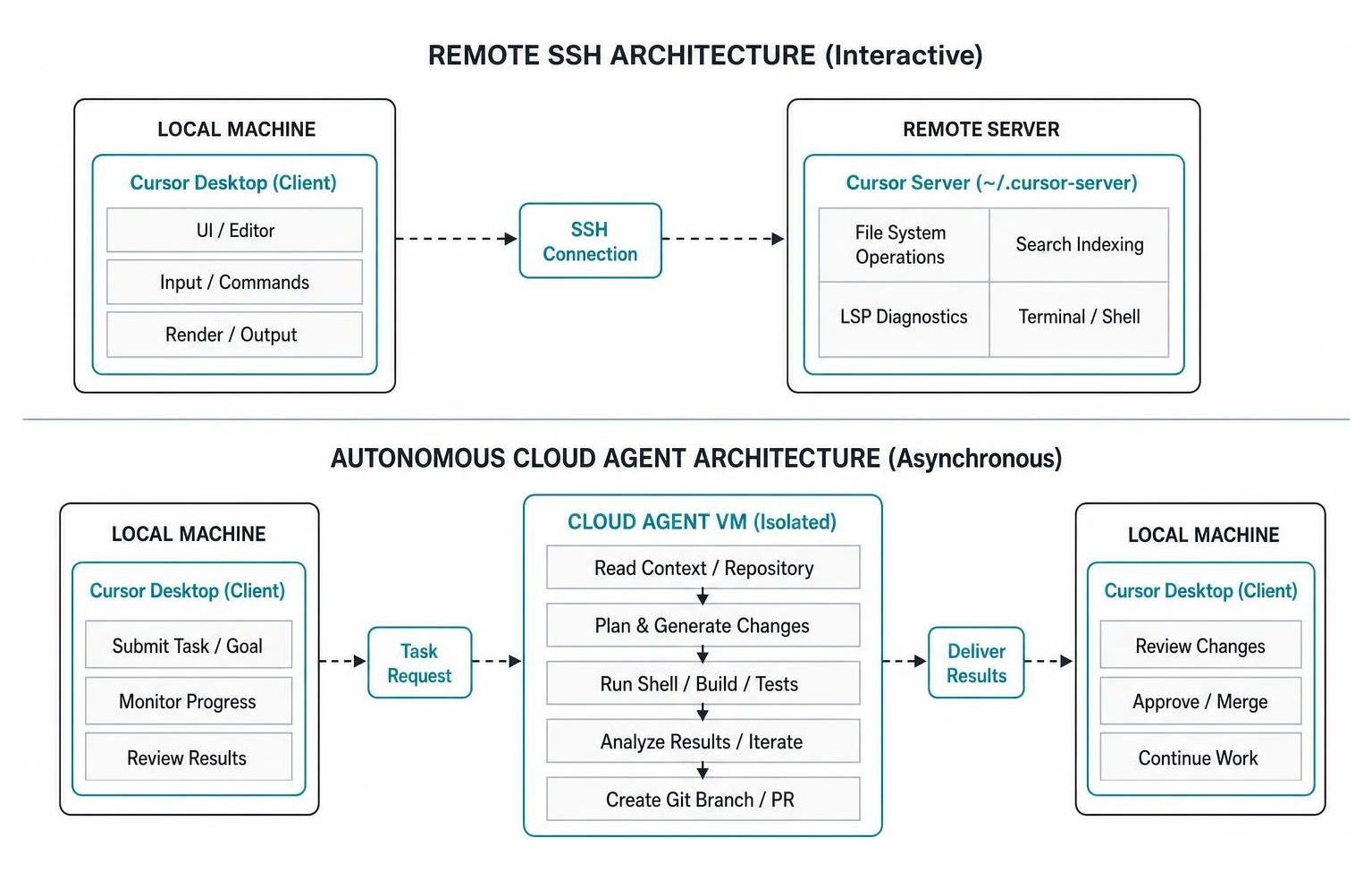
Traditional remote development relies on interactive SSH connections where Cursor splits its execution. The local desktop application acts as the client rendering the UI, while a remote server process running under ~/.cursor-server handles file operations, search indexing, and language server protocol (LSP) diagnostics.
Conversely, autonomous Cloud Agents operate on a fully decoupled paradigm. Introduced in Cursor 3, Cloud Agents (formerly called Background Agents) run inside isolated cloud virtual machines with full development environments. Rather than keeping a constant terminal pipe open to your workstation, you delegate tasks asynchronously. The cloud agent runs an agentic loop: reading context, generating multi-file code modifications, executing local shell builds, analyzing test output, and submitting a clean Git branch or pull request when finished.
Third-Party Platforms and Tools for Remote Workflows
Beyond native Cursor capabilities, third-party ecosystem tools enhance remote development setups:
- Diploi: A cloud deployment platform that lets developers launch remote development environments with custom hardware profiles (e.g., Medium tier server instances optimized to handle dev-server overhead) and hand off directly to Cursor via one-click SSH links.
- MindStudio: Enables broader AI workflow automation, placing project management agents alongside Cursor agents to schedule, route, and direct autonomous tasks across distributed engineering teams.
- CursorRemote: An open-source relay system leveraging Chrome DevTools Protocol (CDP) on port
9222. It streams active Cursor IDE chat tabs and diff previews directly to custom interfaces, such as Telegram supergroup topics, allowing developers to approve terminal execution steps remotely without running a full desktop client.
How Cloud Agents Work and Mobile Orchestration
According to official cloud-agent.md documentation, Cursor Cloud Agents run in isolated cloud containers initialized via .cursor/environment.json. They support Model Context Protocol (MCP) servers, pre-execution command hooks, and multi-repository cross-linking.
Because these agents operate independently of local hardware, they eliminate workstation thermal constraints. A developer can launch three parallel agent runs across separate frontend and backend repositories without causing local UI lag or battery drain.
Mobile Supervision vs Workstation Remote Coding with Cursor
As discussed in community explorations like Cursor on your phone: open-source remote control for agent mode, mobile devices excel as command-and-control centers rather than primary authoring environments. Writing code on a smartphone touchscreen remains impractical, but steering an agentic loop works surprisingly well on mobile displays.

Via cursor.com/agents (accessible as an iOS or Android PWA) or tools like CursorRemote, mobile interaction focuses on supervisory review gates:
- Reviewing high-level execution plans before code generation begins.
- Reading diff previews and inline execution traces.
- Reprompting agents when they hit edge cases or fail test suites.
- Approving terminal commands or merging pull requests directly into main branches.
Mobile interaction is intentionally constrained: complex multi-file environment debugging, manual terminal debugging, and detailed line-by-line syntax edits remain best suited for desktop displays.
Strategic Use Cases for Autonomous Remote Agents
As showcased on Cursor — Build Software with AI Agents, cloud agents allow engineering teams to execute high-value asynchronous workflows:
- Overnight Test Generation: Directing an agent to scan untested edge cases and generate unit tests targeting 80%+ test coverage while the primary engineering team is offline.
- Large-Scale Codebase Refactoring: Migration tasks—such as updating API adapters across 50 separate modules—can be handed off to background agents running in parallel.
- Context Switching Mitigations: Assigning minor bug fixes or non-critical documentation tasks to background agents while staying focused on core feature architecture.
- Parallel Task Execution: Triggering parallel sub-agents across multiple repos to update frontend dependencies alongside corresponding backend API endpoints simultaneously.
Step-by-Step Setup and Offline Environment Troubleshooting
Setting up remote coding with Cursor requires configuring SSH endpoints and handling dark-site (air-gapped) server environments safely.
Setting Up Remote Coding with Cursor on Headless Servers and Diploi
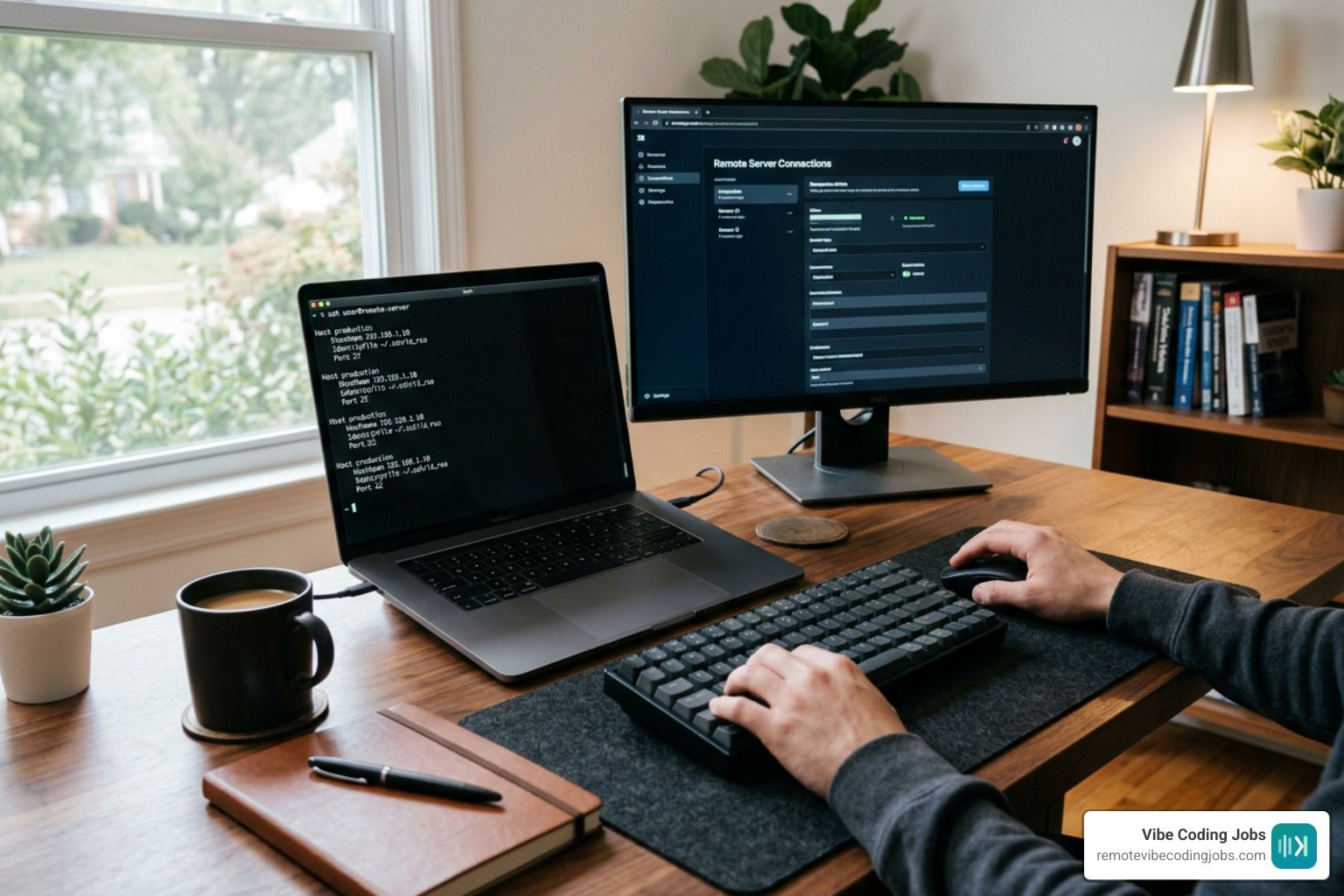
Connecting Cursor to headless servers or cloud platforms like Diploi follows standard SSH protocol flows, as outlined in Remote Development Environments with Cursor?:
- Generate SSH Keys: On your local workstation, create an SSH key pair:
ssh-keygen -t ed25519 -C "developer@company.com" - Append Public Key to Remote Target: Copy your public key (
~/.ssh/id_ed25519.pub) to the remote host’s~/.ssh/authorized_keysfile or register it directly within your cloud platform (Diploi) profile. Configure Local SSH Config: Edit
~/.ssh/configon your local host:Initiate Cursor Remote Connection: Open Cursor, launch the Command Palette (
Cmd+Shift+P/Ctrl+Shift+P), chooseRemote-SSH: Connect to Host..., and selectproduction-devbox. Cursor will automatically download and unpack the matchingcursor-serverbinary on the target remote machine.
Managing Language Servers and Extensions without Internet Access
Installing extensions and language servers on air-gapped hosts without public internet access requires manual workarounds, a common challenge highlighted in Struggling hard to install python language server on Remote host without internet – Help – Cursor – Community Forum.
When an SSH host lacks external internet connectivity, Cursor cannot pull language server binaries like cursorpyright automatically. Standard .zip archives fail because the Cursor remote CLI expects a structured VSIX directory layout containing .vsixmanifest and an extension/ subfolder.
To package and install language servers manually on an air-gapped host:
- On an internet-connected workstation, locate the pre-installed extension folder under
~/.cursor/extensions/anysphere.cursorpyright-./ - Open
package.jsoninside the extension folder and remove theprepublishscript entry to prevent build script execution failures. - Run
npm installinside the extension directory to capture missing local node modules. - Execute
vsce packageusing the Visual Studio Code Extension CLI tool to build a compliant VSIX package file. - SCP the compiled
.vsixfile to the remote dark host:scp anysphere.cursorpyright-1.0.0.vsix user@dark-host:/tmp/ - Execute extension installation via the internal Cursor remote CLI binary on the remote server:
~/.cursor-server/bin//bin/remote-cli/code --install-extension /tmp/anysphere.cursorpyright-1.0.0.vsix
Securing Remote Connections and Comparing VS Code Workflows
Security considerations are vital when extending development environments across local and remote boundaries.

Mitigating Remote-SSH Protocol Vulnerabilities
Because Cursor inherits its remote development framework from VS Code’s Remote-SSH extension architecture, it shares identical underlying security risks. Security researchers have demonstrated that connecting local editors to untrusted or compromised remote servers can expose local workstations to pivot attacks.
If an attacker compromises an unhardened remote devbox, they can potentially pivot back through the active SSH session protocol to execute arbitrary commands or access files on the connected local workstation.
To protect local machines when using remote coding with Cursor:
- Use Isolated Devboxes: Avoid running remote development sessions directly on sensitive shared infrastructure; launch disposable single-tenant cloud VMs or containerized devboxes instead.
- Isolate Network Access: Restrict SSH port access via strict IP whitelisting or Tailscale VPN overlays rather than exposing raw SSH ports to public IP addresses.
- Disable SSH Agent Forwarding: Ensure
ForwardAgent nois explicitly set in your~/.ssh/configunless specifically required, preventing key extraction from remote processes. - Use Web Interfaces for Untrusted Targets: If forced to inspect untrusted repositories or third-party servers, use web-isolated editor instances or browser agents instead of full desktop Remote-SSH tunnels.
- Leverage AI Security Career Guidance: Review our AI-Assisted Development Career Guide for details on secure remote architecture practices.
Cursor Remote vs Traditional VS Code Remote Development
While Cursor shares SSH configuration mechanics with traditional editors, its execution ecosystem differs substantially:
| Feature | Cursor Remote | Traditional VS Code Remote |
|---|---|---|
| Primary Architecture | Hybrid (SSH + Autonomous Cloud Agents) | Interactive Remote-SSH / Containers |
| Agent Autonomy | High (Background loops, terminal execution, multi-file edits) | Low (Single-file inline completion / manual edits) |
| Mobile Control | Native PWA / Web UI via cursor.com/agents |
Limited (Requires third-party VNC / Web SSH) |
| Multi-Repo Swarms | Supported across cloud agents in parallel | Single window context per SSH session |
| Air-Gapped Setup | Requires manual VSIX bundling via remote-cli |
Manual VSIX bundling via code CLI |
| Model Customization | Built-in routing (Claude, GPT-4o, Composer 2) | Extension-dependent API configuration |
Frequently Asked Questions About Remote Coding with Cursor
How do Cursor cloud agents differ from traditional SSH remote development?
Traditional SSH remote development provides an interactive terminal and editor connection to a remote server, relying on a developer to manually drive every code change. Cursor Cloud Agents operate autonomously inside isolated virtual machines. Once given a task prompt, a cloud agent independently reads files, executes shell commands, runs test suites, fixes compilation errors, and submits pull requests asynchronously without clogging your local workstation resources.
Can you install language servers on remote hosts without internet access?
Yes. You can package locally installed extensions into VSIX files on an internet-connected workstation using the vsce CLI tool (after removing any prepublish scripts from the extension’s package.json). Transport the compiled .vsix package to the remote host using scp, and execute installation using Cursor’s internal CLI command: ~/.cursor-server/bin/.
What security precautions should developers take when using Remote-SSH?
Developers should treat remote servers as untrusted execution environments. To mitigate pivot attacks from compromised remote hosts back to local workstations, ensure SSH Agent Forwarding is disabled (ForwardAgent no), isolate development targets inside disposable containers or cloud VMs, restrict connection access via Tailscale or private VPNs, and avoid attaching local root environments directly to untrusted remote networks.
Conclusion
Mastering remote coding with Cursor requires moving away from the mindset that development must happen exclusively on a local workstation display. By pairing low-latency interactive Remote-SSH setups with autonomous, mobile-orchestrated Cloud Agents, software engineers can decouple code production from desktop availability.
Whether you are dispatching overnight test-generation tasks, performing multi-repository refactors via background swarms, or reviewing diffs from your smartphone while traveling, Cursor’s remote architecture unlocks productivity.
Ready to land an async-first role that leverages cutting-edge AI workflows? Explore curated job listings on Remote Opportunities for Cursor and Copilot Developers, check out our full What is Vibe Coding Guide, and apply to top AI-forward engineering teams today!