Stop Struggling and Start Vibe Coding with These Top Tools
The Best Vibe Coding Tools Are Changing How Developers Ship Software
The best vibe coding tools in 2026 let you describe what you want in plain English and watch working code appear. No syntax memorization. No blank-file paralysis. Just prompt, iterate, and ship.
Here’s a quick look at the top picks:
| Tool | Best For | Skill Level |
|---|---|---|
| Cursor | Full-stack development, large codebases | All levels |
| Windsurf | Agentic flow-state coding | Intermediate |
| Claude Code | Complex reasoning, terminal-native work | Advanced |
| v0 by Vercel | Production-ready React UI components | Intermediate |
| Lovable | Visual app building, no-code founders | Beginner |
| Bolt | Fast full-stack prototyping | Beginner–Intermediate |
| Replit Agent | Backend-heavy apps, cloud deployment | Beginner |
| GitHub Copilot | Lightweight AI assist in existing IDEs | All levels |
| Antigravity | Multi-agent autonomous execution | Advanced |
| Base 44 | Quick prototypes, simple apps | Beginner |
The numbers back up the shift. Over 68% of developers now use prompts to generate code. Citizen developers are on track to outnumber professional developers 4 to 1. And the broader no-code and AI dev market is projected to hit $187 billion by 2030.
But here’s the honest truth: not every tool works for every developer. A complete beginner reaching for Cursor is like being handed a Formula 1 car before learning to drive. The right tool depends on your skill level, your stack, and whether you’re building a quick prototype or production-grade software.
This guide cuts through the noise so you can pick the right tool and start shipping faster.
We are RVCJ Editorial, the team behind Remote Vibe Coding Jobs, and we cover AI-assisted development tools daily — from benchmarking the best vibe coding tools to tracking which ones actually land developers remote jobs at async-first teams. We’ve pulled together hands-on testing, community feedback, and real benchmark data so you don’t have to.
What is Vibe Coding and the 2026 Development Standard
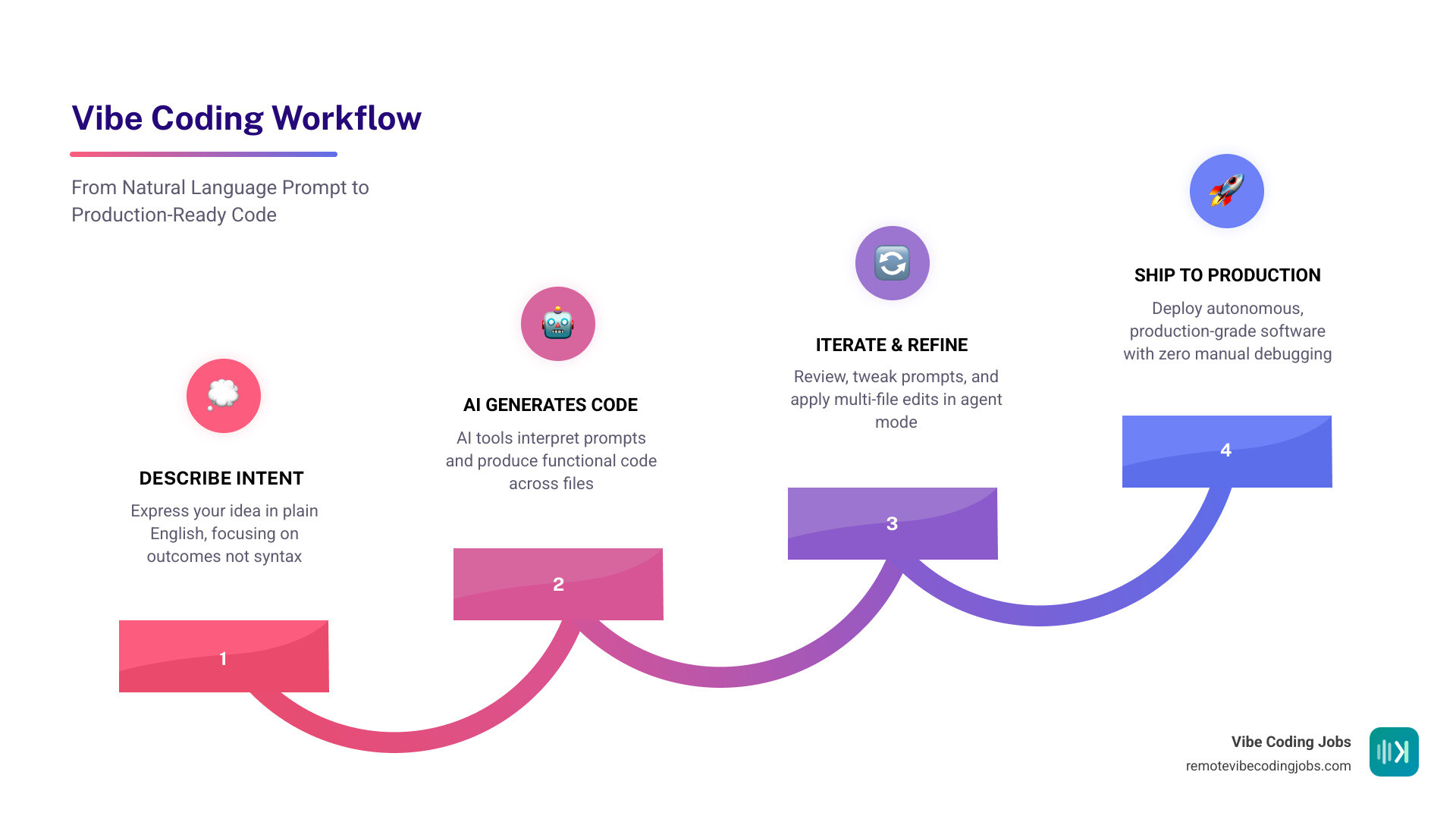
If you are wondering What is Vibe Coding, it is the shift from manual syntax entry to high-level intent. In May 2026, we no longer measure a developer’s worth by their ability to remember semicolon placement, but by their ability to “vibe” with an AI—orchestrating complex systems through natural language.
This evolution is driven by the massive AI Coding Tools Evolution that turned simple autocompletes into autonomous agents. Today, the market for these tools is expected to reach $187 billion by 2030, largely because “citizen developers” (non-technical founders and creators) now outnumber professionals 4 to 1.
Why has this become the standard? Efficiency. Tools like Vibe Mode — Lightning Fast Vibe IDE for macOS have rewritten the rules of performance. We are seeing native IDEs with sub-20ms latency and 900+ tokens per second. Furthermore, benchmarks like SWE-bench now show AI agents resolving over 76% of real-world software issues autonomously. When an AI can fix a bug in minutes that used to take a human hours, vibe coding isn’t just a trend—it’s the only way to stay competitive.
To help you navigate this new landscape, we’ve categorized the Vibe Coder Toolkit Services into a definitive ranking for 2026.
The 10 Best Vibe Coding Tools for Every Developer Level
Choosing from the best vibe coding tools requires matching the tool’s “autonomy” to your technical comfort. We’ve tested everything from browser-based builders to heavy-duty IDEs to see which ones actually hold up when the “vibe” gets complicated.

According to our latest Best AI Coding Tools 2026 report, the industry has split into two camps: IDE-based tools for long-term maintenance and Browser-based builders for rapid prototyping.
- v0 by Vercel: Our top pick for React developers. It generates polished UI components using Tailwind CSS and shadcn/ui. It’s the closest thing to having a Senior Frontend Engineer in your browser.
- Bolt: This tool is a speed demon. In our tests, it scaffolds full-stack apps in under 15 seconds. It’s perfect for the “I have an idea and need to see it live now” phase.
- Replit Agent: The best “all-in-one” for beginners. It handles the database, authentication, and hosting. You just talk to it, and it builds.
- Lovable: Incredible for UI/UX. It prioritizes aesthetics and is a favorite for non-technical founders building MVPs.
- Base 44: A rising star for simple, single-purpose apps that don’t require the overhead of a full IDE.
- Antigravity: This is for the power users. Antigravity IDE | The Agent-First Platform for Autonomous Execution & Vibe Coding offers a 1-million-token context window—5x larger than most competitors—allowing it to understand entire enterprise monorepos at once.
Cursor: The Overall Best Vibe Coding Tools Leader
With over 7 million developers and adoption by half of the Fortune 500, Cursor remains the undisputed king of the best vibe coding tools. It isn’t just a plugin; it’s a complete fork of VS Code designed specifically for AI.
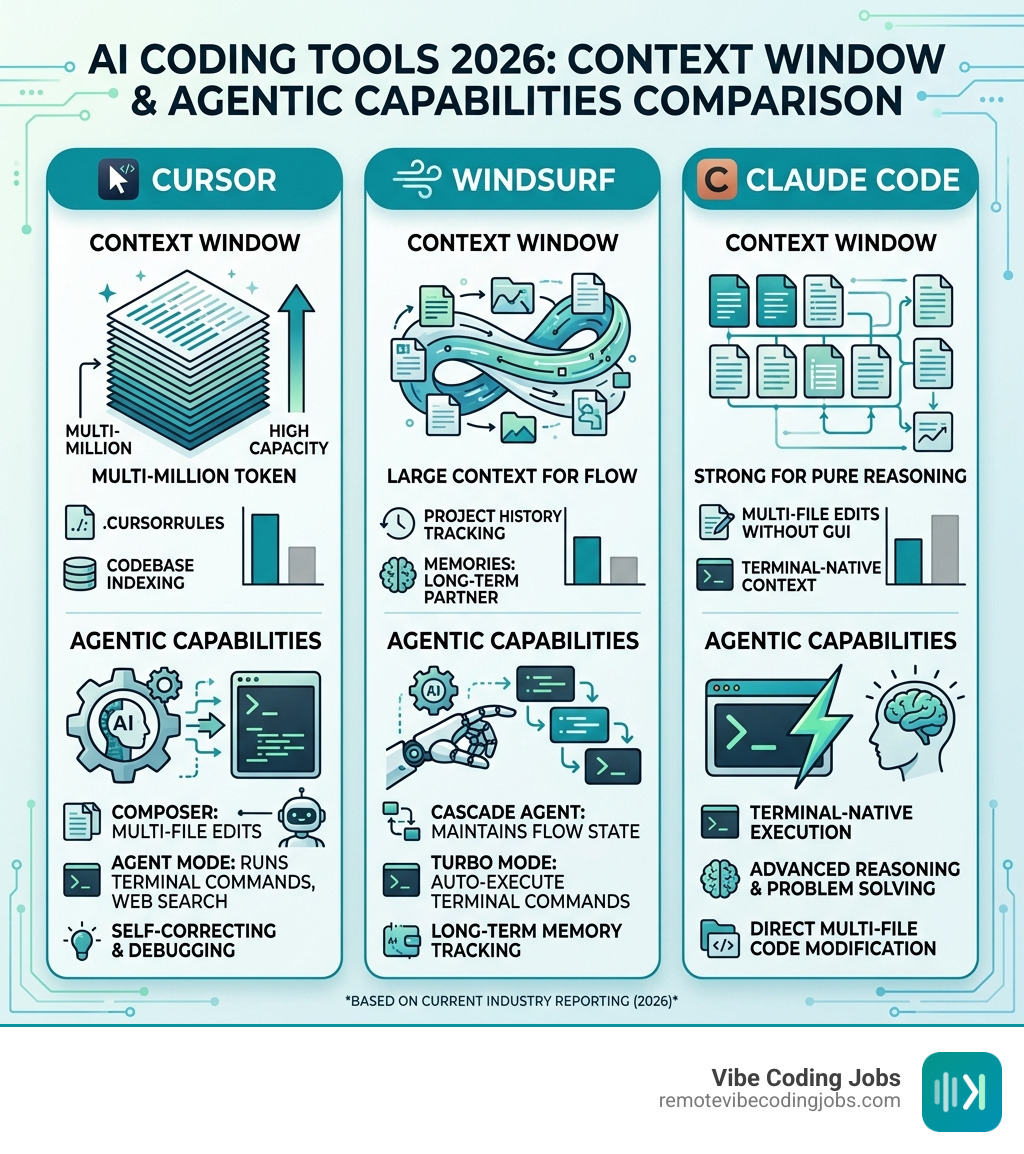
If you’re just starting, check out our Vibe Coding with Cursor Tutorial. The secret sauce of Cursor is its Codebase Indexing. By creating embeddings of your entire project, Cursor’s AI (often powered by Claude 3.5 Sonnet or GPT-5) understands how your files relate to each other.
Key features that make it the leader:
- Composer: Allows you to describe a change (e.g., “Add JWT auth to all routes”) and applies the code across dozens of files simultaneously.
- Tab Autocomplete: A specialized model that predicts your next 10 lines of code with eerie accuracy.
- .cursorrules: You can create a file that tells the AI exactly how to behave—ensuring it follows your team’s specific “vibe” and coding standards.
- Agent Mode: Cursor can now run its own terminal commands, search the web for documentation, and fix its own bugs.
Windsurf and Claude Code: High-Performance Best Vibe Coding Tools
While Cursor is the “Formula 1” car, Windsurf and Claude Code are the high-performance challengers. In the Claude Code vs Copilot for Developers debate, Claude Code wins for pure reasoning. It is a terminal-native tool that lives where developers spend their time, offering multi-file edits without the distraction of a GUI.
Windsurf, on the other hand, introduces the Cascade agent. In our Cursor vs Windsurf for Developers comparison, Windsurf excels at maintaining “Flow State.” It uses a feature called Memories to track your project’s history and rules, acting more like a long-term partner than a one-off assistant. Windsurf is also notable for its “Turbo Mode,” which allows the AI to auto-execute terminal commands to speed up testing loops.
Comparing Performance, Privacy, and Pricing in 2026
As we use these AI Coding Tools for Vibe Coding, we have to talk about the “hidden” costs: privacy and pricing.
Privacy and Security
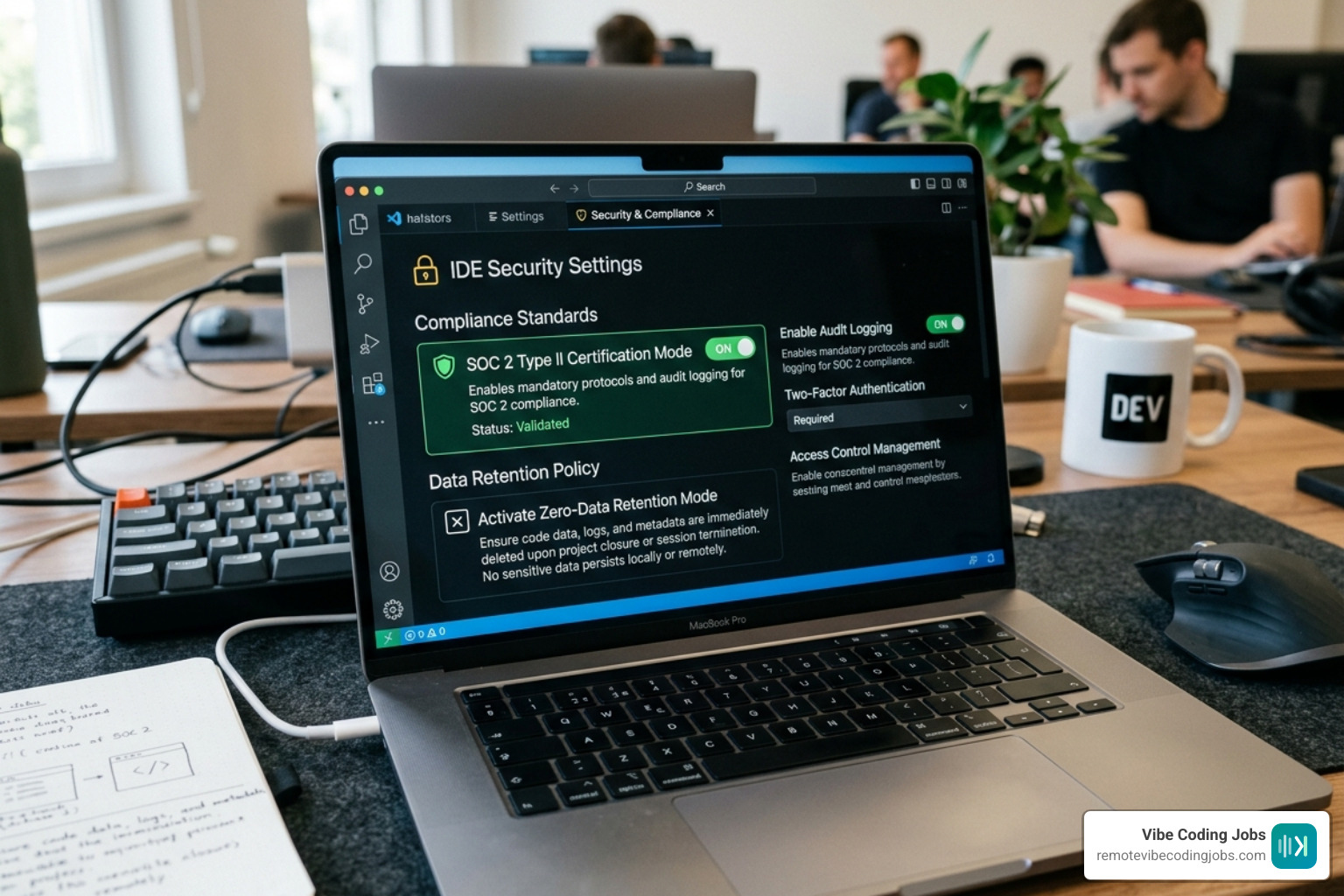
For enterprise developers, privacy is non-negotiable. Most of the best vibe coding tools now offer SOC 2 compliance and Zero-data retention modes. Cursor, for instance, has a Privacy Mode that ensures your code is never used to train their models. Antigravity takes this further with sandboxed environments for autonomous execution, ensuring the AI can’t accidentally delete your production database while “vibing.”
Pricing Models
The economics of coding have shifted. Instead of hiring a developer for $10,000 to build a simple site, you might spend $50–$200 in AI credits.
- Subscription Tiers: Most tools (Cursor, Windsurf, Lovable) charge around $20/month for a “Pro” plan.
- Token-Based Pricing: Tools like Claude Code or Aider often use a pay-as-you-go model via API keys. This can be cheaper for light users but can lead to “bill shock” if an agent gets stuck in a loop.
- Free Tiers: Most tools offer a “Hobby” tier with limited completions. If you’re looking for Best Cursor Alternatives for Remote Developers, Aider is a fantastic open-source option that lets you bring your own API key.
For those who want to stay within the familiar VS Code ecosystem without switching editors, the Top AI Code Completion Tools for VSCode still include GitHub Copilot, which remains the most frictionless (if slightly less “agentic”) option.
Frequently Asked Questions about Vibe Coding Tools
What is the simplest vibe coding stack for Mac beginners?
For a Mac user who just wants to build their first app, the simplest stack is Replit + Claude 3.5 Sonnet. Replit handles the environment setup (which is usually the hardest part for beginners), and Claude provides the most “human-like” coding logic. If you want a native experience, Vibe Mode is built specifically for macOS and Apple Silicon, offering incredible speed with almost zero memory overhead.
Is AI-generated code from vibe coding tools safe for production?
Yes, but with a massive asterisk: Human oversight is mandatory. While these tools are incredible at scaffolding, they can still introduce security vulnerabilities or unoptimized logic. We recommend using vibe coding for rapid prototyping and MVP development, then having a senior developer (or a specialized security AI agent) “harden” the code before a major production launch.
How do pricing models compare across popular tools?
- Cursor/Windsurf: ~$20/month for unlimited basic use and ~500 “fast” premium requests.
- Claude Code: Pay-as-you-go. You pay for exactly what you use via the Anthropic API.
- Lovable: Credit-based. You pay per “generation,” which can get expensive if you iterate frequently on the UI.
- GitHub Copilot: $10/month for individuals, making it the budget-friendly choice for basic assistance.
Conclusion
The era of struggling with syntax is over. Whether you are using Cursor for a complex SaaS project or Lovable for a quick design prototype, the best vibe coding tools are making development more accessible and, frankly, more fun. We are moving toward a future of multi-agent collaboration, where your IDE doesn’t just suggest code—it executes entire features while you focus on the big picture.
At RemoteVibeCodingJobs, we see this transition happening in real-time. Companies are no longer just looking for “coders”; they are looking for “vibe coders” who can leverage these tools to ship 10x faster.
Ready to master the craft? Check out our Learn Vibe Coding Tutorial to get started. It’s time to Stop Struggling and Start Vibe Coding. The future of software is already here, and it’s waiting for your next prompt.