
The Fastest Way to Start Vibe Coding in 2026
How to start vibe coding comes down to five simple steps:
- Pick one AI tool — Cursor, Claude Code, or Bolt are solid starting points
- Choose a tiny project — a to-do app, notes app, or simple web form works great
- Describe one feature at a time in plain English
- Run the app, paste any errors back into the AI, and iterate
- Deploy using Vercel, Netlify, or Railway when it works
That’s the core loop. Everything else is refinement.
Not long ago, building software meant learning syntax, memorizing commands, and spending months before you could ship anything real. That’s changing fast.
Vibe coding flips the script. Instead of writing code, you describe what you want — and an AI builds it. You review, test, and direct. The AI executes. It’s less like programming and more like being a product manager who happens to ship working software.
The term exploded onto the developer scene when AI researcher Andrej Karpathy shared his take on this style of AI-assisted development — a post that went on to rack up over 4.5 million views. The idea hit a nerve. Developers and non-developers alike realized that the barrier to building real software had dropped dramatically.
You don’t need a CS degree. You don’t need to memorize syntax. You need clarity about what you want to build, and the patience to iterate until it works.
This guide will walk you through everything — from your first prompt to your first deployed app.
I’m RVCJ Editorial, the team behind Remote Vibe Coding Jobs, where we cover AI-assisted development workflows and help developers land remote roles at AI-first companies — including practical guidance on how to start vibe coding for both beginners and working engineers. We’ve tracked the tools, workflows, and hiring trends shaping this space since it emerged, so you’ll get advice grounded in what’s actually working in 2026.
How to Start Vibe Coding: What It Is and Why It Feels Different
Vibe coding is an AI-assisted way of building software where we tell an AI what we want in plain language, then review, test, and refine the code it generates. The human stays in charge of goals, product choices, and quality. The AI handles much of the typing, scaffolding, and repetitive implementation.
In practice, vibe coding feels different because the center of gravity moves from syntax to intent. Instead of asking, “How do I write this function?” we ask, “What should this feature do?”
That change is a big reason the idea spread so quickly. It makes software creation feel more accessible, especially for beginners.
| Vibe coding | Traditional programming |
|---|---|
| Starts with prompts and outcomes | Starts with syntax and implementation |
| AI generates code drafts | Human writes most code manually |
| Fast for prototypes and MVPs | Slower at the beginning, often steadier later |
| Great for iteration and exploration | Great for precision and deep control |
| Requires strong reviewing skills | Requires strong writing and debugging skills |
| Risk of messy code if unmanaged | Risk of slower output for simple tasks |
For a broader explanation, Google Cloud has a useful overview in Vibe Coding Explained: Tools and Guides – Google Cloud. We also break down the differences in Vibe Coding vs Traditional Coding.
What vibe coding means in practice
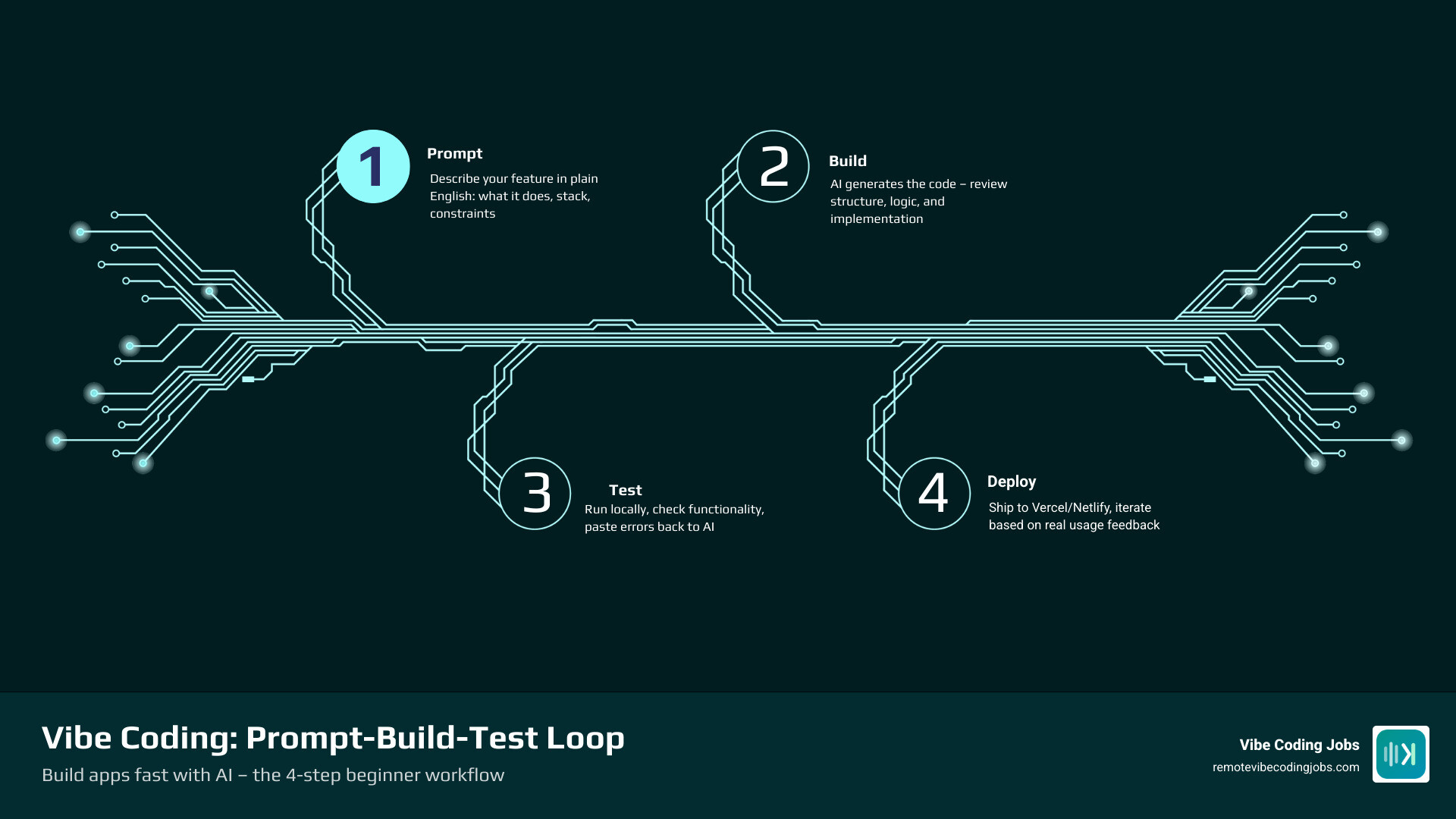
In the real world, vibe coding usually looks like this:
- We describe a feature in plain English.
- The AI proposes code or a plan.
- We run the app and test it.
- We paste back errors, edge cases, or improvement requests.
- We repeat until the feature works.
That loop can cover more than coding. AI tools can help draft requirements, propose wireframes, generate test cases, and explain unfamiliar code. This is why some beginners feel productive within hours, not months.
Where the term came from and why it took off
The phrase “vibe coding” became widely known after Andrej Karpathy posted about it online. That post passed 4.5 million views, which tells you the idea landed hard with the internet’s favorite hobby: arguing about the future of programming.
Why did it take off?
- AI coding agents got much better at handling real project context
- More people wanted to build apps without a traditional engineering background
- Developers discovered they could move faster on boilerplate and prototypes
- Teams started treating AI more like a collaborator than autocomplete
The timing mattered too. By 2026, AI-assisted development is no longer a novelty. It is part of how many people build.
How vibe coding differs from traditional programming
Traditional programming rewards precise manual implementation. Vibe coding rewards clear direction, constraint setting, and good review habits.
That does not mean traditional skills are useless. Quite the opposite. The best vibe coders still understand basic logic, file structure, debugging, and how to tell when the AI is confidently wrong. The difference is that we spend less time typing every line and more time steering.
Benefits include:
- Faster prototyping
- Lower barrier to entry
- Easier experimentation
- Faster learning through real examples
- Less time spent on repetitive code
Potential drawbacks include:
- Messy architecture if we prompt without a plan
- Security mistakes in generated code
- Over-reliance on the AI
- Prompt sprawl in long, chaotic threads
- Harder maintenance if we do not document decisions
So yes, vibe coding is powerful. No, it is not magic. Magic rarely comes with stack traces.
Your Beginner Setup: Tools, Skills, and the Fastest Way to Start
A beginner setup should be simple. We do not need six AI subscriptions, three monitors, and a philosophical framework about tabs versus spaces. We need one workable toolchain and a tiny project.
The best starter tools for how to start vibe coding
The easiest starting stack usually includes:
- An AI coding editor or assistant
- A place to store code, usually Git-based repo hosting
- A simple deployment platform
- A browser and terminal
- Optional chat workspace for longer reasoning
A practical beginner path is:
- Pick one AI editor or coding assistant
- Connect it to a local folder or repository
- Build a tiny web app
- Deploy when it works
If you want tool-specific guidance, see Best AI Coding Tools for Vibe Coders 2026 and Vibe Coder Tools: Copilot & Cursor.
Our advice for beginners:
- Start with one main tool, not several
- Prefer tools that can edit files and explain changes
- Use repo hosting from day one, even for tiny projects
- Pick deployment that feels boring and reliable
Skills you actually need before your first project
You do not need advanced computer science knowledge to begin. You do need a few practical skills:
- Breaking a problem into small features
- Copying and pasting exact error messages
- Reading folder and file names without panic
- Basic HTML, CSS, and JavaScript awareness
- A willingness to test instead of blindly trusting
The key prerequisite is not “knowing how to code everything.” It is being able to ask better questions and verify answers.
A realistic beginner progression from the research looks like this:
- First few hours: generate and run a simple feature
- 1 to 2 weeks: get comfortable with the prompt-test-fix loop
- 1 to 3 months: build small MVPs with more confidence
That timeline feels right in our experience too.
Pick a tiny project and avoid beginner traps
Your first project should be painfully small. If it sounds startup-worthy, it is too big.
Good first projects:
- To-do list
- Notes app
- Landing page with a contact form
- Simple CSV cleaner
- Habit tracker with local storage
Bad first projects:
- “A social network but with AI”
- “A full SaaS with billing, auth, dashboards, and mobile app”
- “The next big thing”
The biggest beginner traps are:
- Overbuilding too early
- Asking for five features in one prompt
- Not testing after each change
- Letting the AI redesign the whole app every turn
- Losing context in long chats
A solid external guide on this beginner-friendly approach is How to Start with Vibe Coding: Get Started Guide & 7 Steps.
How to Start Vibe Coding with Better Prompts

Prompts are the steering wheel. Bad prompts create confusion, rewrites, and those weird moments where the AI decides your note app should become a distributed microservices platform.
The simple prompt formula for how to start vibe coding
A strong prompt usually includes these parts:
- Goal
- Stack
- Relevant files or current state
- Constraints
- Output format
- Test or acceptance criteria
Here is the formula:
- Goal: what feature we want
- Stack: framework, language, database
- Files: where changes should happen
- Constraints: keep styling, do not touch auth, use existing components
- Output: explain plan first, then edit files
- Tests: what counts as done
Example:
“Add email validation to the signup form in our React app. The form lives in SignupForm.jsx. Use the existing error message component and do not change styling. Email is required and must show an inline error on blur and on submit. First give me a short plan, then the code changes.”
That prompt is clear, constrained, and testable.
Examples of strong vs weak prompts
Weak prompt:
- Make the form better
Strong prompt:
- Update the contact form so name and email are required, show inline validation messages, disable submit while sending, and display a success message after a successful POST request. Only edit ContactForm.js and keep the current layout.
Weak bug report:
- My app is broken
Strong bug report:
- When I click Save on the notes page, the UI says success but the note disappears after refresh. Stack trace below. Reproduce by creating a note, clicking Save, then refreshing. Do not rewrite the page. Find the likely persistence bug and suggest the smallest fix first.
When debugging, paste errors exactly as they appear. Verbatim errors save hours.
Prompting rules that save hours of rework
These rules matter more than fancy phrasing:
- Ask for one feature at a time
- Give the full relevant context up front
- Paste exact errors and stack traces
- Ask for a plan before code on larger changes
- Start a fresh thread if the conversation gets messy
- Review generated code before merging or shipping
One useful idea from recent guides is avoiding very long threads. AI quality often drops when a conversation grows too tangled. If a feature has gone through too many rounds, start a clean prompt with a summary.
For more beginner prompting guidance, see Learn Vibe Coding Tutorial.
Build Your First Vibe-Coded App Step by Step
Let us build the simplest possible first app: a notes app with create, edit, and delete.
Step 1: Define the outcome before generating code
Before asking the AI for anything, write a tiny spec:
- Users can create notes
- Users can edit notes
- Users can delete notes
- Notes persist after refresh
- Clean, simple interface
Then write one short user story:
- As a user, I want to save personal notes so I can view them later.
Add success criteria:
- I can create a note in under 10 seconds
- Notes remain after reload
- Empty notes cannot be saved
A napkin wireframe is enough. Fancy design docs are optional. Clarity is not.
Step 2: Generate one feature at a time
Now prompt the AI in small batches.
Feature 1:
- Create the app shell with a note list and form
Feature 2:
- Add create-note functionality
Feature 3:
- Add edit-note functionality
Feature 4:
- Add delete confirmation
Feature 5:
- Persist notes in local storage or a simple database
Do not ask for all five at once. Small batches make debugging easier and keep the AI focused.
This incremental style also works for more advanced features like auth flows, CRUD operations, or form validation.
Step 3: Run, test, and debug with the AI
This is where beginners become real builders.
After each feature:
- Run the app
- Click around like a mildly suspicious user
- Capture bugs clearly
- Paste the issue back into the AI
Include:
- What you expected
- What happened instead
- Steps to reproduce
- Error logs or stack traces
- What file or feature changed last
Also do regression checks. If the AI fixed one thing, make sure it did not break two others. Generated code sometimes solves problems like a raccoon solves a trash can: with enthusiasm, but not always elegance.
Step 4: Refine, document, and ship
Once the core feature set works:
- Ask the AI to clean obvious duplication
- Generate a short README
- List environment variables
- Check mobile responsiveness
- Verify error handling
- Create a simple deployment checklist
Then deploy.
This is the moment many beginners skip, but shipping matters. A deployed tiny app teaches more than a perfect unfinished local project.
For editor-based workflow help, see Vibe Coding with Cursor Tutorial: Unleash Your AI Coding Potential.
Google Cloud and Production-Ready Vibe Coding Basics
By 2026, vibe coding is not just for toy apps. It is showing up in serious environments too. Google Cloud’s own explanation of vibe coding reflects that shift.
And production matters. AI can help us generate software quickly, but security, maintainability, and scalability still require human judgment.
Some broader industry signals from the research support this professional trend:
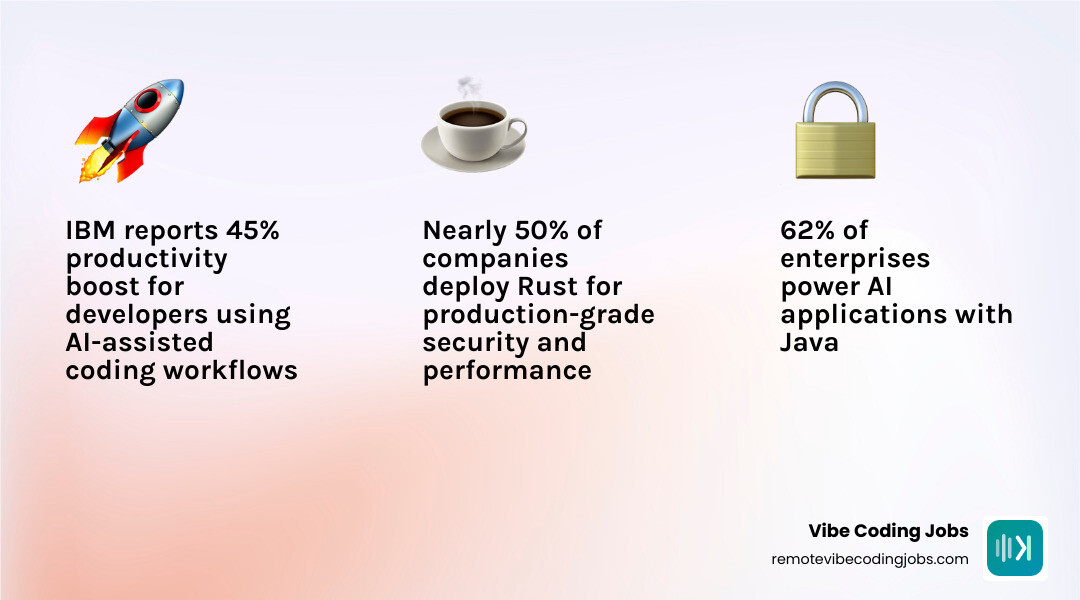
- IBM reported a productivity lift of 45% for tens of thousands of developers using AI-assisted workflows
- 62% of enterprises now use Java to power AI apps
- Nearly half of companies use Rust in production
The takeaway is simple: AI-assisted development is entering mainstream engineering, not replacing engineering discipline.
Which Google Cloud tools support vibe coding
For production-oriented vibe coding, useful cloud categories include:
- Managed runtimes for web apps and APIs
- Container platforms for portable deployments
- Managed databases
- Observability and logging tools
- Secret management
- Authentication and access control
- Serverless workflows for event-driven tasks
A sensible workflow looks like this:
- Use AI to scaffold the app
- Deploy to a managed runtime or container platform
- Store secrets in a secret manager, not in code
- Use hosted databases instead of DIY production databases
- Turn on logging, monitoring, and alerts
The cloud should reduce operational risk, not give us more places to misplace API keys.
How to use cloud tools without breaking security
Security is where “it worked on my machine” stops being charming.
Basic responsible habits:
- Never hardcode secrets
- Use environment variables and secret managers
- Validate all user input
- Keep dependencies updated
- Review AI-generated auth code carefully
- Apply least-privilege permissions
- Log errors without exposing sensitive data
- Scan dependencies and container images when possible
If an AI generates login, payment, or file upload code, slow down. High-risk areas need extra review.
Best practices for responsible vibe coding at work
In professional settings, vibe coding works best when humans keep control over standards and approval.
Best practices:
- Require human code review before production
- Keep architecture decisions documented
- Add test coverage for critical paths
- Use version control for every change
- Maintain a source-of-truth file for stack and conventions
- Hand off with readable docs, not chat history
- Avoid giant AI-generated rewrites unless there is a rollback plan
Maintainability and scalability come from structure. AI can help create structure, but it will not defend it unless we ask clearly and review consistently.
Beginner Project Ideas, Realistic Timelines, and Next Steps
Once we understand the basic loop, the next question is usually, “What should I build?”
Practical projects for beginners
Start with projects that are useful, small, and easy to test.
Good beginner ideas:
- Habit tracker
- CSV cleaner for duplicate emails
- Notes app
- Contact form app
- Personal dashboard
- Expense tracker with local storage
- Internal admin table with search and filters
These projects teach important patterns:
- Forms
- Validation
- CRUD
- State management
- Persistence
- Basic UI polish
They also make good portfolio pieces because they are understandable in 30 seconds.
How long it takes to get good at vibe coding
A realistic progression is:
- First few hours: set up a tool and ship one tiny feature
- 1 to 2 weeks: feel comfortable prompting, testing, and fixing simple bugs
- 1 to 3 months: build small MVPs and navigate common debugging issues
That timeline matches what many practical guides now suggest. The skill curve is less about typing speed and more about decision quality.
You get better by:
- Choosing smaller scopes
- Writing clearer prompts
- Testing more often
- Reading generated code
- Keeping projects organized
When to move from hobby builds to professional workflows
You are ready to level up when:
- Your apps are deployed, not just local
- You can explain your architecture choices
- You use version control confidently
- You can debug without panicking
- Your portfolio shows working projects with clear value
At that point, start building work samples intentionally. Our guide on Build a Developer Portfolio with AI Tools 2026 Guide can help.
If your longer-term goal is work, you can also explore How to Get a Vibe Coding Job: Skills, Portfolio, Networking, How to Get a Vibe Coding Job: Skills, Courses, Advice, Entry-Level AI Coding Jobs, and Remote Coding Jobs No LeetCode: Practical Portfolio.
Frequently Asked Questions about How to Start Vibe Coding
Do I need to know programming before I start vibe coding?
No, not fully. But basic logic helps a lot.
You do not need to master syntax before starting. You do need to learn how to:
- Read simple code
- Understand files and folders
- Test behavior
- Describe bugs clearly
- Notice when the AI misunderstood you
Many people now learn by building first and studying concepts in context. That is one of the biggest advantages of vibe coding.
Can vibe-coded apps be secure and scalable?
Yes, but only if we treat AI output as a draft, not a final answer.
Secure and scalable apps still need:
- Human review
- Clear architecture
- Good authentication patterns
- Input validation
- Observability
- Deployment discipline
- Ongoing maintenance
Vibe coding helps us move faster. It does not exempt us from software engineering reality.
What should I do when the AI gets stuck or breaks my app?
Use this recovery sequence:
- Stop adding new requests
- Revert to the last working version
- Start a fresh conversation
- Narrow the prompt to one issue
- Paste exact errors and reproduction steps
- Ask for the smallest possible fix first
If needed, make a manual edit yourself. Reading and editing code is still a superpower in this workflow.
Conclusion
If you came here wondering how to start vibe coding, the answer is simpler than it looks: pick one tool, build one tiny project, prompt one feature at a time, and test constantly.
That is the real workflow. Not hype. Not magic. Just fast iteration with AI as a collaborator.
As you improve, focus on the skills that matter most:
- Clear thinking
- Better prompts
- Strong review habits
- Debugging discipline
- Shipping real projects
Those are the same habits that turn hobby builds into portfolio pieces and portfolio pieces into jobs.
If you want the bigger-picture foundation, start with our pillar guide on What is Vibe Coding. And if your next goal is turning these skills into remote work, RemoteVibeCodingJobs can help you find AI-assisted development roles filtered by stack, culture, and tools.
Build something tiny this week. Then ship it. That is how this starts.