
Get Your Vibe on for Free with These Student Coding Tools
Free Vibe Coding Tools for Students: The Quick Answer
The best vibe coding tools free for students right now include:
| Tool | Free Tier | Best For |
|---|---|---|
| Google AI Studio | Fully free, no subscription | Complete beginners, app prototyping |
| Replit | Free tier with browser-based IDE | Beginners, full deployment |
| Lovable | 5 messages/day, 30 credits/month | Full-stack web apps |
| Bolt.new | Free tier with code export | Fast prototyping |
| GitHub Copilot | 100% free for verified students | Code assistance in any IDE |
| Windsurf | Free tier with unlimited autocomplete | Learning with AI help |
| v0 by Vercel | $5 monthly credits, 10 messages/day | Frontend UI components |
Something big is happening in software development right now. Around 41% of all new code is already written by AI — and a new wave of tools is making it possible for anyone to build real apps using plain English instead of memorizing syntax. That includes students with zero prior coding experience.
This isn’t a distant future. It’s June 2026, and the numbers back it up: searches related to vibe coding jumped 6,700% in Q2 2025 alone. Meanwhile, 44% of non-technical founders are already building prototypes with AI coding tools — no computer science degree required.
For students, the timing couldn’t be better. Several of the most powerful AI-assisted development platforms now offer genuinely free tiers — not just trials, but usable, functional free access that lets you go from idea to deployed app without spending a dollar.
The catch? Free tiers come with real limits. Credit caps, public-only projects, and daily message quotas mean you need to pick the right tool for your goals from the start.
We cover this space daily at RVCJ Editorial — the team behind Remote Vibe Coding Jobs, where we track AI-assisted development tools, hiring trends, and career paths for developers working with platforms like Cursor, Copilot, and Replit. Evaluating vibe coding tools free for students is squarely in our wheelhouse, and what follows is our no-fluff breakdown of what actually works.
Quick vibe coding tools free for students definitions:
What is Vibe Coding and How Does It Differ from Traditional CS?
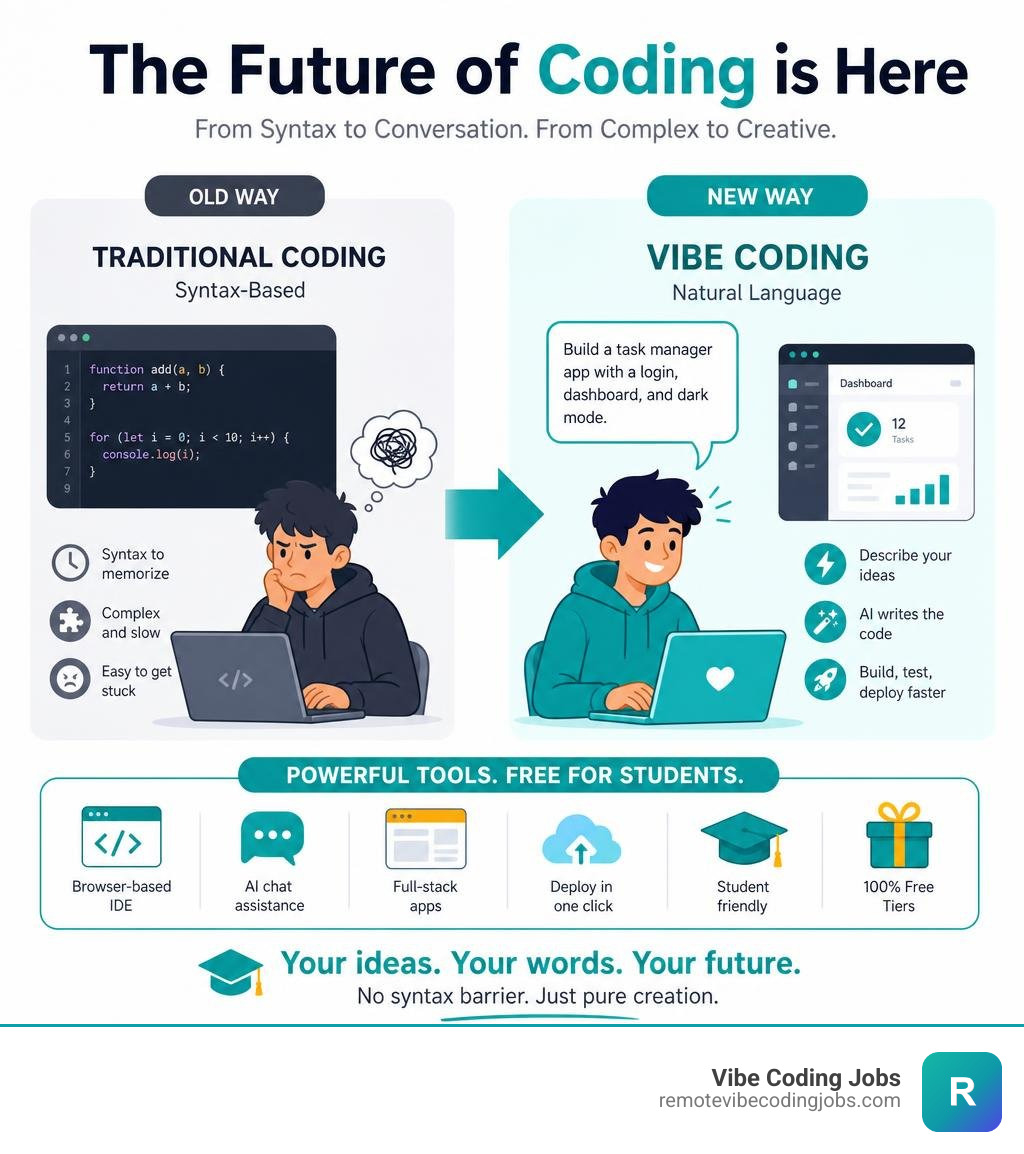
For decades, learning computer science meant dedicating months to memorizing semi-colons, brackets, and syntax rules. If you missed a single character, your entire program crashed. Traditional programming education focuses heavily on the mechanics of writing code first, often pushing creative problem-solving and actual application design to the back burner.
Vibe coding turns this model on its head. Coined by AI visionaries like Andrej Karpathy, “vibe coding” refers to an AI-first approach to software development. Instead of typing out loops and functions line by line, you describe the “vibe” or goal of your software in plain English. The AI agent handles the heavy lifting—writing the actual code, structuring the database, and building the visual interface.
Traditional Coding:
[Idea] ➔ [Learn Syntax] ➔ [Write Code Line-by-Line] ➔ [Debug Errors] ➔ [Deploy]

Vibe Coding:
[Idea] ➔ [Describe to AI] ➔ [Review Live Preview] ➔ [Iterate via Chat] ➔ [One-Click Deploy]
This shift is democratizing creation. Projections show that “citizen developers” (non-technical creators building functional software) will soon outnumber professional developers by 4 to 1.
In an educational setting, vibe coding shifts the student’s role from a “code typist” to a software architect and product designer. Instead of spending three weeks trying to make a basic terminal calculator work, students can leverage a vibe coding tools AI powered arsenal to build and deploy complex, full-stack web applications over a single weekend.
By removing the intimidating syntax barrier, Vibe Coding for Students focuses heavily on rapid prototyping, design thinking, and systems architecture. Students learn how components talk to each other and how to structure a user experience, making the learning process far more inclusive for those who don’t traditionally see themselves as “techy.”
Top Vibe Coding Tools Free for Students in 2026
If you are a student looking to build apps without breaking the bank, navigating the market can be tricky. Many tools promise “free” access, only to lock your project behind a paywall the second you try to deploy it or make a critical API call.
To help you choose, we have put together a detailed comparison of the leading platforms offering free tiers or student discounts in 2026.
Here is how the landscape shapes up across the best AI coding tools vibe coders 2026:
| Platform | Best For | Code Ownership | Free Tier Limitations |
|---|---|---|---|
| Google AI Studio | Zero-cost prototyping & Gemini models | 100% yours | Rate limits on free API tiers |
| Replit | Interactive full-stack apps & deployment | Fully exportable | Limited workspace compute on free tier |
| Lovable | High-fidelity frontend & backend UI | Exportable on paid tiers | 5 credits/day (max 30/month), public projects only |
| Bolt.new | Rapid browser-based prototyping | Exportable to zip/GitHub | Message limits per day |
| Cursor | Code-fluent students & local editing | 100% yours | 50 fast premium queries/month on free tier |
Google AI Studio: Free Vibe Coding Tools for Students
Google AI Studio is currently one of the most generous entries in the student developer ecosystem. Instead of charging a monthly subscription, Google provides free access to its latest Gemini models, making Vibe Coding | Google AI Studio a fantastic sandbox for experimental projects.
The platform is designed for zero-friction creation. You start by typing a plain English description of what you want to build—for instance, “a conversational language learning app that tracks my daily progress.” Gemini instantly generates the user interface, writes the underlying logic, and presents a live preview.
If you want to make changes, you simply type conversational commands like “change the background to a soft blue” or “add a search bar at the top.” The AI rewrites the code in real-time.
[Your Prompt] ➔ [Gemini Engine] ➔ [Live Preview Sandbox] ➔ [One-Click Cloud Run Deploy]
Key Features for Students:
- One-Click Deployment: You can hit the “Deploy” button to host your application directly on Google Cloud Run, or use the “Save to GitHub” option to secure a permanent home for your codebase.
- No Coding Required: It is built for absolute beginners, removing all local environment setup hurdles.
- Robust Data Privacy: Google AI Studio offers enterprise-grade security. By default, your prompts and applications are protected, meaning your data is not used to train public models without your explicit permission.
Replit, Lovable, and Bolt: Web-Based Prototyping
If your goal is to build full-stack applications entirely within your web browser, three platforms dominate the conversation: Replit, Lovable, and Bolt.new.
Replit (and Replit Agents)
Replit is a long-time favorite in classrooms. Its browser-based IDE allows you to write, run, and deploy code in one single tab. With the introduction of Replit Agents, the platform has become a powerhouse for vibe coding. You describe your application, and the agent installs the necessary packages, configures the database, and runs the server.
While Replit has moved toward paid structures for high-performance compute, its free tier remains highly functional for basic student projects and classroom learning.
Lovable
Lovable is widely regarded as one of the best tools for generating beautiful, visually polished web applications. It excels at turning text prompts into production-ready designs. However, the free tier comes with strict boundaries.
According to the official Vibe Coding Apps: 10 Tools for Beginners in 2026 | Lovable guide, Lovable offers a free tier with 5 credits per day (up to a maximum of 30 per month). Furthermore, on the free tier, your projects must remain public, and exporting the clean source code generally requires upgrading to a paid plan.
Tip: Keep an eye out for educational partnerships. For example, platforms like imagi Edu have occasionally partnered with Lovable to offer free, temporary classroom access for students.
Bolt.new
Bolt.new is a browser-based development environment that allows you to run full-stack Node.js applications directly in your browser. Unlike many sandboxed platforms, Bolt.new allows you to export your full code as a ZIP file or push it directly to GitHub, allowing you to host it for free on platforms like Vercel or Netlify.
Cursor and Windsurf: Next-Gen IDEs with Student Access
For students who want to bridge the gap between vibe coding and professional software development, IDE forks like Cursor and Windsurf are the gold standard.

Cursor
Cursor is a fork of VS Code, meaning it looks and feels exactly like the editor used by millions of professional developers. However, it is built from the ground up for AI-first development. You can highlight sections of your code and ask the AI to refactor it, write tests, or fix bugs.
While Cursor is adopted by 7 million developers and Fortune 1000 companies, it offers a generous free tier that includes 50 fast premium AI queries per month, alongside unlimited slow queries. It is a fantastic tool for students who want to understand the structure of a real codebase. To see how it stacks up against other assistants, check out our guide on cursor vs copilot vs claude.
Windsurf
Created by Codeium, Windsurf is another next-generation IDE built for AI flow. It features a highly collaborative AI agent that can actively edit files and run terminal commands with your permission. Windsurf stands out by offering a generous free tier that includes monthly premium credits alongside unlimited autocomplete, making it highly accessible for students learning to code with real-time AI assistance.
Classroom Challenges: Assessment, Privacy, and Security
While vibe coding tools make building software easier than ever, they introduce unique challenges when brought into a classroom or academic environment. Teachers and school administrators must navigate how to evaluate actual student progress, protect student data, and maintain academic integrity when an AI can write an entire application in seconds.
How Educators Can Assess Student Learning When AI Writes the Code
If a student can prompt an AI to build a fully functional web application over the weekend, grading the final output is no longer a viable way to assess their programming skills. Educators must shift their evaluation methods:
- Code Explanation and Oral Defense: Instead of grading the code itself, teachers can ask students to explain how specific blocks of the AI-generated code work. If a student cannot explain what a function does, they haven’t learned the underlying concept.
- AI-Guided Debugging Exercises: Teachers can intentionally introduce bugs into an application and ask students to work with an AI assistant to locate, explain, and resolve the error. This teaches critical thinking and troubleshooting.
- Prompt Engineering Documentation: Grade students on their “prompting journey.” Asking students to document their initial prompts, the mistakes the AI made, and how they iteratively guided the AI to the final product reveals their design and logical reasoning.
- Hybrid Workflows: Require students to write basic loops and variables by hand before allowing them to use code-generation tools. This ensures they master foundational computer science concepts before accelerating their workflow.
Data Privacy and Security Considerations for Schools
When introducing AI tools to students, data privacy must be a top priority. Schools must ensure that student data is protected and that platforms comply with educational regulations like COPPA and FERPA.
- Zero Data Retention (ZDR): Educators should look for tools that offer Zero Data Retention by default. This ensures that the code, prompts, and personal information entered by students are not logged, stored, or used to train public AI models. Platforms like Vibe — The AI IDE Built for Vibe Coders, Where Developers Feel at Home emphasize ZDR to protect user IP and privacy.
- Secure Sandboxes: Tools like VibeCode | Devpost utilize isolated Docker containers to run student code. This prevents malicious code from affecting local machines or school networks.
- API Key Management: Many open-source or free extensions require users to plug in their own API keys (e.g., from OpenAI or Anthropic). Schools must teach students how to secure these keys and avoid hardcoding them into public GitHub repositories.
Career Readiness: Vibe Coding Tools Free for Students in the Real World
Some skeptics argue that vibe coding is a “shortcut” that leaves students unprepared for real-world software engineering. However, the professional landscape is changing rapidly.
With 82% of professional developers using AI coding tools weekly, companies are actively seeking “AI-fluent” professionals. Learning how to collaborate with AI doesn’t make you lazy—it makes you highly productive.
By mastering vibe coding tools early, students prepare themselves for modern development roles:
- AI-First Developer & Product Engineer: These emerging roles focus less on typing syntax and more on system design, product architecture, and rapid deployment.
- 2-5x Productivity Boost: Professionals who know how to prompt and guide AI tools can build features in hours that used to take days, a massive advantage in startup environments.
- Robust Portfolios: Instead of graduating with a resume filled with basic class assignments, students can build a portfolio of 3 to 4 live, deployed full-stack applications.
If you want to see how these skills translate into real-world compensation, take a look at our vibe coding salary guide remote to explore what AI-fluent developers are earning in the current market.
Frequently Asked Questions
Is vibe coding a replacement for learning traditional programming?
No, vibe coding is not a replacement; it is an evolution. While AI can generate hundreds of lines of code instantly, it still makes mistakes—often referred to as “hallucinations.”
To build complex, secure, and scalable systems, you still need to understand computer science fundamentals. Knowing how databases talk to frontends, how APIs handle authentication, and how to debug logic errors is what separates a true developer from someone who simply types prompts. The future belongs to hybrid workflows where human design guides AI execution.
What are the best completely free, offline vibe coding options?
If you have a computer with at least 8 GB of RAM, you can run vibe coding tools completely free and offline, with zero token costs and absolute privacy.
Using tools like Ollama or LM Studio, you can download lightweight open-source models (like Llama 3.2 or Phi-4) directly onto your machine. You can then use free VS Code extensions like Cline, Roo Code, or the local setup instructions found on Get Started — VibeCode Labs AI Code Assistant to chat with your local model and edit files directly in your workspace.
How do student credit limits work on platforms like Lovable and v0?
Free web-based platforms typically use credit or message-based quotas to manage server costs:
- Lovable: Gives you 5 messages per day (up to 30 per month) on public-only projects.
- v0 by Vercel: Offers a free tier with $5 of included monthly credits and a limit of about 10 messages per day.
Once you hit these limits, you are typically throttled or asked to upgrade to a premium plan. To maximize your free credits, plan your prompts carefully before typing, and use local IDEs for heavy debugging sessions.
Conclusion
The rise of vibe coding is completely changing how we think about programming education. By removing the frustrating syntax barriers of the past, vibe coding tools free for students allow you to focus on what matters most: bringing your creative ideas to life, understanding system architecture, and building real-world projects.
Whether you are a complete beginner starting with Google AI Studio, or an aspiring professional mastering vibe-coder-tools-copilot-cursor, the tools are more accessible than ever.
Once you have built your portfolio and are ready to take your AI-assisted development skills into the professional world, we are here to help. Check out our curated listings at Remote Vibe Coding Jobs to find remote opportunities at async-first companies looking for AI-fluent developers. Keep vibing, and keep shipping!