
Why a Curated Remote AI Stack Is the Key to Landing the Right Role
A curated remote AI stack is a hand-picked set of AI tools – covering coding, collaboration, hiring, and compliance – chosen to work together for distributed teams.
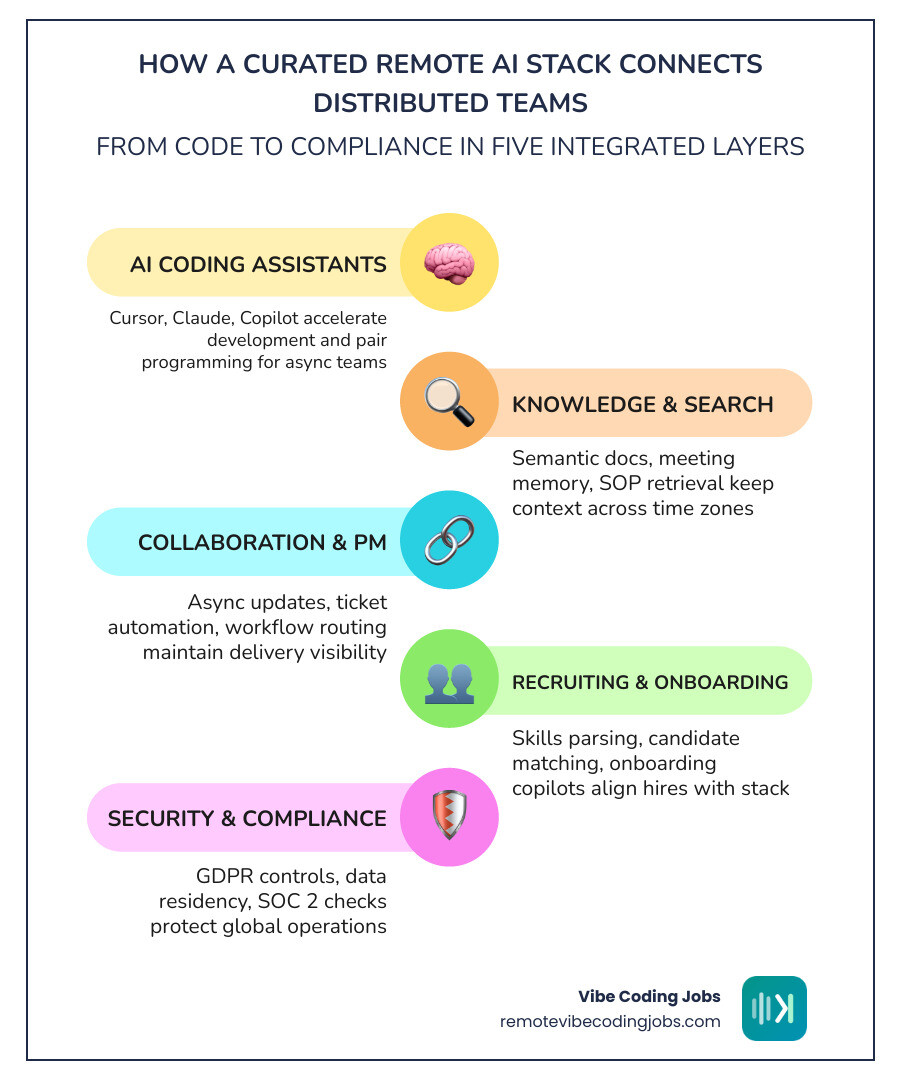
Here’s what a curated remote AI stack typically includes:
- AI coding assistants – Cursor, Claude, GitHub Copilot
- Knowledge and search tools – async docs, semantic search, cross-session memory
- Collaboration tools – async video, meeting summaries, timezone handoffs
- Project management – AI-assisted backlog triage, workflow automation
- Recruiting and onboarding – candidate matching, skills parsing, onboarding copilots
- Security and compliance – GDPR controls, data residency, SOC 2 checks
The remote developer job market has never been more crowded – or more specific. Companies hiring in 2026 are not just looking for coders. They want developers who already work the way they work: async-first, AI-native, and tool-fluent.
The problem? Most job listings do not tell you which tools matter. And most job boards do not filter by stack.
That gap is exactly why knowing how to read and build a curated remote AI stack – and finding employers who use one – gives you a real edge.
Remote workers are already 13% more productive than in-office counterparts according to Stanford research. Companies with fully distributed teams report 21% higher employee retention. The right stack is a big reason why.
We are the editorial team behind Remote Vibe Coding Jobs – we cover AI-assisted development, async hiring, and remote career growth for developers building with tools like Cursor, Claude, and Copilot, with a specific focus on helping engineers navigate the curated remote AI stack landscape. In this guide, we walk through every layer of a remote AI stack and show you what to look for when evaluating your next role.
What a curated remote ai stack actually includes
A curated remote AI stack is not just “a bunch of apps we pay for and forget in a dusty admin panel.” It is a working system.
For remote-first teams, that system usually spans these layers:
- Development tools for writing, reviewing, and refactoring code
- Shared knowledge systems for docs, decisions, and search
- Communication tools that reduce meeting overload
- Project tools that help humans and agents move work forward
- Productivity automations for repetitive personal tasks
- Analytics and observability for quality, cost, and usage
- Recruiting, interviewing, and onboarding workflows
- Legal, finance, and compliance controls
The key idea is fit. Each layer should support remote-first workflows, async collaboration, governance, and clear handoffs across time zones.
Why a curated remote ai stack matters for distributed teams
Distributed teams win when tools reduce friction instead of adding it.
That matters because remote work is no longer a niche experiment. Research cited in our brief shows remote work reached 35% of the U.S. workforce in 2023, with 98% of workers wanting remote work at least some of the time. Over 16 million Americans work remotely at least half the time, and many report fewer distractions and better focus at home.

A curated stack helps remote teams by:
- Reducing tool sprawl and duplicate subscriptions
- Standardizing how work is documented and handed off
- Making cross-time-zone collaboration less chaotic
- Improving onboarding because processes are visible
- Creating guardrails for privacy, access, and model usage
- Supporting measurable productivity instead of “AI vibes only”
When 91% of remote workers say they are more productive at home and 77% report fewer distractions, the stack becomes part of that productivity story. Good tools help. Good tool combinations help more.
The difference between a tool list and a curated remote ai stack
A tool list says, “Here are 20 products.”
A curated stack says, “Here is how these tools fit together, where they overlap, what trade-offs they bring, and which outcomes they improve.”
That distinction matters. One of the best ideas in AI Infrastructure Stacks – Curated Tool Combinations (2026) at Infrabase.ai is that developers do not just ask “What is the best tool in category X?” They ask, “I am building this workflow – what combination do I need?”
That same logic applies to remote teams:
- An IDE assistant without team docs creates shallow speed
- A meeting summarizer without decision logs creates confusion later
- A recruiting AI without human review can amplify bad filters
- A self-hosted model without governance can create compliance risk
So when we talk about a curated remote AI stack, we mean cross-category fit, not software shopping as a hobby.
10 building blocks of a curated remote ai stack for remote-first companies
1. AI coding and development assistants for shipping faster
This is the layer most developers notice first because it touches daily output.
Core capabilities include:
- Code generation
- Refactoring help
- Test creation
- Review assistance
- Architecture prompting
- Debugging support
- Context-aware pair programming
The best remote teams do not just buy one assistant and declare victory. They define prompt workflows, review expectations, and when to use AI for first drafts versus production-ready changes.
If you want a deeper view of current tooling, see More info about remote developer AI tools and More info about best AI tools for coding.
What strong employers usually make clear:
- Which assistants are approved
- Whether code can be sent to hosted models
- How architecture context is stored
- What human review is required before merge
For advanced teams, examples from open-source AI workflow projects show how agent layers, memory, routing, and code review can be assembled into real workflows rather than isolated prompts.
2. Knowledge management and search tools for async teams
Remote work breaks down fast when information lives in ten chats, three call recordings, and one mysterious “final-final-v2” document.
A strong knowledge layer should support:
- Internal docs and SOPs
- Semantic search
- Meeting memory
- Decision logs
- Cross-session context
- Easy retrieval of past solutions
This is especially important for async teams because work does not pause while someone sleeps in another time zone. If the reasoning behind a decision is searchable, the next person can continue instead of waiting 12 hours for a reply.
In practice, the best setups include:
- A central docs home
- Search that understands meaning, not just keywords
- Clear decision records
- AI summaries linked back to source material
- Memory systems for recurring project context
3. Communication and collaboration tools that support AI-powered remote workflows
Remote-first communication is not just chat plus video. It is structured communication.
Look for tools and habits that support:
- Async standups
- Meeting summaries
- Auto-generated action items
- Video transcripts
- Time-zone handoffs
- Searchable team discussions
The point is not to replace human conversation. It is to make communication durable.
For many developers, the biggest green flag is async maturity: fewer meetings, better documentation, and clearer handoffs. We cover that in More info about async remote developer jobs.
Healthy AI-powered communication workflows usually include:
- AI-generated summaries reviewed by a human
- Action items pushed into project tools automatically
- Recorded updates instead of mandatory live meetings
- Transcripts that become searchable knowledge
This is one place where remote culture shows up fast. If a company says it is async-first but every decision still happens in urgent chat threads, the stack is not actually curated. It is decorative.
4. Project management and agent-friendly workflow tools
Project tools are where good intentions either become visible work or vanish into backlog fog.
The best remote AI-ready project systems support:
- Backlog triage
- Task enrichment
- Sprint planning
- Workflow automation
- Delivery visibility
- Agent-friendly structured fields
Why “agent-friendly”? Because AI works better when tasks are structured. A vague ticket like “fix login issue maybe” is a cry for help. A ticket with user impact, expected behavior, constraints, repo links, and acceptance criteria is much more useful for both humans and AI assistants.
A curated stack here should help with:
- Routing work to the right person
- Turning rough requests into actionable tasks
- Linking tickets to docs, PRs, and decisions
- Making progress visible without status-meeting theater
5. Productivity and personal automation tools for remote workers
At the individual level, a curated stack should protect focus, not destroy it with 47 notifications per hour.
Useful categories include:
- Calendar assistants
- Inbox triage
- Note capture
- Personal AI agents
- Repetitive task automation
- Focus and scheduling helpers
The best tools in this layer reduce tiny drains on attention:
- Summarizing long email threads
- Drafting routine replies
- Capturing notes from calls
- Building reminders from action items
- Blocking focus time automatically
These gains look small, but repeated daily they matter. Productivity comes from lower friction, not just faster typing.
6. Analytics and observability tools for AI work quality
If a company cannot measure AI usage, quality, or cost, it does not have a mature stack. It has hope.
This layer should cover:
- Usage metrics
- Prompt and workflow logs
- Model costs
- Evaluation frameworks
- Hallucination checks
- ROI tracking
For remote teams, observability matters even more because managers cannot rely on office visibility. They need better signals, not more surveillance.
Good signals include:
- Cycle time improvements
- Rework rates
- Defect trends
- Documentation coverage
- Time saved in repeated workflows
- Cost per successful output
And no, “our team says it feels faster” is not a KPI. It is a mood.
7. AI-powered recruiting, interviewing, and onboarding systems
Hiring is now part of the curated remote AI stack, not a separate world.
Modern remote hiring systems use AI for:
- Resume parsing
- Candidate matching
- Interview scheduling
- Skills signal extraction
- Question generation
- Onboarding copilots
That can improve speed and fit when used carefully. It can also create bad filters if left unattended.
We recommend looking at employers that are explicit about how they assess AI-native skills, especially for remote roles. Our guide on More info about remote AI developer jobs requirements breaks down what companies often expect.
Strong hiring workflows usually show:
- Clear skill criteria, not vague “AI passion”
- Tool transparency
- Structured interview stages
- Real work samples or portfolio review
- Onboarding systems that answer common questions asynchronously
8. Legal, finance, and compliance controls for global teams
This is the layer people ignore until a vendor review turns into a small horror film.
Remote AI deployments raise questions around:
- Data residency
- Consent
- Access control
- GDPR compliance
- SOC 2 expectations
- Payroll and contractor risk
- Vendor security reviews
If tools process candidate data, customer data, code, or internal docs, teams need policies on:
- What can be shared with external models
- Which vendors are approved
- Where data is stored
- How logs are retained
- Who can access outputs and source data
Legal and compliance maturity is not exciting, but it is often the difference between scalable adoption and sudden tool shutdowns.
9. Relocation and housing tools that use AI for mobility support
Not every remote role is “work from literally anywhere forever.” Some involve relocation support, country restrictions, visa pathways, or hybrid transitions.
AI can help by improving:
- Relocation planning
- Destination matching
- Cost-of-living comparisons
- Housing search relevance
- Visa and eligibility signal sorting
We have also seen curated job research methods emphasize manually checking location restrictions and verifying which roles are truly remote versus relocation-friendly. That matters because many listings are vague until late in the process.
For candidates, this layer is useful when evaluating offers. A company with mobility support tools and transparent location policies is often more operationally mature than one that says “global team” and then sends a twelve-country exception spreadsheet.
10. Open-source versus proprietary stack choices
This is one of the most practical decisions in any stack.
Open-source tools often offer:
- More control
- Better privacy options
- Lower software cost
- Self-hosting flexibility
- Customization freedom
Proprietary tools often offer:
- Faster setup
- Better support
- Polished UX
- Enterprise security features
- Easier onboarding for non-technical teams
For example, Complete LLM Fine-Tuning Stack – aicoolies highlights how open-source tooling can keep software cost near zero while scaling from a single machine to larger distributed training setups. That is compelling for technical teams with strong internal capability.
At the same time, many remote-first companies prefer managed services where speed, support, and compliance documentation matter more than deep customization.
A balanced rule:
- Choose open-source when privacy, control, and customization are critical
- Choose proprietary when rollout speed, support, and low maintenance are more important
How remote hiring platforms use AI to match developers with better-fit roles
How AI improves remote job discovery and candidate matching
The most useful capabilities include:
- Personalized role matching
- Structured candidate profiles
- Semantic search
- Salary and seniority filters
- Async culture indicators
- Tool-based filtering
For developers searching for AI-assisted roles, stack-aware matching matters. A React engineer who uses Cursor and Claude daily should not have to wade through jobs that ban AI tools or expect office-heavy collaboration.
We explore this further in More info about remote AI developer jobs boards market outlook.
What to look for in a curated remote ai stack when evaluating employers
When reading a job listing or talking to a recruiter, we suggest checking for:
- AI tool policy
- Stack transparency
- Async norms
- Security practices
- Onboarding support
- Evaluation process
In other words: do they actually know how they work?
A mature employer should be able to explain:
- Which AI tools are approved
- How prompts, docs, and reviews fit into delivery
- Whether work is meeting-heavy or async-first
- How they handle privacy and model access
- How new hires get productive quickly
For more on stack integration signals, see More info about remote developer jobs AI tools stack integration benefits.
How curated listings beat generic job feeds for AI-assisted roles
Generic job feeds are broad. Broad is useful until it becomes noisy.
Curated listings are better for AI-assisted roles because they can include:
- Manual verification
- Company careers page checks
- Boolean search methods
- LinkedIn validation
- Daily curation
- Culture screening
That approach matches what strong curated remote resource directories have done for years, including lukasz-madon/awesome-remote-job: A curated list of … – GitHub.
At Remote Vibe Coding Jobs, this is why we focus on curated daily listings filtered by culture, tech stack, and AI tools. If a company is async-first and actively uses AI-assisted development workflows, that information matters. It should not be buried.
How to evaluate and maintain your curated remote ai stack in 2026
A remote AI stack is never “done.” New tools appear, model pricing changes, governance evolves, and teams drift into duplication unless someone is paying attention.
A simple scorecard for choosing the right curated remote ai stack
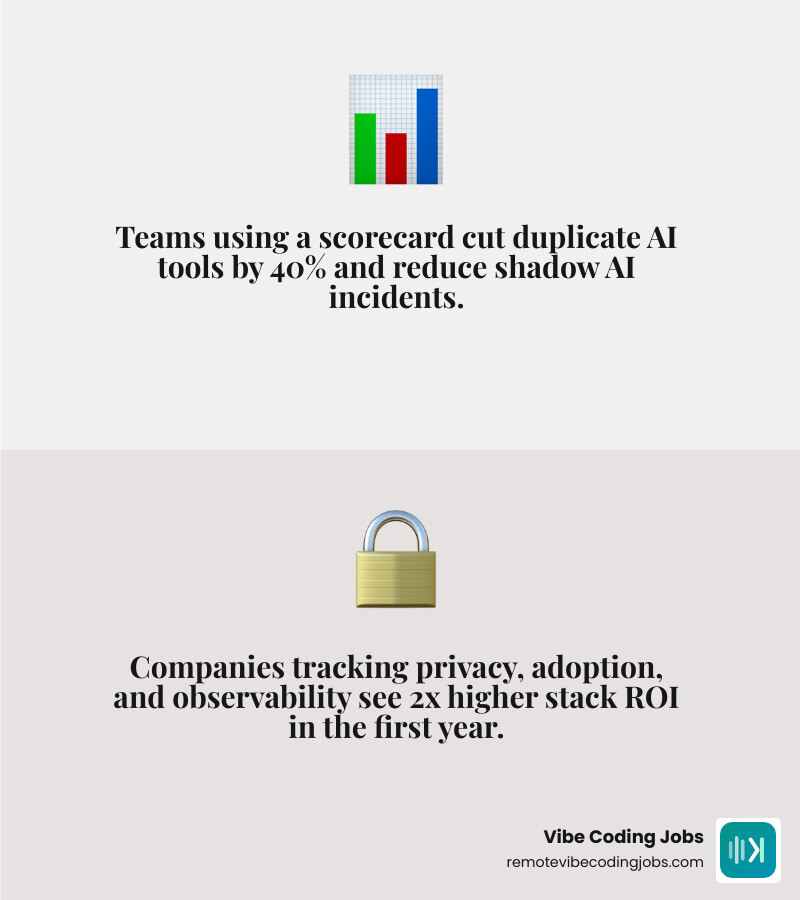
Use a practical scorecard across these criteria:
- Use case fit
- Privacy and compliance
- Adoption likelihood
- Integration quality
- Support quality
- Observability
- Total cost
- Lock-in risk
Simple questions help:
- Does this tool solve a real workflow problem?
- Does it work well with the rest of our stack?
- Can we measure output quality and cost?
- Can non-experts adopt it?
- What happens if we need to switch later?
Best practices for rollout, training, and ongoing upkeep
The strongest teams usually do the following:
- Start with pilot teams
- Publish clear usage guidelines
- Require human review for critical outputs
- Set access controls by role
- Run monthly audits
- Retire duplicate or low-value tools
- Train people on workflows, not just features
This last point matters a lot. Tools fail when companies train people on buttons instead of judgment.
Warning signs your stack is overbuilt or under-governed
Watch for:
- Shadow AI usage
- Duplicate tools with overlapping functions
- Low adoption
- Weak security review
- Hidden cost growth
- Compliance gaps
- No one owning the stack roadmap
If a company has five summarizers, three copilots, unclear data-sharing rules, and nobody knows which one is official, that is not innovation. That is software soup.
For more on security and governance concerns, see More info about remote developer jobs AI tools security automation.
Frequently Asked Questions about curated remote ai stack
What is the best curated remote ai stack for a small remote startup?
For a small team, we recommend a lean stack with essential layers:
- One approved coding assistant
- One docs and search system
- One async communication system
- One project management tool
- Basic automation for repetitive admin work
- Lightweight analytics and access controls
- A simple hiring and onboarding workflow
Keep it small, integrated, and documented. The goal is not maximum tooling. It is minimum friction.
Should remote teams choose open-source or proprietary AI tools?
Usually, a mix works best.
Open-source is great for ownership, privacy, and customization if the team can maintain it. Proprietary tools are great for speed, support, and enterprise readiness. The right answer depends on your security needs, internal skill level, and tolerance for maintenance burden.
Can a strong AI stack help me land a better remote developer job?
Yes, if you can show real fluency.
Employers value candidates who can explain:
- Which tools they use
- How those tools fit into workflows
- How they review AI output safely
- How they document and hand off work asynchronously
- What productivity gains they created without lowering quality
That proof can show up in portfolios, project writeups, GitHub history, or interview stories. We cover the career upside in More info about AI-assisted development career opportunities benefits remote.
Conclusion
The best curated remote AI stack is not the fanciest one. It is the one that helps distributed teams hire well, ship faster, collaborate asynchronously, and stay compliant without turning every workflow into an experiment.
For candidates, stack fluency is now part of career fit. Knowing how to evaluate AI tools, async norms, onboarding systems, and governance gives you a sharper filter when choosing your next role.
That is exactly why we built Remote Vibe Coding Jobs around curated daily listings, AI-tool filters, async-first companies, and fast applications. If you want roles that match how you actually build, not just a random pile of “remote developer” posts, start there.
Keep exploring with More info about best remote developer jobs 2026 future proof your career and More info about h services.