
The Best Tools for Remote Pair Programming Start With Shared Control
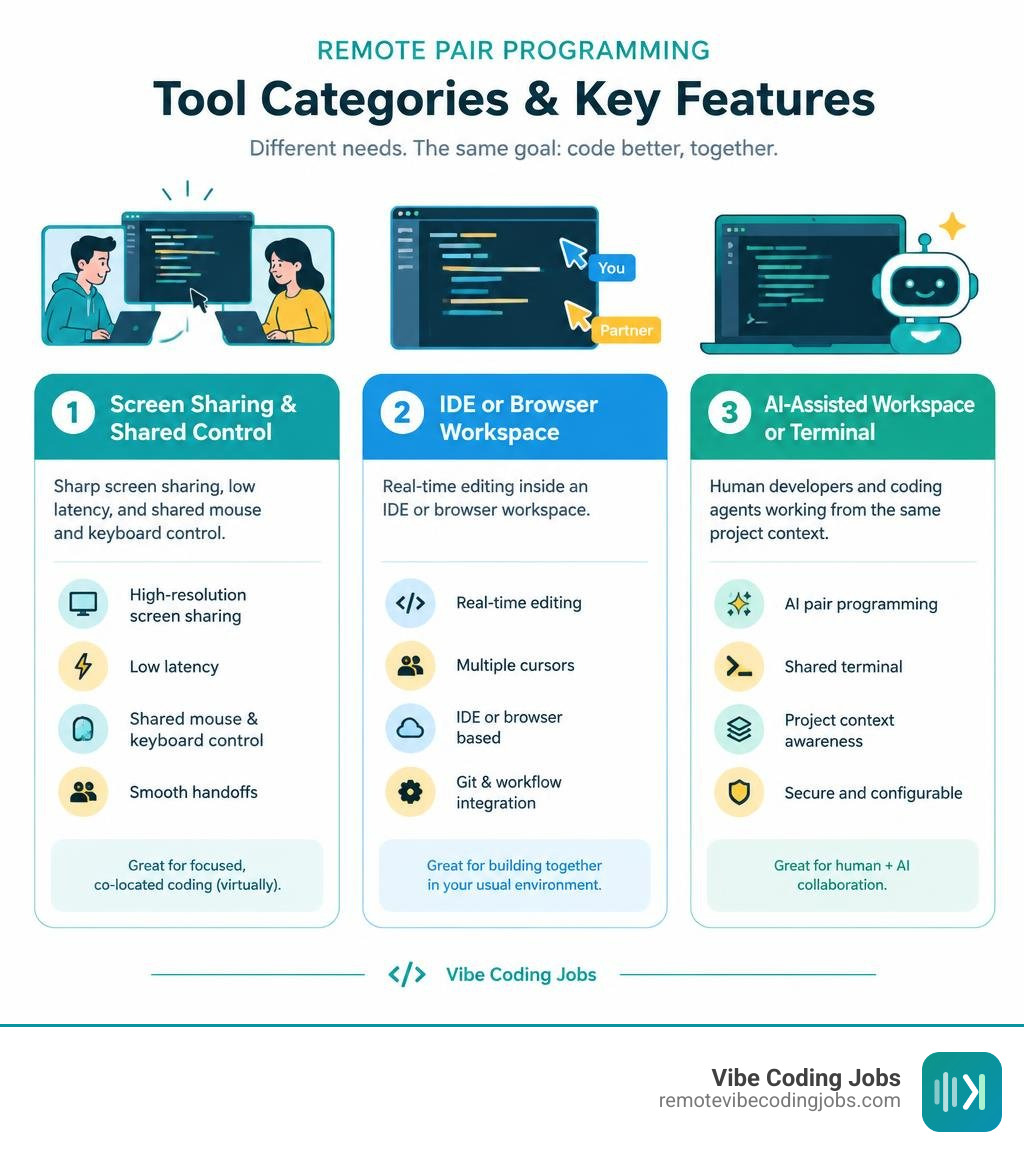
The best tools for remote pair programming depend on how your team works:
- Choose Tuple, Hopp, CoScreen, or Drovio when you need sharp screen sharing, low latency, and shared mouse and keyboard control.
- Choose VS Live Share, JetBrains Code With Me, Replit Multiplayer, or CodeSandbox when your priority is real-time editing inside an IDE or browser workspace.
- Choose an AI-assisted workspace or terminal tool when you want human developers and coding agents to work from the same project context.
Remote pair programming puts a driver and navigator in the same coding session from different locations. Great tools make that feel close to sitting at one desk: readable code, clear audio, fast handoffs, and no fighting over a single cursor.
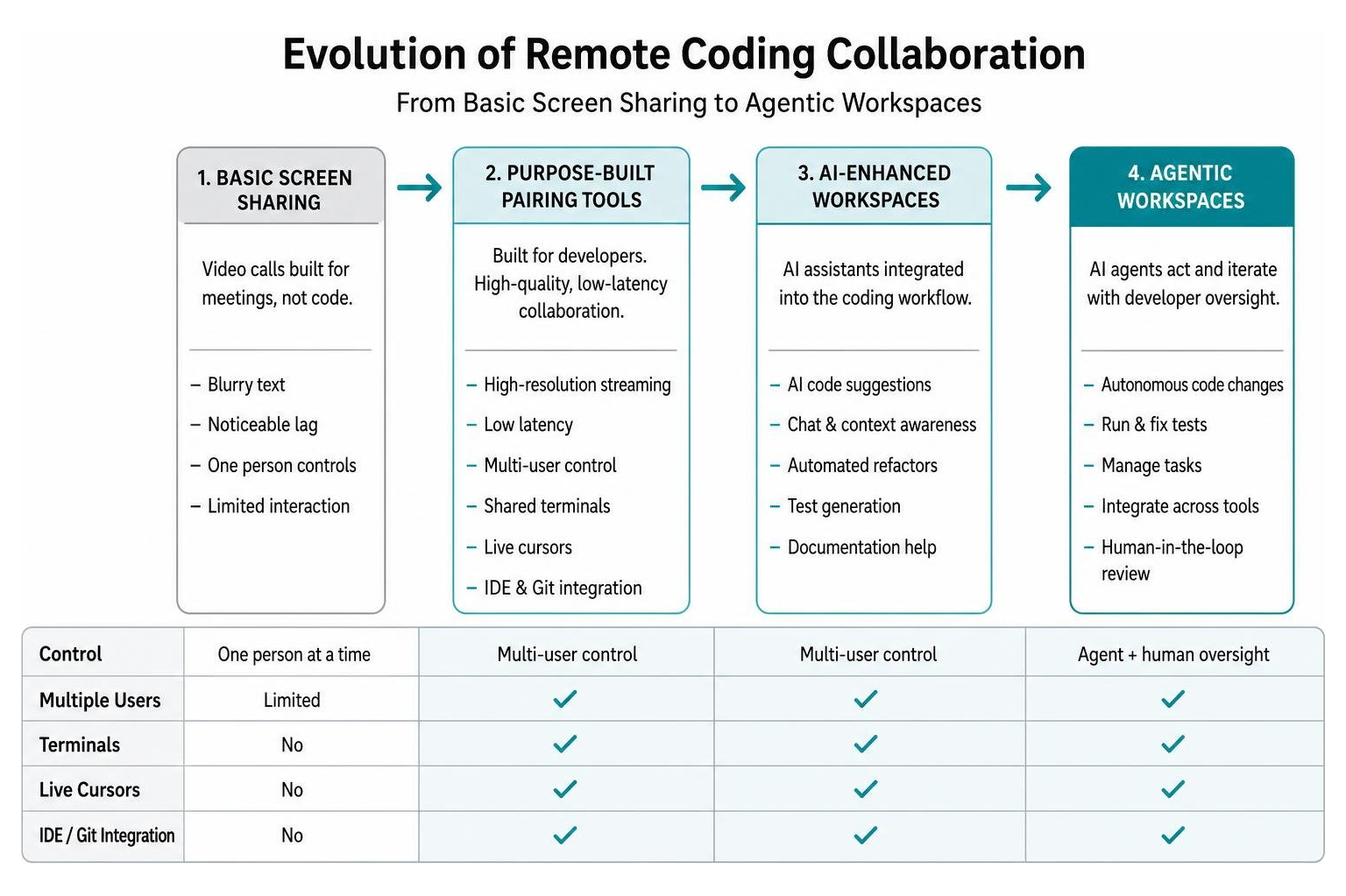
General meeting apps can work for a quick call. But they often blur small fonts, add noticeable lag, and limit control to one person. Purpose-built pairing tools solve those problems with high-resolution streaming, multi-user control, shared terminals, live cursors, and tighter IDE or Git workflows.
I’m Dominic Zijlstra, a technologist, data and DevOps practitioner, and founder who has built systems for teams that need clear, efficient technical collaboration. In this guide, I’ll help you compare the best tools for remote pair programming based on your stack, security needs, budget, and AI workflow.
Important best tools for remote pair programming terms:
Why Traditional Screen Sharing Fails Distributed Engineering Teams
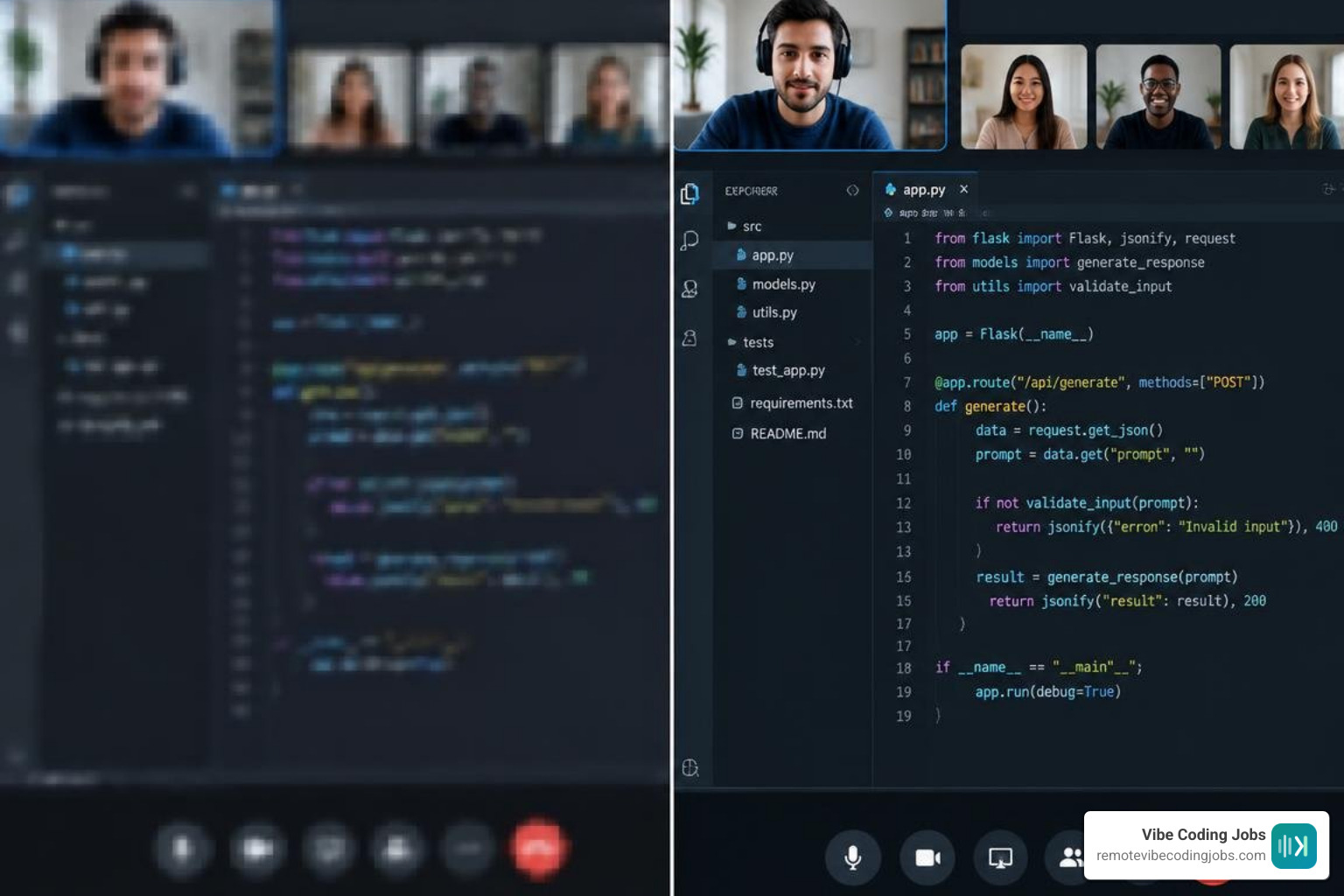
We have all experienced the pain of pairing over conventional video conferencing software. You squint at 11pt JetBrains Mono text compressed into a blurry smudge, struggle through 300ms input lag, and listen to audio chop whenever someone opens a local Docker container.
Traditional video conferencing platforms were engineered for slide decks and talking heads, not code syntax. When video encoders compress screen streams to save bandwidth, subtle text anti-aliasing is the first thing discarded. Developers spend half their energy asking, “Can you zoom in?” or “Did that line save?”
As highlighted in the Atlassian guide to remote pairing, distributed engineering teams thrive when communication feels frictionless and natural. According to developer surveys, 61% of software engineers strongly agree that they enjoy remote work, and over half would rather seek new opportunities than return to an in-office mandate. Yet, pairing friction remains a major productivity tax.
When you use generic meeting software:
- Only one person controls the mouse and keyboard at a time.
- Passing control requires awkward permission dialogues and OS-level security warnings.
- Background processes trigger aggressive downscaling, dropping frame rates below 15 FPS.
- Navigators cannot independently click, inspect files, highlight lines, or run a test in a separate terminal tab.
Purpose-built pairing platforms flip this dynamic entirely. By leveraging native streaming pipelines, local rendering, and conflict-free data structures, modern software makes collaborative programming 2-3x faster than standard web meetings. Explore our curated developer tools directory to see how modern engineering workflows are built for distributed collaboration.
Comparing the Best Tools for Remote Pair Programming in 2026
To help your engineering team identify the ideal collaboration stack, we evaluated the leading tools across latency, rendering fidelity, multi-cursor capabilities, and pricing architecture.
| Tool | Category | Streaming Resolution | Latency Target | Multi-Cursor / Shared Control | Ideal Workflow |
|---|---|---|---|---|---|
| Tuple | Native Screen App | Up to 5K Native | Ultra-low (sub-100ms) | Dual mouse/keyboard + Annotations | Native macOS/Windows cross-IDE pairing |
| Hopp | Open-Source Native | Default 4K (LiveKit) | Sub-100ms | Up to 10 users simultaneous control | Self-hosted & OSS-first engineering teams |
| CoScreen | Joint Desktop | Multi-window HD | Low latency | Up to 10 users joint desktop control | Multi-app debugging & mob programming |
| Drovio | Screen-Level App | Full Desktop HD | Low latency | Up to 10 users multi-cursor control | Cross-platform coding interviews & mobbing |
| VS Live Share | IDE Extension | Native Editor DOM | Zero video stream lag | Independent multi-cursor & shared terminal | Distributed VS Code development |
| Replit Multiplayer | Browser Cloud IDE | In-Browser Web | Cloud sync | Real-time concurrent text editing | Zero-setup prototyping & education |
| CodeshareLive | Web Sandbox | Monaco Editor | Instant WebSockets | Shared cursors + browser execution | Instant link-based live interviews |
| Cozea | AI Workspace | Cloud Multi-Agent | Real-time | Multi-user + Multi-AI orchestration | Agentic development & human-AI pairing |
Low-Latency Native Desktop and Screen-Control Apps
Native desktop screen-control applications bypass browser rendering engines to deliver raw pixel streams directly to your partner’s display.
- Tuple: Built with a lightweight, native C++ engine rather than Electron, Tuple runs directly from your menu bar without hogging your CPU. It streams up to 5K resolution so tiny fonts remain razor-sharp. Tuple features seamless dual-cursor support, low-latency audio, and handy workflow triggers, such as auto-pausing your media player or automatically adding Git co-author trailers when starting a session. It also includes App Veil to hide private windows during full-screen handoffs.
- Hopp: As an open-source pairing platform, Hopp open-source pairing leverages fine-tuned libwebrtc pipelines and the LiveKit network to provide sub-100ms shared control. It defaults to 4K resolution and supports up to 10 people in a single room with simultaneous mouse and keyboard control. It can be fully self-hosted for complete data privacy.
- CoScreen: Operating on a unique joint-desktop architecture, CoScreen multi-user desktop enables up to 10 developers to share and interact with individual application windows simultaneously. Teams write software 30% faster by letting engineers simultaneously click, drag, type, and paste across different desktop applications without sharing entire personal desktops.
- Drovio: Offering screen-level collaboration, Drovio works across any IDE or terminal on macOS, Windows, and Linux. It supports up to 10 participants simultaneously, assigning each person an independent, named cursor and providing built-in voice and video communication.
Cloud Workspaces and IDE-Centric Collaborative Editors
Rather than streaming pixels across the network, IDE-centric and cloud sandbox tools synchronize the underlying text buffer.
- Visual Studio Live Share: A staple for distributed teams, Live Share synchronizes Abstract Syntax Trees and editor states directly inside VS Code. It lets both developers keep their personal keybindings, themes, and font preferences while sharing terminal instances, local server ports, and debugging sessions.
- JetBrains Code With Me: Integrated natively into JetBrains IDEs (IntelliJ IDEA, PyCharm, WebStorm), Code With Me provides customizable permissions, simultaneous editing, and synchronized or independent navigation modes for complex enterprise codebases.
- Replit Multiplayer & CodeSandbox CDE: Cloud development environments provide isolated container VMs per branch. Multiple developers can enter a browser-based Monaco editor, edit files concurrently, run background tasks, and view instant live deployment previews without configuring local dependencies.
- CodeshareLive: The open-source YukiStackAI CodeshareLive repository provides zero-setup, link-based collaborative editing powered by the Monaco Editor, React, and Socket.io. It supports sandboxed in-browser code execution across 19 programming languages.
- Tessera.io: Showcased in the payalrvs3 Tessera.io sandbox project, modern open-source engines use Yjs Conflict-free Replicated Data Types (CRDTs) alongside gVisor kernel-isolated Docker sandboxes, ensuring real-time multi-user synchronization remains safe from untrusted code execution.
AI-Assisted and Agentic Coding Collaboration Platforms
Pair programming is no longer limited to two humans staring at a single screen. Modern workflows frequently integrate autonomous coding agents as active participants in the pairing loop.

Engineering teams are finding that AI-powered remote pair programming tools boost teamwork by handling boilerplate, generating test suites, and proposing refactors in real time.
- Cozea: The Cozea vibe coding workspace provides a multiplayer environment designed specifically for human-AI agent orchestration. Teams can invite multiple developers into a single room while dispatching autonomous sub-agents across models like Claude, GPT, and Gemini to scaffold components, run terminal commands, and deploy directly to cloud hosting.
- Aider: A terminal-first open-source pairing tool that connects directly to local Git repositories. Aider automatically maps repository dependencies, executes architectural refactors, runs local test suites, and generates clean Git commit messages while accepting natural language instructions from both pairing partners.
- Claude Code & Cursor Workflows: Developers looking to streamline pair programming often leverage Claude Code tool workflows for multi-file terminal refactoring alongside Cursor AI tool integration for inline multi-cursor completions. To see how these models compare when handling complex codebases, read our breakdown of Cursor vs Copilot vs Claude comparison.
- CodePair: For technical hiring, CodePair live coding interview sandbox provides reproducible Nix-backed environments where interviewers and candidates pair on real repositories with full transparency into how candidates interact with AI tools.
Standout Features Across the Best Tools for Remote Pair Programming
When testing different solutions, look for standout quality-of-life features that transform daily engineering sessions:
- Independent Multi-User Cursors: Tools like Hopp, Drovio, and CoScreen assign each participant a distinct, labeled cursor. This eliminates the confusion of fighting over a single system mouse pointer.
- App-Specific Window Sharing (App Veil): Native screen-sharing tools provide window isolation so background notifications, personal Slack channels, and browser tabs remain invisible to your pairing partner.
- Granular Terminal & Port Forwarding: IDE-centric tools like Live Share let you share a localhost port securely over an encrypted tunnel, allowing your navigator to interact with your local development server directly from their browser.
- Automated Git Co-Authoring: Built-in triggers automatically append
Co-authored-by: Nameto Git commits, ensuring proper attribution without manual commit edits.
For a deeper look into the modern ecosystem of intelligent developer tooling, check out our guide to the best AI coding tools for vibe coders 2026.
How to Evaluate Security, Architecture, and Pricing for Team Workflows
Evaluating collaborative software requires balancing developer ergonomics with organizational security standards and budget structures.
When selecting tools for your organization, review these architectural foundations:
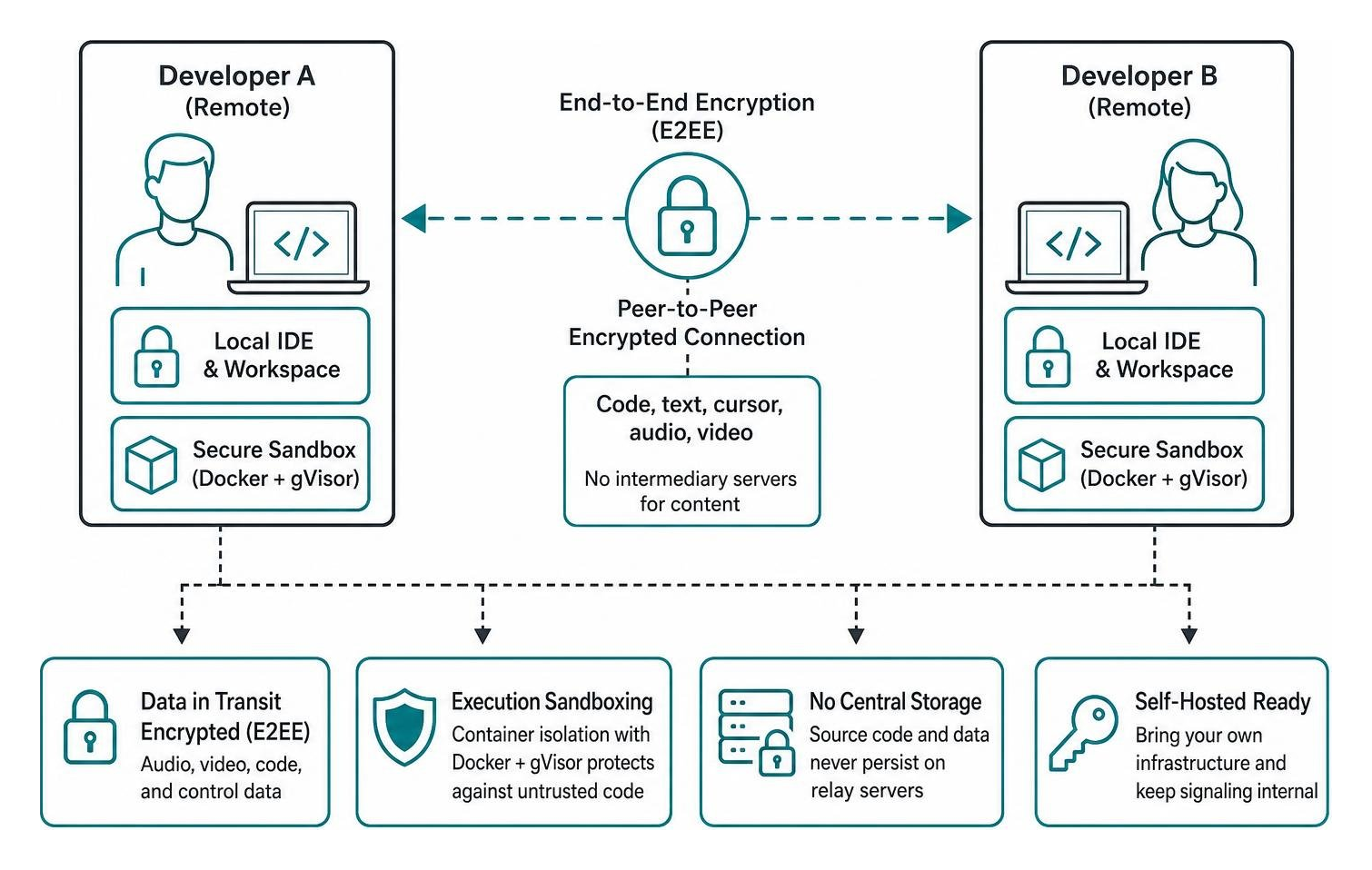
- Data Encryption & Transit: Ensure the platform provides end-to-end encryption (E2EE) for audio, video, and control data. Screen streaming tools like Tuple encrypt media streams directly between peers, ensuring proprietary source code never persists on intermediary relay servers.
- Execution Sandboxing: If your team executes untrusted code or shares web-based sandboxes, look for container-level security such as Docker workers hardened with gVisor kernel isolation.
- Self-Hosting & Compliance: Teams with strict regulatory requirements (SOC2, HIPAA, ISO 27001) should prioritize open-source or self-hosted platforms like Hopp that let you bring your own LiveKit credentials and keep all signaling internal.
- Pricing Models: Native screen apps typically bill on a predictable per-seat SaaS model ($10–$25 per user/month). In contrast, cloud development environments (CDEs) often combine free basic tiers with usage-based compute pricing for cloud VM hours.
To learn how next-generation AI platforms fit into enterprise workflows, explore our analysis of the best AI coding tools 2026.
How to Choose the Best Tools for Remote Pair Programming for Your Team
To select the ideal platform for your engineering group, match your primary operational needs against the following team dynamics:
- Heterogeneous IDE Teams: If your engineers use a mix of Neovim, VS Code, RustRover, and Emacs, choose screen-level pairing tools (Tuple, Hopp, CoScreen). They work across any window without requiring matching IDE extensions.
- Bandwidth-Constrained Environments: If developers operate on variable home internet connections, IDE buffer synchronization (VS Live Share, CodeSandbox) consumes dramatically less network bandwidth than real-time 4K/5K video streams.
- Mob Programming and Architecture Design: If your team runs 5-to-10-person mob pairing, technical workshops, or system reviews, select multi-user joint desktop platforms (CoScreen, Hopp, Drovio) that support multiple concurrent inputs and interactive screen annotations.
- Async-First Knowledge Transfer: Combine live screen pairing sessions with lightweight async screen walkthroughs using Loom or Jira-linked recordings, allowing teammates in different time zones to review decisions without meeting fatigue.
Frequently Asked Questions About Remote Pair Programming
How do dedicated pair programming tools differ from Zoom or Google Meet?
Dedicated pair programming tools are built specifically for technical workflows. They feature native C++ or WebRTC streaming engines that stream at up to 5K resolution, maintaining razor-sharp rendering for small programming fonts. Crucially, they offer dual-cursor control, sub-100ms latency, independent keybinding support, and shared terminal integration—capabilities entirely missing from standard video conferencing software.
Can pair programming tools support multiplayer AI collaboration?
Yes. Modern agentic workspaces like Cozea and collaborative sandboxes like Tessera.io allow multiple developers to orchestrate AI models simultaneously. Both the driver and navigator can observe live AI prompts, inspect generated diffs, manage Model Context Protocol (MCP) servers, and direct autonomous sub-agents within a shared execution context.
What is the most cost-effective remote pairing stack for small teams?
Small teams and startups can achieve a powerful, zero-cost setup by combining Visual Studio Live Share for real-time IDE synchronization with self-hosted Hopp instances or open-source WebSockets engines like CodeshareLive. For AI-assisted terminal pairing, running open-source Aider connected to local Ollama models or pay-as-you-go API keys provides a highly capable, subscription-free workflow.
Conclusion
Remote pair programming is one of the highest-leverage practices a distributed software team can adopt. When equipped with tools that eliminate lag, render code crisply, and allow seamless shared control, engineering teams onboard new hires faster, catch bugs before they hit production, and build stronger collaborative bonds across time zones.
At RemoteVibeCodingJobs, we support forward-thinking, async-first software teams building the future of technology. If you are ready to find your next high-impact engineering role or scale your distributed team, explore cutting-edge openings and equip your developers with the best AI tools for coding today.