Cursor Student Free Access: What You Can Still Claim
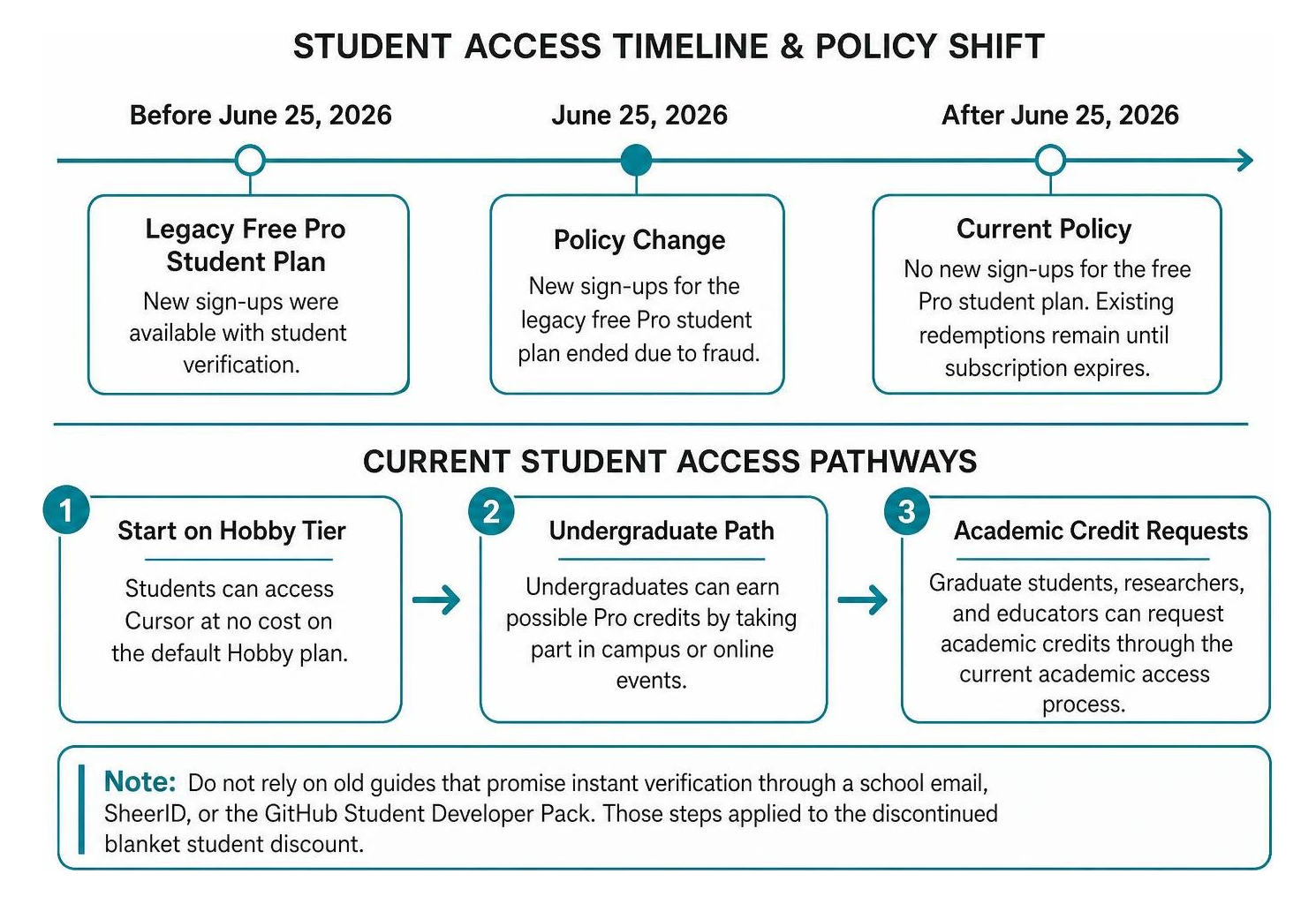
Cursor no longer offers new sign-ups for its free one-year Pro student plan. The legacy discount ended on June 25, 2026, after the program faced fraud. If you already redeemed it, your discounted rate remains in place until the current subscription expires.
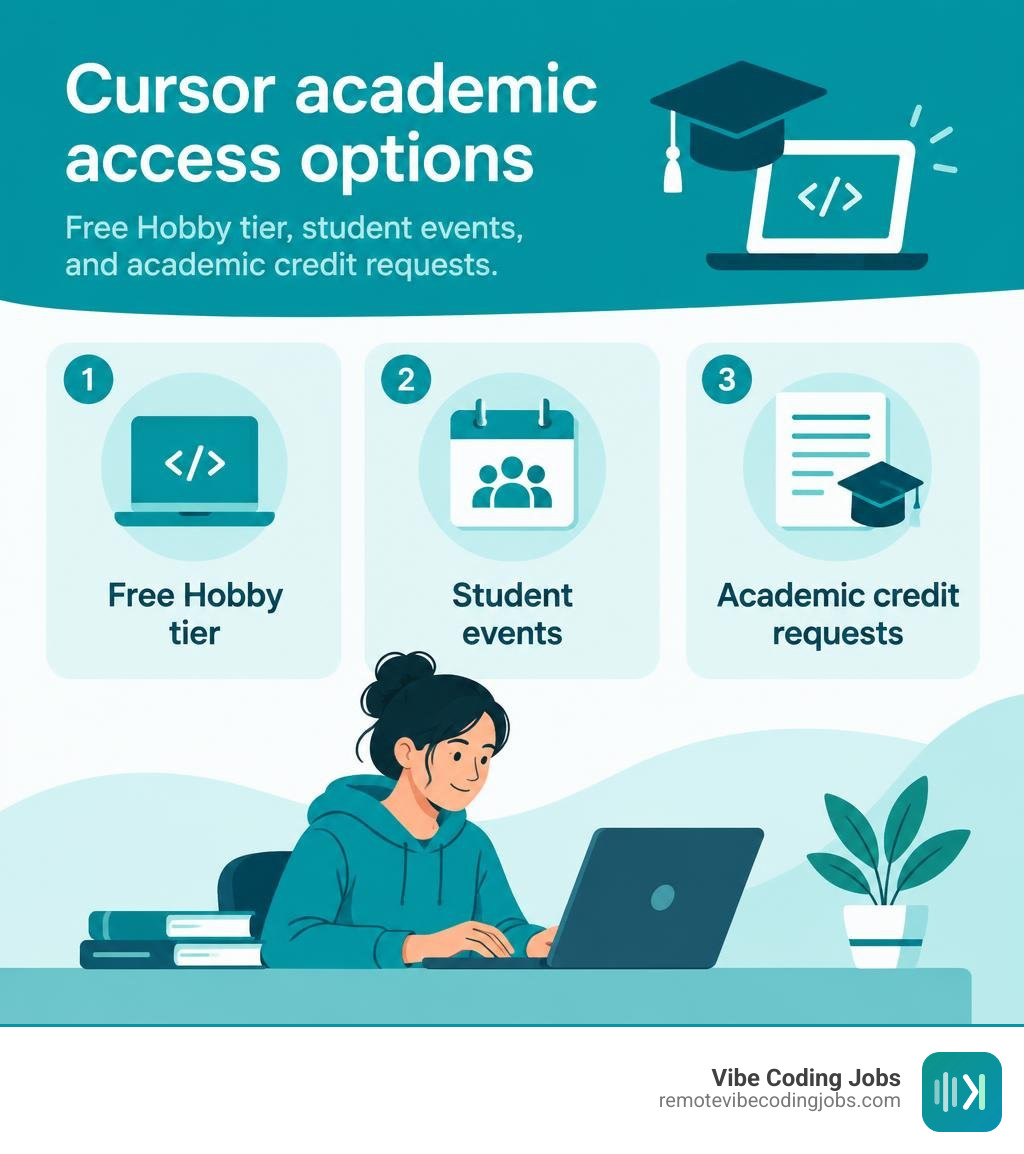
Students can still get Cursor at no cost by starting on the Hobby tier. For possible Pro credits, undergraduates should watch for Cursor campus or online events. Graduate students, researchers, and educators can request academic credits through Cursor’s current academic access process.
The old offer was valuable: Cursor Pro normally costs $20 per month, with more premium AI capacity and tools for multi-file coding. But do not rely on old guides that promise instant verification through a school email, SheerID, or the GitHub Student Developer Pack. Those steps applied to the discontinued blanket student discount.
I am Hansjan Kamerling, cofounder of Adaptify SEO, with more than a decade in technology and product design. I focus on practical, current guidance around tools and workflows such as cursor student free access, so developers can spend less time sorting through outdated claims.
Glossary for cursor student free:
Cursor Student Free Eligibility and Policy Updates
Navigating developer discounts can feel like chasing a moving target. In early 2026, students worldwide could easily unlock a free 12-month Pro plan worth $240 per year simply by verifying an institutional email address. However, massive automated fraud operations targeted the program using bulk-generated .edu domains and third-party credential resellers.
To protect platform integrity and manage infrastructure load, Cursor officially discontinued new sign-ups for the legacy blanket student discount on June 25, 2026.

The company shifted its academic strategy away from automated blanket portals toward targeted distribution. If you visit the official student portal, you will see an ecosystem focused on builders, campus hackathons, and research grants rather than an open checkout discount code.
Here is what the current policy means for you right now:
- Existing Student Subscriptions: If you redeemed the free Pro plan before the June 25 cutoff, your account is grandfathered. Your free access remains active until the end of your 12-month billing period.
- Undergraduate Access: Undergraduates can access Cursor completely free on the default Hobby plan. To gain additional Pro usage credits, you can participate in partnered campus hackathons, student developer clubs, or virtual workshops.
- Academic Research Grants: Graduate researchers, PhD candidates, teaching assistants, and faculty can apply directly via a dedicated research request form to receive compute credits for lab work and educational coursework.
Who Qualifies for Academic Verification
While the open self-serve portal has evolved, academic eligibility standards remain consistent across Cursor’s active event distributions and research grant applications. The program supports technical learners worldwide, accommodating diverse educational paths beyond traditional four-year universities.
- University Undergraduates: Enrolled in accredited associate or bachelor programs globally. Eligible for event-based promotional credits and default free Hobby access.
- High School Students (Ages 16+): Secondary school coders working on robotics, computer science clubs, or portfolio projects.
- Coding Bootcamp Enrollees: Students enrolled in intensive, recognized software engineering bootcamps preparing for technical careers.
- Graduate Students & PhD Researchers: Master’s and doctoral candidates conducting machine learning, scientific data processing, or systems research.
- Educators & Teaching Assistants: Computer science faculty and instructional staff building course curriculums or guiding lab sections.
What Is Included in the Cursor Student Free Pro Plan
To understand why the developer community values this tool, it helps to compare the standard free Hobby plan with the Pro tier received through academic grants, grandfathered subscriptions, or campus event promotions.
| Feature / Quota | Free Hobby Tier | Cursor Pro (Student / Grant Tier) |
|---|---|---|
| Monthly Pricing | $0/month | $0 (Normally $20/month; saves $240/yr) |
| Fast Premium Model Requests | 50 requests / month | 500 requests / month |
| Slow Premium Requests | 200 / month | Unlimited (queued during peak times) |
| Monthly Model Usage Credits | $0 | $20 included credit allocation |
| Frontier Models | Limited access | Claude 3.5 Sonnet, GPT-4o, Gemini 1.5 Pro |
| Agent Mode (Multi-File Editing) | Basic single-file | Full multi-file Composer & background runs |
| Context Window & Indexing | Partial repo indexing | Full codebase semantic indexing |
| Privacy Mode | User-configurable | Enforced zero-retention / no model training |
The Pro tier provides significant advantages for heavy academic workloads. Having 500 fast requests per month paired with unlimited slow requests allows you to debug entire code repositories, generate comprehensive test suites, and refactor complex architectures without hitting daily paywalls.
Step-by-Step Verification Guide for Academic Access
Securing academic credits or setting up an optimized student account requires following the updated institutional workflow. Bypassing unverified third-party workarounds is essential, as accounts linked to fraudulent credential brokers are systematically purged.
How to Claim Cursor Student Free Access in 2026
If you are setting up your student environment or applying for academic credits, follow these concrete steps aligned with the Cursor documentation guidelines.
- Register with Your Primary Institutional Email: Create your account on the main Cursor portal using your official school address (e.g.,
.edu,.ac.uk,.edu.cn,.edu.pk). Keeping your primary account identity matched to your institution prevents verification flags. - Download and Initialize the IDE: Install the Cursor editor on macOS, Windows, or Linux. During the onboarding setup, import your VS Code keybindings, extensions, and settings with one click.
- Engage with Campus & Online Builder Events: Undergraduates looking for Pro credit boosts should register for official collegiate hackathons and builder communities partnered with Cursor. Promotional upgrade codes are distributed to attendees during these developer sprints.
- Submit a Research / Educator Credit Request: If you are a graduate student, PhD candidate, researcher, or educator, navigate to the academic intake form via the help center. Provide your institutional affiliation, a link to your lab or faculty page, and an overview of your computational research requirements.
- Confirm Plan Status in Account Settings: Once approved or when applying an event token, navigate to
Settings > Subscriptionwithin the editor. Verify that your account displays active Pro access or credited balances.
Troubleshooting Verification and School Email Errors
If you run into issues while verifying academic credentials or requesting research compute, check these common points of friction:
- Mismatched Account Emails: If your login email is a personal Gmail address while your academic form lists an institutional email, automated matching will fail. Update your account settings so both match.
- Regional Academic Domains: Some international institutions (such as secondary campuses in Europe, Latin America, or South Asia) use localized subdomains not immediately recognized by global databases. Always submit an official enrollment verification letter, dated tuition receipt, or active student portal transcript.
- Network and VPN Interference: Institutional verification portals often block requests routed through commercial VPN servers or anonymous proxies to prevent bulk fraud. Disable VPN extensions during registration.
- Manual Review Timeline: While domain-recognized applications process quickly, manual reviews by academic coordinators typically require 24 to 48 business hours. Check your institution’s spam and quarantine folders for confirmation messages.
Maximizing AI-Assisted Development in Your Coursework
Having access to an AI-native editor changes how you approach complex academic projects. Rather than treating artificial intelligence as a simple copy-paste shortcut, top students use it to eliminate tedious syntax bottlenecks, rapidly explore architectural patterns, and master core computer science principles.
Modern workflows are shifting toward intuitive vibe coding practices, where developers use conversational natural language to coordinate project features while maintaining high-level structural oversight. Understanding how AI coding agents work in multi-file contexts lets you delegate repetitive tasks like writing database migrations, formatting API endpoints, or mocking test datasets.
To get the most out of your setup during semester projects and capstones, implement these daily habits:
- Create a
.cursorrulesFile: Define project-level guidelines in the root directory of your assignments. Specify the exact language versions, styling rules, and testing frameworks your professors require. - Leverage Multi-File Composer: Use Composer (
Cmd+IorCtrl+I) to make coordinated edits across multiple components simultaneously, such as updating an interface and all its dependent services in a single step. - Index Your Coursework Repositories: Allow the editor to compute semantic embeddings of your entire codebase. Use
@Codebasein chat to ask architectural questions, trace bugs across modules, or locate helper functions across unfamiliar libraries. - Explore Modern Tech Stacks: Familiarize yourself with the top programming languages and master industry-standard AI coding tools to prepare for modern software engineering environments.
Frequently Asked Questions About Academic AI Editor Access
What happens after the student plan expires?
When your 12-month grandfathered plan or academic grant term reaches its end, your account automatically transitions to the standard free Hobby tier. You will not be charged unless you manually add a payment method and opt into the standard $20/month Pro tier. All your local settings, .cursorrules, and codebases remain completely untouched.
Can existing Pro subscribers switch to the academic tier?
If you currently maintain an active, self-paid Pro subscription ($20/month) and receive academic research credits or event vouchers, you can apply them directly within your account billing settings. The platform adjusts your upcoming invoice schedule to consume your awarded promotional credits before charging your card.
How does the editor compare to alternative student developer programs?
While plugin-based tools provide line-by-line autocompletion across arbitrary IDEs, Cursor is an AI-native fork of VS Code designed around full repository indexing, multi-file agent execution, and real-time model switching (Claude 3.5 Sonnet, GPT-4o, and Gemini 1.5 Pro). For academic capstones and complex multi-module applications, full IDE integration offers deeper contextual debugging than basic autocomplete extensions.
Conclusion
Mastering AI-assisted programming during your academic career provides a strong competitive edge when stepping into the professional software market. By understanding how to work alongside intelligent agents, manage multi-file architectures, and structure production-ready code, you build habits that modern tech organizations actively look for.
At RemoteVibeCodingJobs, we help developers transition from academic projects to high-impact careers by curating daily opportunities across async-first, forward-thinking engineering teams. When you are ready to turn your AI development skills into a rewarding career, explore high-paying remote AI engineering roles and join the next generation of software builders.