
How to Get Cleaner Code from ChatGPT 3
To code effectively with ChatGPT 3, give it one small task at a time. Name the language, describe the inputs and expected output, and include any rules the code must follow. Ask for tests and edge cases. Then run the code, check its logic and security, and use real errors to refine your next prompt.
GPT-3 made natural-language code generation possible, but a useful suggestion is not the same as reliable software. The prompt gives the model direction; testing and review make the result fit for your project.
I’m Di Su, a software engineer with over 10 years of experience building web products and Python workflows. That hands-on work shapes my approach to chat gpt 3 coding: start with a clear request, then verify what the model gives you.
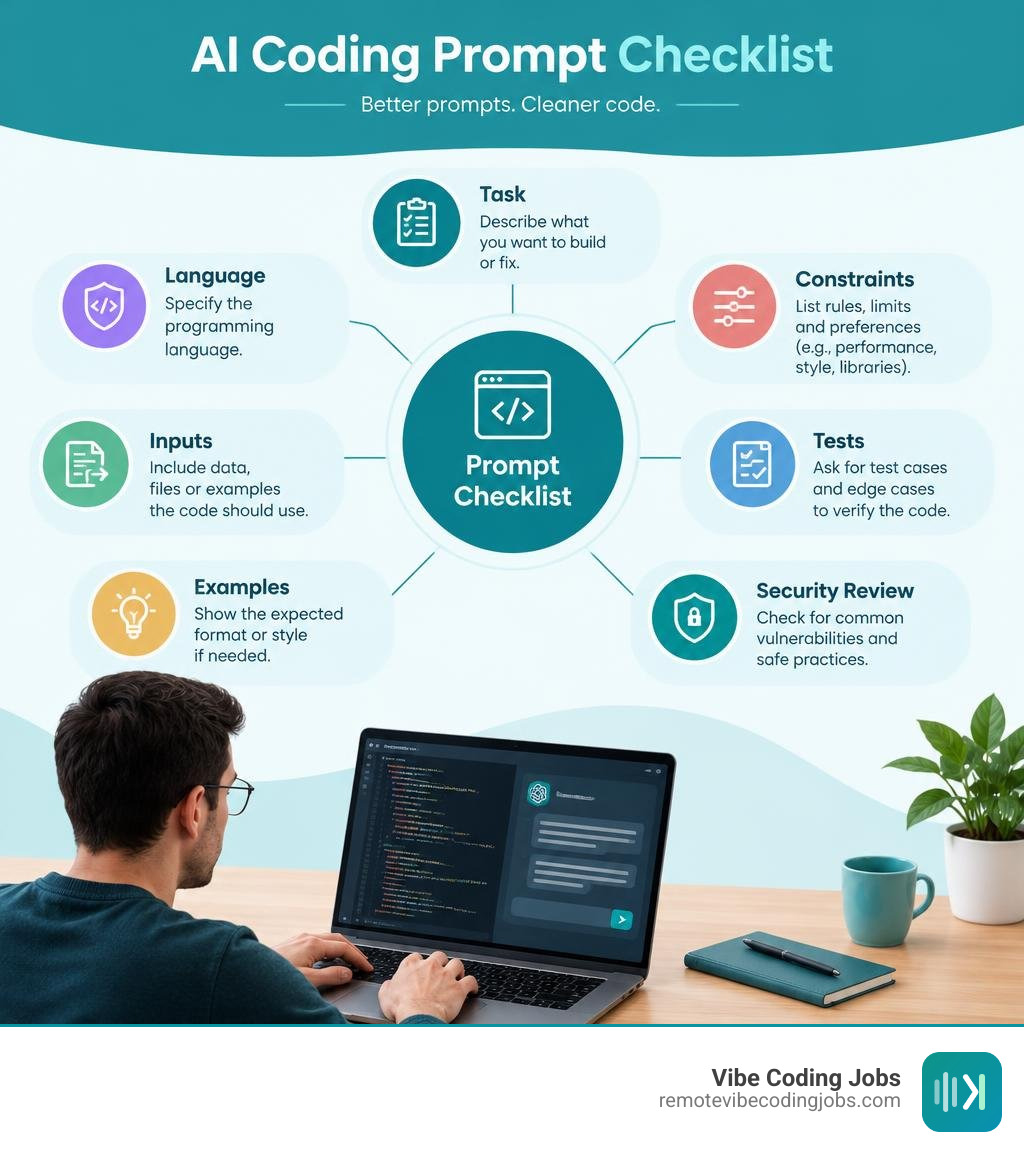
Chat gpt 3 coding word roundup:
Fundamentals of Chat GPT 3 Coding: Architecture and Codex Evolution
Understanding how to coax production-grade scripts out of early large language models requires looking under the hood. GPT-3 established the foundation of autoregressive text generation at massive scale. Built as a decoder-only transformer with 175 billion parameters, GPT-3 was trained across an extensive web corpus: 410 billion tokens from Common Crawl, 19 billion from WebText2, 12 billion from Books1, 55 billion from Books2, and 3 billion from Wikipedia. Storing its weights alone required roughly 350GB of memory.
Despite being designed as a general-purpose natural language model with a standard 2,048-token context window, GPT-3 demonstrated a startling emergent property: it could parse, reason about, and generate working code across languages like Python, JavaScript, CSS, and JSX without explicit task-specific fine-tuning.
As documented in the landmark paper GPT-3: Language Models are Few-Shot Learners, scaling model parameters enabled few-shot learning directly through prompt context. This architectural leap marked the start of the transition from traditional software engineering toward modern AI-assisted engineering.
| Feature / Metric | Base GPT-3 (Davinci) | OpenAI Codex (code-davinci-002) | GPT-3.5 ChatGPT (text-davinci-003 / turbo) |
|---|---|---|---|
| Primary Architecture | 175B Parameter Transformer | 175B Fine-Tuned on Public Code | Instruction & RLHF Fine-Tuned |
| Context Window | 2,048 Tokens | 4,096 to 8,000 Tokens | 4,096 Tokens |
| Specialized Training Data | Web text, books, Wikipedia (under 10% code) | Billions of lines of public GitHub source code | Curated conversational text, code, and human feedback pairs |
| Primary Strength | Creative few-shot text and basic syntax completion | Complex algorithmic reasoning and multi-line script generation | Conversational debugging, step-by-step logic, and code explanations |
| Deterministic Control | Requires strict few-shot examples | Sensitive to temperature and stop tokens | Steered via conversational system instructions |
How Codex and GPT-3.5 Transformed Code Generation
While base GPT-3 could complete basic functions, it frequently drifted or hallucinated invalid syntax when tasks became intricate. To resolve this, OpenAI developed Codex—a specialized descendant model fine-tuned on billions of lines of open-source repository data. Codex powered early iterations of developer tools and expanded the context window up to 8,000 tokens, allowing the engine to parse entire modules rather than isolated snippets.
Following Codex, OpenAI introduced Reinforcement Learning from Human Feedback (RLHF) to align these engines with conversational intent. This effort culminated in GPT-3.5 and the public release of the interactive chat interface via ChatGPT: Chat, Work, Create & Code with AI.
RLHF changed how developers interact with AI. Instead of guessing how an autoregressive model might complete a comment, engineers could converse directly with the engine: asking it to spot off-by-one errors, rewrite loops for better time complexity, or translate pseudocode into idiomatic TypeScript.
Low-Code Integrations and Citizen Developers
The code-generation capabilities of GPT-3 quickly expanded beyond developer terminals into enterprise low-code ecosystems. Microsoft integrated a custom fine-tuned GPT-3 model directly into Power Apps, enabling non-programmers to translate plain English into executable Power Fx formulas.
For example, typing “Show 10 orders that have stroller in the product name and sort by purchase date newest first” automatically yields the appropriate query structure. Powered by Azure Machine Learning managed endpoints with built-in content moderation, this integration opened software development to citizen developers who understand business workflows but lack formal computer science backgrounds.
As explored in an in-depth Medium analysis of Codex and low-code platforms, pairing natural language models with declarative formula engines represents a major step toward democratizing application delivery.
Practical Prompt Engineering Strategies for Clean Code

Writing clear, reliable code with GPT-3 requires structured prompt design. LLMs operate by calculating next-token probabilities based on the context provided. Vague prompts invite ambiguous outputs, while precise technical specifications yield maintainable code.
To get clean code, follow these core prompting principles:
- Role Definition: Assign the AI an explicit engineering role (e.g., “Act as a Senior Python Performance Engineer”).
- Explicit Language & Library Pinning: Always name the programming language, framework version, and required packages (e.g., “Use Python 3.11 with Pydantic v2”).
- Strict Formatting Boundaries: Instruct the model to return raw code without conversational padding when integrating into scripts, or demand structured markdown docstrings when documenting.
- Parameter Calibration: In API or playground settings, set your temperature to 0.0 or 0.2 for deterministic code, math, and SQL queries. Reserve higher temperatures (0.7+) for naming brainstorming or architectural brainstorming.
- Add Negative Constraints: Tell the engine what not to do (e.g., “Do not use deprecated libraries, do not use global variables, do not emit regex without inline comments”).
Equipping yourself with essential modern tools for developers makes applying these prompt structures effortless across day-to-day sprints.
Zero-Shot vs Few-Shot Prompts for Chat GPT 3 Coding
Zero-shot prompting asks the model to generate an answer with no prior examples. While adequate for basic boilerplate, zero-shot prompts often yield inconsistent formatting or unexpected patterns.
Few-shot prompting provides two or three input-output demonstration pairs within the prompt body. This guides the model’s pattern-recognition abilities toward your exact architectural standards.
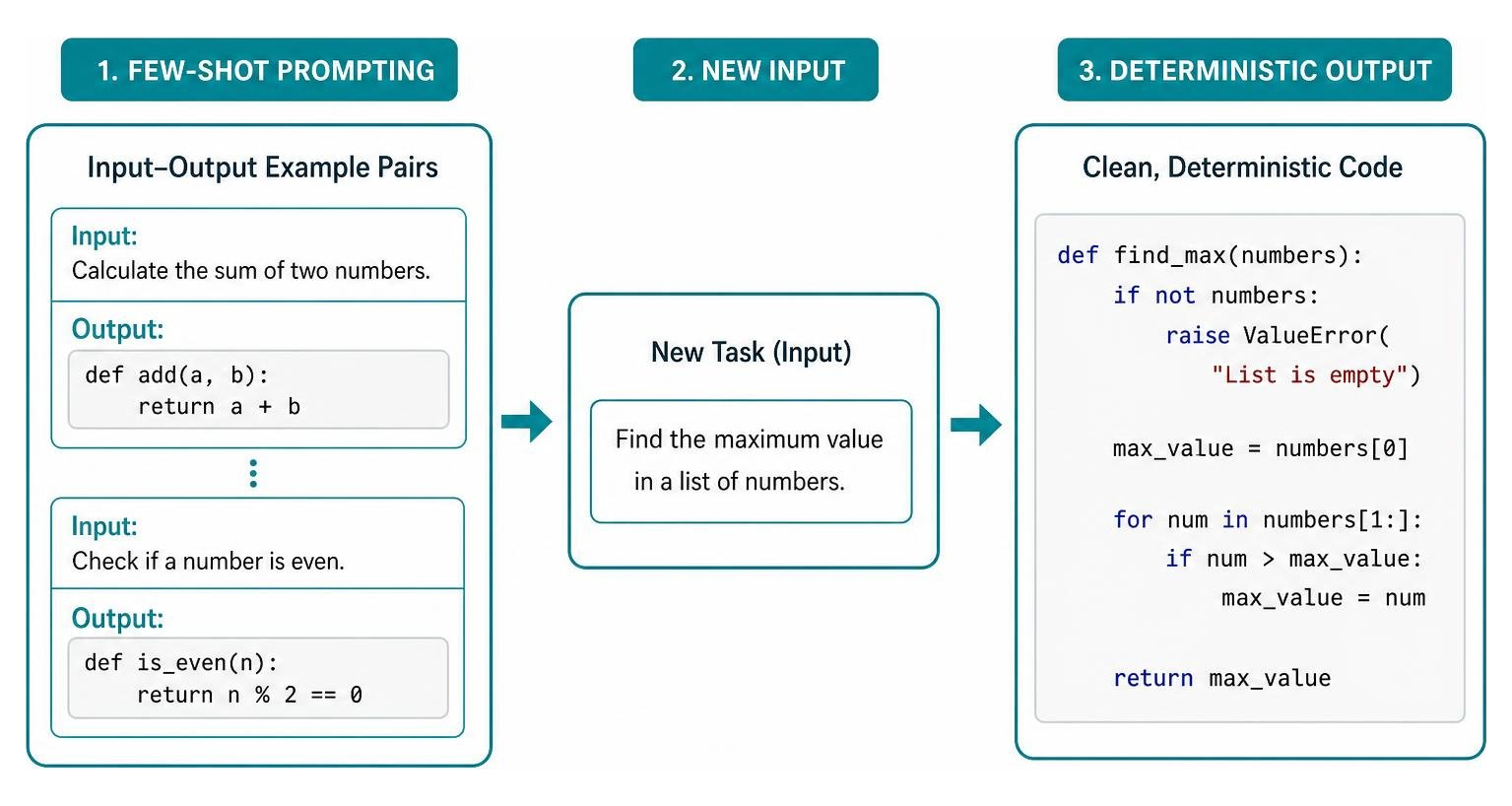
When exploring options via How to Use GPT-3 in OpenAI Playground, few-shot examples allow you to establish custom error handling, typing rules, and output schemas that the model mirrors consistently.
Step-by-Step Refactoring and Bug Detection
GPT-3 excels when you ask it to think through logic step by step before generating final code. Instead of prompting “Fix this bug,” use a phased approach:
- Ask the model to explain the execution flow of the buggy snippet.
- Request a list of potential runtime edge cases (such as null inputs, race conditions, or off-by-one errors).
- Ask it to generate the refactored code with explanatory comments alongside a test suite covering those failure points.
This structured workflow is particularly effective when implementing complex full-stack app implementation methods, where front-end UI state must align cleanly with backend database schemas.
Integrating GPT-3 and IDE Extensions into Daily Workflows
Using GPT-3 inside your integrated development environment (IDE) reduces context switching and accelerates development loops. Rather than toggling between a browser tab and your editor, modern IDE extensions connect directly to OpenAI API endpoints to surface inline code completions, automated unit tests, and instant documentation.
To ensure safety and stability, pair these tools with automated security and integration practices, maintaining linting checks and test runners in isolated local development environments.
CodeGPT and GitHub Copilot Integration
Extensions such as timkmecl/codegpt integrate API models directly into VS Code. By configuring custom API keys and selecting models like text-davinci-003 or chat endpoints, developers can highlight existing code blocks and run context commands such as:
- Explain Selection: Breaks down complex algorithms or legacy code into plain English.
- Refactor Selection: Rewrites functions for readability, modularity, or speed.
- Find Problems: Scans code blocks for missing null checks, syntax errors, and logic traps.
- Generate Tests: Scaffolds unit test fixtures matching the target framework.
When choosing your toolchain, evaluating modern IDE assistants helps balance editor latency, codebase indexing, and multi-file reasoning capabilities.
Overcoming Context Limits in Coding with ChatGPT 3
The 2,048-token context ceiling of base GPT-3 requires smart architectural habits:
- Decompose Large Tasks: Never ask the model to generate an entire application in one pass. Break components into separate modules, interfaces, and utility functions.
- Provide Interface Contracts First: Prompt the model with type definitions or API signatures before asking it to write function bodies.
- Automate Local Feedback Loops: Tools like Silenttttttt/gpt-py-programmer show how small Python scripts can send prompts, execute returned code locally, and feed standard error outputs back to the engine for automated iterative fixes.
Limitations, Security Risks, and Ethical Considerations
While GPT-3 and its derivatives accelerate code production, unsupervised adoption introduces critical risks:
- Hallucinated Packages and APIs: GPT-3 often invents plausible-sounding library functions or package names that do not exist. Threat actors have exploited this by publishing malicious packages under commonly hallucinated names.
- Security Flaws & Hardcoded Secrets: Models trained on public web scrapes may reproduce insecure code patterns, such as SQL injection vulnerabilities, weak cryptographic defaults, or unescaped user inputs.
- Licensing and IP Attribution: Training on public open-source repositories raises important questions regarding copyleft licenses (like GPL) and attribution requirements. Developers must verify that generated code does not infringe on third-party licenses.
- Human-in-the-Loop Reviews: AI is an assistant, not an autonomous engineer. Every line of generated code should pass static analysis, automated test suites, and human peer review before production deployment.
For engineers navigating market skills and developer guidance, mastering code auditing and architectural verification is just as important as prompt engineering.
Frequently Asked Questions About ChatGPT 3 Coding
Can ChatGPT 3 write complete production-ready software?
No. ChatGPT 3 can generate functional functions, boilerplate modules, and test suites, but it lacks full-repository awareness, real-time runtime feedback, and architectural oversight. Developers must verify system design, security, and edge-case handling before deploying code to production.
What is the difference between GPT-3 and OpenAI Codex for coding?
Base GPT-3 is a general language model trained broadly on web text, books, and articles, with code representing only a small fraction of its dataset. OpenAI Codex is a fine-tuned descendant of GPT-3 trained on billions of lines of public code, giving it deeper multi-language syntax awareness and stronger algorithmic problem-solving capabilities.
How do I prevent GPT-3 from generating insecure code?
Set your model temperature to low values (0.0 to 0.2), explicitly ask for secure coding patterns (such as parameterized SQL queries and input validation), run automated static code analysis (SAST) tools over all suggestions, and never paste production credentials, private API keys, or sensitive customer data into prompts.
Conclusion
The emergence of GPT-3 laid the technical foundation for the AI-assisted software development landscape we work in today. By mastering the fundamentals—from few-shot prompt construction and parameter calibration to context window management and security auditing—developers can turn raw AI completions into clean, reliable, and production-grade code.
At RemoteVibeCodingJobs, we help developers navigate this evolving landscape by curating top remote, async-first roles filtered by modern tech stacks and AI workflows. If you want to expand your toolset and stay ahead in modern software delivery, explore AI coding tools for vibe coding and build cleaner applications faster.
— Di Su, Topic Expert & Senior Software Engineer