
AI Code Documentation 101
AI Code Documentation Is Changing How Developers Work in 2026
AI code documentation refers to using artificial intelligence — specifically large language models (LLMs) — to automatically generate, update, and maintain written explanations of source code. Here’s a quick overview:
- What it does: Analyzes your code and produces human-readable docs — inline comments, docstrings, API references, README files, and more
- How it works: LLMs trained on code datasets read your source files and generate context-aware explanations in natural language
- Who it’s for: Individual developers, engineering teams, and enterprises dealing with modern or legacy codebases
- Key benefit: Cuts documentation time dramatically — teams have reported reductions of up to 59%
- Popular tools: CodeGPT, DocuWriter.ai, Cursor, Gemini Code Assist, OpenAI Codex, and more
If you’ve ever stared at a wall of undocumented code left behind by a developer who quit two years ago, you already understand the problem. Keeping documentation accurate, complete, and up to date is one of the most painful parts of software development — and it’s usually the first thing that gets skipped when deadlines hit.
According to a 2025 Stack Overflow survey, over 52% of developers are already using AI to create or maintain documentation — either mostly or partially. That number is only going up.
AI doesn’t just speed up documentation. It makes it possible for teams who would otherwise ship with none at all.
I’m part of the RVCJ Editorial team at Remote Vibe Coding Jobs, where we cover AI-assisted development workflows and tools — including the rapidly evolving space of ai code documentation — to help developers work smarter and land better remote roles. In this guide, we break down exactly how these tools work, which ones are worth your time, and how to use them without cutting corners on quality.
What is AI Code Documentation and How Does it Work?
At its core, ai code documentation is the bridge between the logical, often cryptic world of syntax and the human need for clarity. But how does a machine actually “understand” what your messy for loop is trying to achieve?
These tools leverage Large Language Models (LLMs) that have been trained on billions of lines of open-source code. When you point an AI at a file, it doesn’t just look at keywords; it performs a deep semantic analysis. It looks at variable names, function signatures, and the overall flow of logic to infer the developer’s intent.
Modern tools are “workspace-aware.” This means they don’t just look at one file in a vacuum. They scan your entire repository to understand dependencies and architecture. For instance, the AI Documentation Agent – Documentation.AI works as a writing assistant built into web editors. It can draft new pages, apply specific UI components, and even refactor the structure of your docs by pulling context directly from GitHub commits and PR diffs.
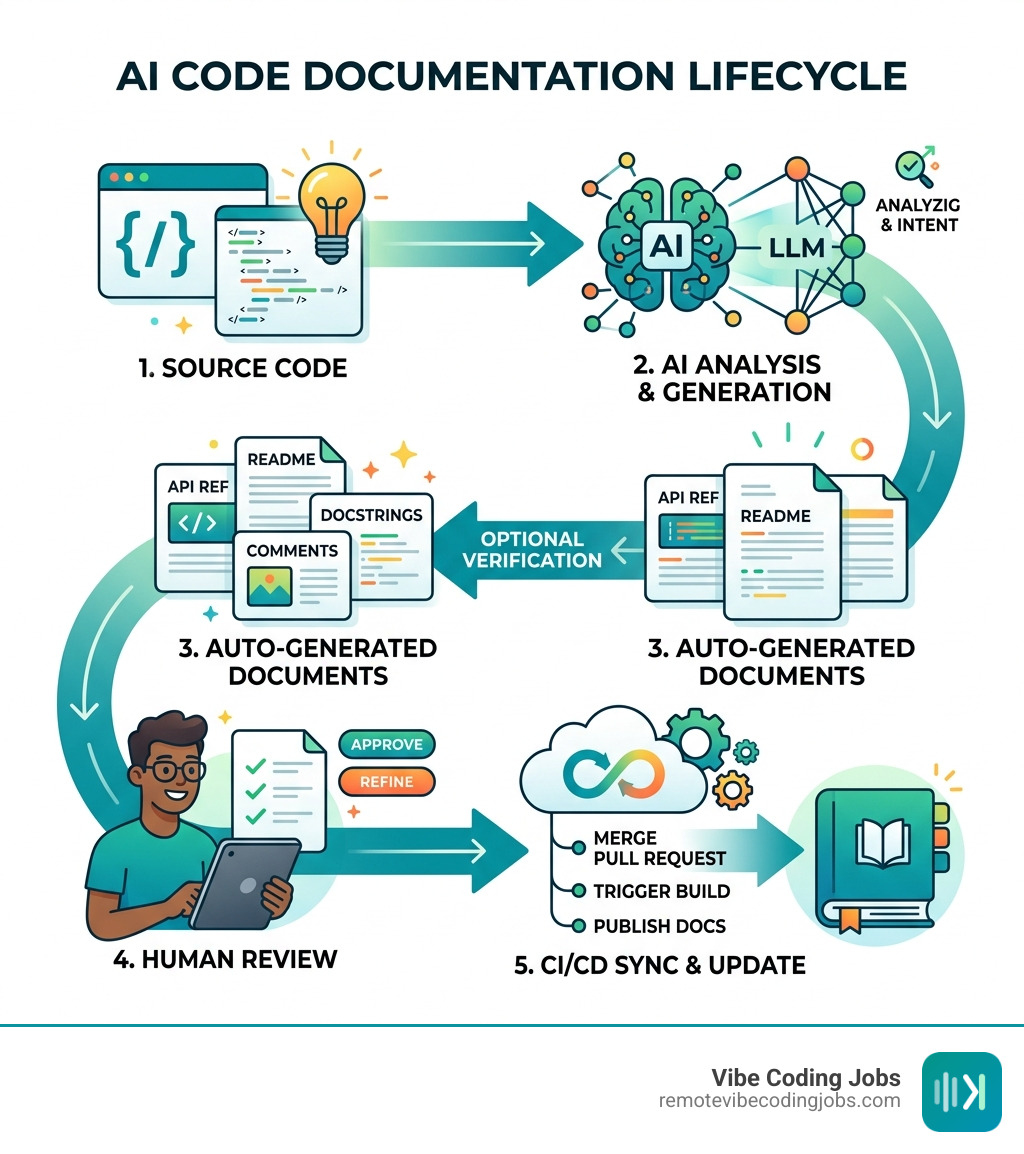
The process usually follows four simple steps:
- Context Gathering: The AI reads the source code, associated comments, and sometimes even your Jira tickets or Slack conversations.
- Analysis: The model identifies the “what” (logic) and tries to infer the “why” (business purpose).
- Generation: Using natural language processing, the AI writes the documentation in your preferred format (Markdown, JSDoc, etc.).
- Integration: The documentation is inserted as inline comments, saved as a README, or pushed to a knowledge base like Confluence.
By April 2026, we’ve moved past simple “summarizers.” Today’s agents can generate full UML diagrams, create Swagger-compliant API docs, and even suggest unit tests based on the documentation they just wrote.
The Core Benefits of AI Code Documentation
Why should we care about automating this? Aside from the obvious “I hate writing READMEs” factor, the data shows a massive impact on team velocity and health.
The most striking benefit is the sheer time-saving aspect. Research shows that teams using AI coding assistants have reduced the time spent on documentation by an average of 59%. In one test, an AI tool summarized nine undocumented JavaScript files (each over 1,000 lines) in about 12 seconds per file. A human developer would have taken at least 3 minutes per file just to skim and summarize, and that’s being generous!
Other major benefits include:
- Consistency: AI doesn’t get tired. It follows the same style and structure across 100 repositories, ensuring your docs don’t look like a patchwork quilt of different developer “vibes.”
- Closing Knowledge Gaps: When a senior dev leaves the company, their “tribal knowledge” often goes with them. AI can document those systems before they leave, preserving the “why” behind the code.
- Faster Onboarding: New hires can use AI assistants to “ask” the codebase questions. Instead of bothering a lead dev, they can query the AI: “Where is the authentication logic handled?”
- Compliance and Audit Readiness: For teams in regulated industries, having up-to-date docs isn’t a luxury — it’s a legal requirement. AI ensures you stay audit-ready without manual heroics.
As noted in the AI Code Documentation: Benefits and Top Tips – IBM report, AI helps streamline the modernization of aging systems by parsing and mapping dependencies that might have been forgotten decades ago.
Streamlining Legacy Systems with AI Code Documentation
Legacy code is the “dark matter” of the software world. It’s everywhere, it’s heavy, and nobody wants to touch it because it might break the entire company. Documenting these systems is notoriously difficult because the original authors are long gone, and the logic is often “tangled” (spaghetti code, anyone?).
AI is a game-changer here. It can act as a “code archaeologist,” digging through 40-year-old FORTRAN or COBOL and explaining it in modern English. While human developers might struggle to see the intent behind a hacky workaround from 1998, an LLM can recognize patterns and say, “This looks like a manual memory management fix for a specific hardware limitation.”
For those of us in the “vibe coding” world — where we use AI to move fast and stay in the flow — documenting legacy debt is the only way to ensure our new, shiny AI-generated features actually play nice with the old systems. You can find More info about AI coding tools for vibe coding to see how modern agents handle these complex environments.
Top AI Tools for Documenting Legacy and Modern Code
The market for ai code documentation has exploded. We’ve moved from simple “comment generators” to full-blown documentation platforms.

| Tool | Primary Use Case | Key Feature | Pricing Model |
|---|---|---|---|
| DocuWriter.ai | Enterprise Repositories | Batch documentation for 100+ repos | Credit-based / Enterprise |
| CodeGPT | IDE Productivity | Right-click “Document” in VS Code | Free tier / Paid Pro |
| Gemini Code Assist | Google Cloud / Enterprise | Huge context window (1M+ tokens) | Standard & Enterprise |
| OpenAI Codex | Agentic Engineering | Powering ChatGPT’s coding capabilities | Included in ChatGPT Plus/Pro |
| Code Summary | GitHub Automation | Voice AI “Talk to your code” | Free / Pro / Teams |
| Cursor | AI-Native Coding | .cursorrules for project-wide style | Free / Pro / Business |
DocuWriter.ai for Enterprise Repositories
If you are a CTO looking at a mountain of undocumented repositories, AI Code Documentation Tool – Generate Docs from Code | DocuWriter.ai is a powerhouse. It’s not just for small snippets; it’s designed for scale.
In one real-world case study, the tool helped a company document over 100 repositories in just 5 weeks. A manual estimate for that same task was roughly 6 months. To date, this platform has saved developers over 316,000 hours of manual writing. It also handles specialized tasks like generating Swagger-compliant JSON for APIs and creating unit test suites in Chai or Sinon.
CodeGPT and IDE Integration
For the developer who wants help right now inside their editor, CodeGPT is a favorite. It integrates directly into VS Code, allowing you to highlight a block of code, right-click, and select “Document CodeGPT.”
It supports over 100 programming languages and allows you to choose which model you want to use — whether it’s GPT-4, Claude, or a specialized documentation model. This makes it one of the Top AI Code Completion Tools for VSCode in 2024 (and still a leader in 2026).
Gemini Code Assist and Google Cloud
Google’s entry into the space, Gemini Code Assist, is built for the enterprise. Its standout feature is its massive context window. While some tools can only “see” a few files at a time, Gemini can ingest your entire codebase.
This allows it to provide Gemini Code Assist overview | Google for Developers insights that are deeply contextual. It can explain how a change in your frontend “buttons” component might affect a specific API call in the backend, and document that relationship automatically.
OpenAI Codex and Agentic Engineering
Codex is the engine behind many of the world’s most popular AI coding tools. Integrated into ChatGPT’s various tiers, Codex | OpenAI Developers is what enables “agentic engineering.”
By 2026, Codex (now often referenced alongside GPT-5 models) doesn’t just write code; it reasons through it. It can read a complex, legacy system and explain the “authorial intent” — the why behind the architecture — which is the holy grail of documentation.
Code Summary for GitHub Automation
AI Code Documentation Tool — Auto-Generate Docs from GitHub | Code Summary takes a different approach by connecting directly to your GitHub as an app. It ensures your docs are perpetually in sync. Every time you push code, the documentation is regenerated.
Their most unique feature is Voice AI. You can literally talk to your codebase. You might ask, “How do we handle Slack notifications for deployments?” and the AI will use its generated documentation to walk you through the logic, even identifying early conflicts before you write a single line of new code.
Cursor: The AI-Native Editor
We can’t talk about vibe coding without mentioning Cursor. It’s a fork of VS Code that treats AI as a first-class citizen rather than a plugin. With features like .cursorrules, you can define exactly how you want your documentation to look across the whole project.
If you’re ready to dive in, check out our Vibe Coding with Cursor Tutorial: Unleash Your AI Coding Potential. It’s the go-to tool for developers who want the AI to handle the “boring stuff” like docstrings while they focus on high-level architecture.
Security, Privacy, and Best Practices
One of the biggest hurdles for ai code documentation is the “Is my code safe?” question. No enterprise wants their proprietary trade secrets ending up in a public training set for a future LLM.

In 2026, the industry has responded with several security layers:
- Zero-Retention Policies: Tools like DocuWriter.ai and OpenCode process code temporarily and delete it immediately after the docs are generated.
- On-Premise & Air-Gapped Deployment: For highly sensitive sectors (defense, banking), many tools offer local versions that don’t require an internet connection.
- Data Governance: Enterprise versions of Gemini and CodeGPT provide IP indemnification and VPC-SC support to ensure data stays within your cloud perimeter.
However, a word of caution: AI isn’t perfect. There’s a famous Reddit thread where developers debated whether AI-generated docs are actually useful or just “noise.” The consensus? If the AI just says int x; // declare integer x, it’s useless. The value comes when the AI explains the business logic.
Best Practices for Accurate AI Code Documentation
To make sure your ai code documentation is actually helpful, follow these “vibe coder” rules:
- Human Oversight is Mandatory: Never “set and forget.” AI can hallucinate or miss subtle edge cases. Always have a human review the output.
- Focus on the “Why,” not the “What”: We can see what the code does by reading it. Use your AI prompts to ask for the intent. “Explain why we are using a recursive approach here instead of a loop.”
- Integrate with CI/CD: Don’t let your docs go stale. Use tools that regenerate documentation on every Pull Request.
- Use Templates: Provide the AI with a style guide. If you want JSDoc format with specific tags for
@authorand@deprecated, tell it! - Feed it High-Level Context: Don’t just give the AI code. Give it your architecture diagrams and PRD (Product Requirement Documents). This helps it write docs that actually make sense to the business.
For teams looking to build a full suite of these capabilities, exploring Vibe Coder Toolkit Services can help you set up the right infrastructure for automated documentation.
Frequently Asked Questions about AI Code Documentation
Can AI handle undocumented legacy code?
Yes, and this is actually where it shines most! AI tools can parse “spaghetti code” and aging languages like COBOL or PowerBuilder. By analyzing the flow of data and the structure of the logic, it can create a “knowledge graph” of the system, making it much easier for modern developers to understand and refactor.
Is my source code safe with these tools?
Most professional-grade tools offer “Privacy Mode” or “Enterprise Tiers” where your code is never used to train their models. Always check for “Zero-Retention” policies. For ultimate security, look for tools that support local LLMs (like Aider or OpenCode) so your code never leaves your machine.
Does AI documentation replace human developers?
Not at all. It replaces the tedium of documentation. A human is still needed to verify accuracy, define the high-level “why,” and ensure the documentation aligns with the actual business goals. Think of it as having a very fast, very eager junior developer who writes the first draft for you.
Conclusion
The era of the “undocumented codebase” is coming to an end. In 2026, ai code documentation has become a standard part of the developer’s toolkit, allowing us to spend less time typing comments and more time solving interesting problems. Whether you’re a solo “vibe coder” using Cursor or an enterprise lead managing 1,000 repositories with DocuWriter.ai, the benefits are undeniable: faster onboarding, less technical debt, and a much happier engineering team.
At Remote Vibe Coding Jobs, we believe that mastering these AI tools is the key to landing the best remote roles at forward-thinking, async-first companies. If you’re ready to take your career to the next level and work with a tech stack that actually embraces the future, we’re here to help.
You can Find the best AI coding tools for vibe coding and browse our curated list of remote jobs where “vibe coding” isn’t just allowed — it’s encouraged. Happy coding!