Why Teams That AI Generate Code Ship Faster
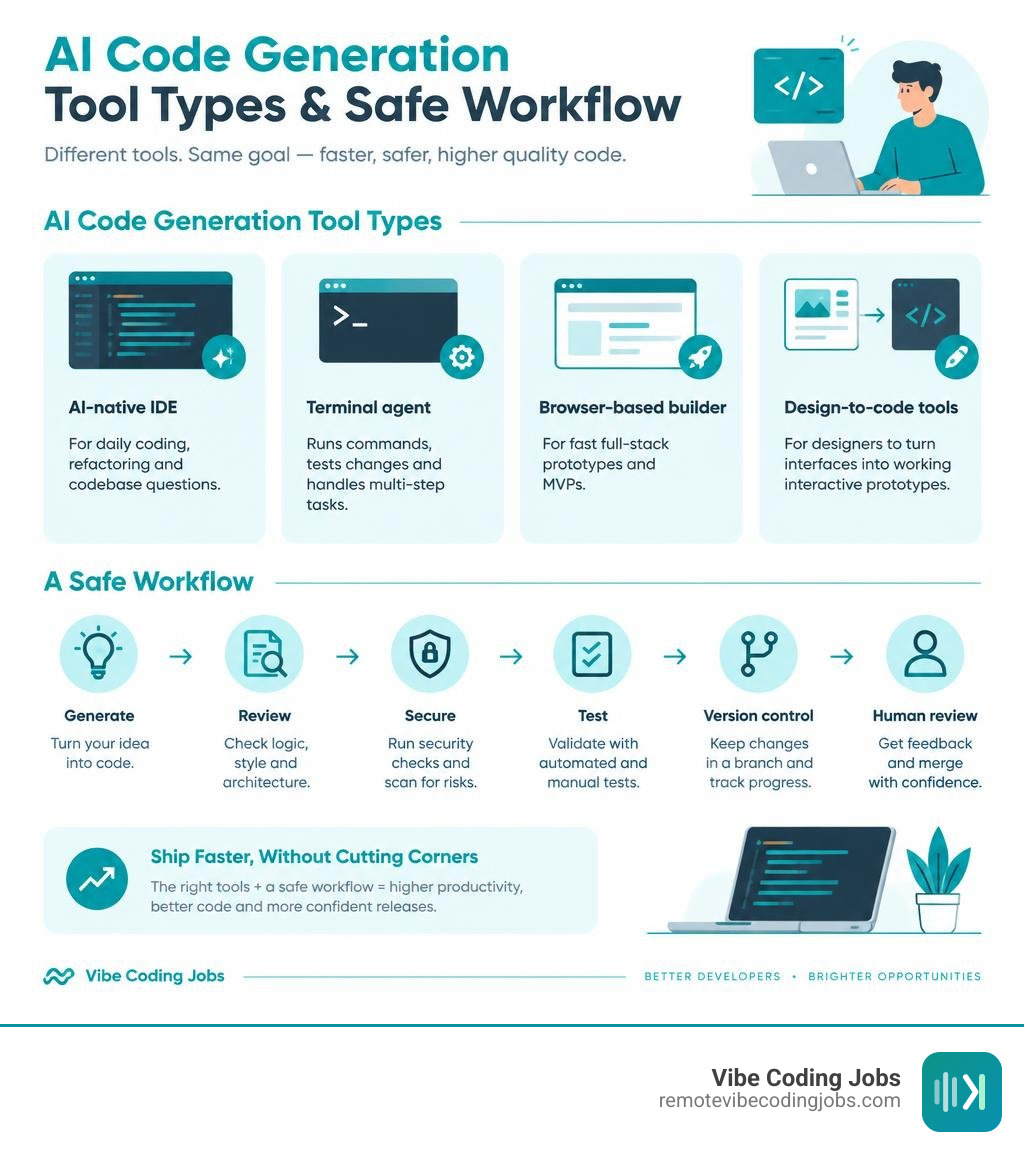
Teams that use AI code generators can move faster because the tools handle repetitive work, explain unfamiliar code, draft tests, and make changes across files. The best choice depends on how you work:
- Use an AI-native IDE for daily coding, refactoring, and codebase questions.
- Use a terminal agent when you want the AI to run commands, test changes, and work through multi-step tasks.
- Use a browser-based builder for fast full-stack prototypes and MVPs.
- Use design-to-code tools when a designer needs to turn an interface into a working interactive prototype.
This does not mean teams can safely ship unreviewed output. AI-generated code still needs tests, security checks, version control, and human review. But it can remove the blank-page problem and shorten the path from ticket to pull request. Developers using AI pair programmers report productivity gains of up to 55% without a reported drop in quality, while users also report higher job satisfaction.
The bigger shift is from autocomplete to agentic development. Instead of suggesting the next line, newer tools can read repository context, propose a plan, edit several files, run tests, and prepare changes for review. That makes them especially useful for remote, async teams where clear context and fewer handoffs matter.
I’m Dominic Zijlstra, a technologist, entrepreneur, former data scientist, DevOps engineer, and communications systems engineer. My work building automated systems and data infrastructure gives me a practical view of how teams can use AI to generate code without giving up reliability, review, or ownership.
How AI Code Generation Actually Works: Under the Hood
Modern development teams no longer rely on simple regex snippets or rigid boilerplate engines. Instead, cloud-scale machine learning systems synthesize production-ready implementations directly from plain English requirements. To understand how platforms analyze repository structures and create functional software, you can review this foundational guide on AI Code Generation: Definition, Uses and Tools.
At its core, code synthesis relies on large language models trained on billions of lines of open-source source code, language specifications, software engineering documentation, and pull requests. When you ask an assistant to solve a technical problem, the system parses your instructions alongside the contextual signals of your environment to determine the most statistically coherent implementation.
How Modern Transformer Models AI Generate Code
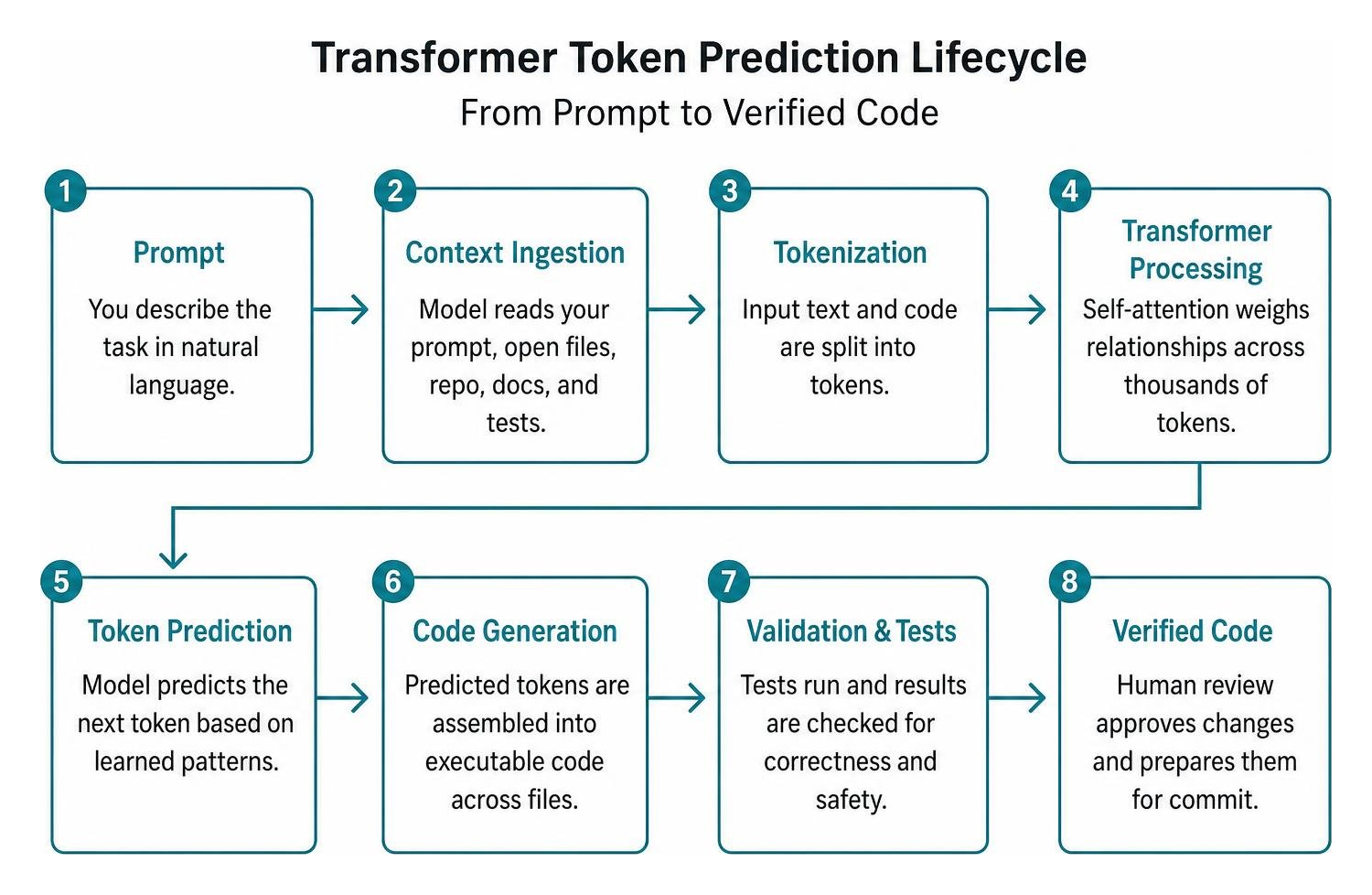
Transformer models utilize self-attention mechanisms to weigh relationships between programming concepts across thousands of lines of context simultaneously. When you use tools to ai generate code, the underlying model breaks your natural language prompt and active files into discrete numerical fragments called tokens.
Rather than executing deterministic logic rules, the model computes the probability distribution of subsequent tokens based on patterns mastered during pre-training. Modern models support context windows ranging from 32,000 to over one million tokens, enabling the assistant to ingest entire monorepos, database schemas, and external API documentation before outputting a single line of code.
Advanced systems also combine hierarchical context pruning with vector embeddings to ensure that only relevant module signatures, types, and interface contracts are passed into the prompt. This repository-wide context awareness eliminates hallucinated variable names and ensures strict type adherence across interconnected dependencies.
The Evolution from Autocomplete to Autonomous AI Agents
The developer tooling landscape has advanced dramatically from single-token inline suggestions to end-to-end agentic workflows. Early pair programmers functioned strictly as smart autocompletion engines, predicting the next few characters on an active line.
In contrast, modern agents operate with task-level autonomy:
- Context Gathering: Reading open tabs, project configurations, and external documentation via Model Context Protocol (MCP) integrations.
- Architectural Planning: Deconstructing complex features into step-by-step implementation plans before touching the codebase.
- Multi-File Execution: Editing controllers, database models, and client components in a single transactional operation.
- Verification Loops: Executing shell commands, interpreting terminal errors, running automated test suites, and refactoring failing implementations without human intervention.
This transformation underpins the cultural shift toward vibe coding vs traditional coding, where software engineers act as technical directors and architectural reviewers rather than line-by-line syntax typists.
The Best Platforms to AI Generate Code in 2026: Complete Roundup
Selecting the right coding assistant requires matching your technical workflow with the appropriate architectural category. Modern tools fall into four distinct operational environments: integrated desktop editors, command-line terminal agents, rapid browser-based application builders, and design-centric visual converters.

The landscape features specialized tools optimized for different phases of the software development lifecycle:
| Platform Category | Core Tools | Primary LLM Engines | Key Strengths | Starting Pricing |
|---|---|---|---|---|
| AI-Native IDEs | Cursor, Windsurf, Zed | Claude 3.5 Sonnet, GPT-5.6, Gemini 3 Pro | Multi-file edits, codebase indexing, custom project rules | Free tier; $10–$20/month |
| Terminal Agents | Claude Code, Warp, Aider | Multi-model routing, Anthropic Claude, OpenAI | CLI integration, computer use, script automation | Free / BYO-API credits |
| Web Builders | Bolt.new, Lovable, v0 | Multi-LLM browser runtimes | Prompt-to-full-stack deployment, instant UI preview | Free tier; $20–$25/month |
| Design-to-Code | Figma Make, Canva Code | GPT-5.6, proprietary multimodal | Direct UI export, interactive prototypes, zero setup | Free tiers available |
AI-Native IDEs: Cursor, Windsurf, and Zed
AI-native editors build intelligence directly into the workspace rather than relying on secondary sidebar plugins. Leading AI coding tools provide deep codebase indexation, making them the standard choice for daily engineering work.
Cursor remains a favorite among high-velocity software engineers due to its seamless VS Code fork foundation and robust repository indexing. With features like project-level .cursorrules, developers can enforce enterprise coding conventions, style guides, and framework constraints across every AI interaction. Cursor’s Background Agents can independently review GitHub issues, branch repositories, and draft complete pull requests.
Windsurf and Zed provide compelling alternatives. Windsurf excels at deep contextual tracking across asynchronous workflows, maintaining state across extended programming sessions. Zed emphasizes raw performance, minimal memory footprints, and multi-model switching, delivering sub-millisecond editor responsiveness alongside integrated AI pair programming.
Terminal Agents and CLI Tools: Claude Code, Warp, and Aider
For engineers who prefer the command line, terminal-first AI agents provide unparalleled speed, system-level execution, and automation. You can explore a deep comparison of command-line agents and editor assistants in our breakdown of Claude Code vs Copilot for Developers in 2026.
Modern CLI platforms turn natural language terminal prompts into automated developer operations:
- Claude Code: Operates directly inside your terminal to navigate directories, manipulate Git states, execute bash commands, and refactor multi-repo projects with agentic reasoning.
- Warp: Bridges the terminal and code editor with enterprise features like secret redaction, multi-model routing, and automated terminal debugging. Learn more about its features via Warp Code: AI-Powered Code Editor for Agents | Warp.
- Aider: An open-source command-line tool that pairs with your local Git repository to create atomic, well-documented commits for every generated code change.
Browser-Based Full-Stack Builders: Bolt.new, Lovable, and v0
Web-based generators allow developers, product managers, and founders to create complete applications without configuring local toolchains. Building reliable platforms with these tools requires understanding scalable AI coding infrastructure to handle hosting, containerization, and data persistence.
Bolt.new and Lovable utilize in-browser WebContainer runtimes to scaffold frontend frameworks, configure Node.js backend endpoints, establish database connections, and deploy live URLs in minutes. Users can review the AI’s architectural plan before execution, making iterative prototyping intuitive.
Similarly, v0 by Vercel specializes in generating accessible, modern React components styled with Tailwind CSS and shadcn/ui, ready for one-click export into production web applications.
Design-to-Code Platforms: Figma Make and Canva Code
The boundary between interface design and software engineering has blurred through visual code generators. Designers can now generate interactive front-end code using tools like the Free AI Code Generator in Figma Make.
These platforms convert design frames into responsive HTML, CSS, and TypeScript components backed by real data bindings. According to industry surveys, 80% of designers who increased their AI tool adoption reported significant improvements in cross-functional collaboration with developers.
Similarly, Canva Code allows non-technical creators to build interactive calculators, widgets, and embeddable web apps using natural language and voice input, connecting seamlessly with spreadsheets and internal business tools.
Real-World Productivity, Team Velocity, and Security Controls
The business impact of automated code generation extends across every engineering metric. Research on developer productivity demonstrates that software engineers using AI pair programmers complete tasks up to 55% faster without compromising code quality, while enterprise rollouts at firms like Grupo Boticário have achieved measured productivity increases of 94%.

Teams adopting enterprise pair programming tools consistently report up to 75% higher job satisfaction, as automated syntax drafting frees developers from repetitive boilerplate and unblocks complex debugging sessions.
Best Prompting Practices to AI Generate Code Safely
Generating robust, maintainable code requires structured, context-rich prompting techniques. Reviewing official implementation guidelines on Code generation | OpenAI API reveals several essential practices for obtaining deterministic, production-grade output:
- Provide Clear Context and Interfaces: Explicitly state your target programming language, framework versions, and public API signatures before requesting functional code.
- Define Strict Constraints: Specify edge cases, performance boundaries, thread-safety requirements, and external package restrictions (e.g., “Use standard library only; do not introduce external dependencies”).
- Include Sample Input and Output Payloads: Supply mock JSON structures or unit test fixtures to anchor the model’s logical reasoning.
- Demand Test Suites in the Initial Prompt: Instruct the model to write corresponding unit tests using frameworks like Jest, PyTest, or Go test alongside the implementation logic.
Enterprise Data Privacy, Model Governance, and Code Quality
Deploying AI coding assistants across remote teams requires strict governance to safeguard intellectual property:
- Secret Redaction: Real-time regex filters strip API tokens, database passwords, and private keys before terminal prompts reach LLM servers.
- Zero Data Retention Agreements: Enterprise licenses prevent third-party AI vendors from training public foundation models on proprietary codebases.
- Bring-Your-Own-LLM (BYO-LLM): Organizations can route sensitive code through private VPC deployments or self-hosted models to comply with strict regulatory frameworks.
- Code Reference and License Filtering: Real-time scanning identifies code snippets resembling public open-source repositories, mitigating software license and copyright liabilities.
- Automated CI/CD Validation: AI-generated code should pass mandatory linters, static analysis, security scans, and regression test suites before merging into trunk branches.
Frequently Asked Questions About AI Code Generation
Can AI code generators handle full-stack architectures and databases?
Yes. Advanced AI code generators can design normalized SQL schemas, generate migration files for ORMs (like Prisma or Drizzle), construct REST and GraphQL API routes, and wire up reactive client-side state management. When creating complex full-stack applications, the best practice is to prompt the AI step-by-step: first establish the data schema, then scaffold backend routes, and finally build frontend interfaces.
How do developers debug and maintain AI-generated code?
Developers debug AI-generated code by combining automated unit test suites with iterative conversational prompts. By providing runtime stack traces, compiler errors, and expected versus actual outputs back to the AI assistant, the model can identify logic errors, null pointer exceptions, or off-by-one bugs. Human oversight and rigorous code review remain essential to verify architectural integrity and maintainability.
Do non-technical team members need coding experience to use AI code generators?
No. Web-based builders and design-to-code platforms allow non-technical founders, product managers, and designers to create functional web tools, landing pages, and interactive prototypes using plain English prompts. However, deploying scalable enterprise-grade applications with complex security, authentication, and database requirements still benefits from software engineering expertise.
Conclusion: The Future of Software Engineering
AI code generation is transforming modern software engineering from a manual syntax-typing discipline into an agile architectural orchestration process. Engineering teams that embrace agentic coding, multi-model terminals, and rapid browser prototyping build faster, eliminate development backlogs, and ship higher-quality products with unprecedented velocity.
As async-first companies transition to this new development standard, the demand for developers skilled in AI-assisted workflows continues to surge. At RemoteVibeCodingJobs, we track and curate daily remote engineering opportunities at companies building at the frontier of technology. Explore our comprehensive directory of essential AI coding tools for modern workflows to master the platforms shaping the future of remote software development.