Why Purpose-Built Remote Pairing Tools Outperform Generic Meeting Apps
The best remote pairing tools available in July 2026 are:
| Tool | Type | Best For |
|---|---|---|
| Tuple | Desktop screen sharing | Low-latency, high-res pairing on Mac/Windows |
| Hopp | Open-source desktop | Free, self-hostable team pairing |
| VS Code Live Share | Editor plugin | In-editor collaboration without repo cloning |
| Drovio | Screen-level sharing | Any IDE, up to 10 participants |
| RawPair | Self-hosted container | Secure mob programming and technical interviews |
| tmux + SSH | Terminal-based | Zero-bandwidth, ultra-low latency pairing |
| Pair-Claude | Terminal sharing | AI-assisted collaborative coding sessions |
Writing code is hard. Writing code alone — especially when you’re stuck — is harder. And writing code remotely with a teammate over a laggy, blurry video call? That’s where productivity goes to die.
The good news: a new generation of dedicated pairing tools has made remote collaboration genuinely enjoyable. According to the Jamstack Community Survey, 61% of developers strongly agree they like remote work, and more than half would rather quit than return to the office full-time. The tools have to keep up.
Generic meeting apps like Zoom or Google Meet were built for conversation, not for reading a tiny programming font in someone else’s editor. Dedicated pairing tools solve this with sub-100ms interaction latency, high-resolution screen sharing, and seamless shared control — the three things that separate a flow state from a frustrating session.
This guide cuts through the noise and shows you exactly which tool fits which workflow.
I’m Dominic Zijlstra, co-founder of Adaptify.ai and a former DevOps engineer and data scientist — someone who has spent years building distributed systems and knows how the right remote pairing tools can make or break a collaborative coding session. Read on for a practical breakdown of every major category, from open-source alternatives to AI-native terminal sharing.
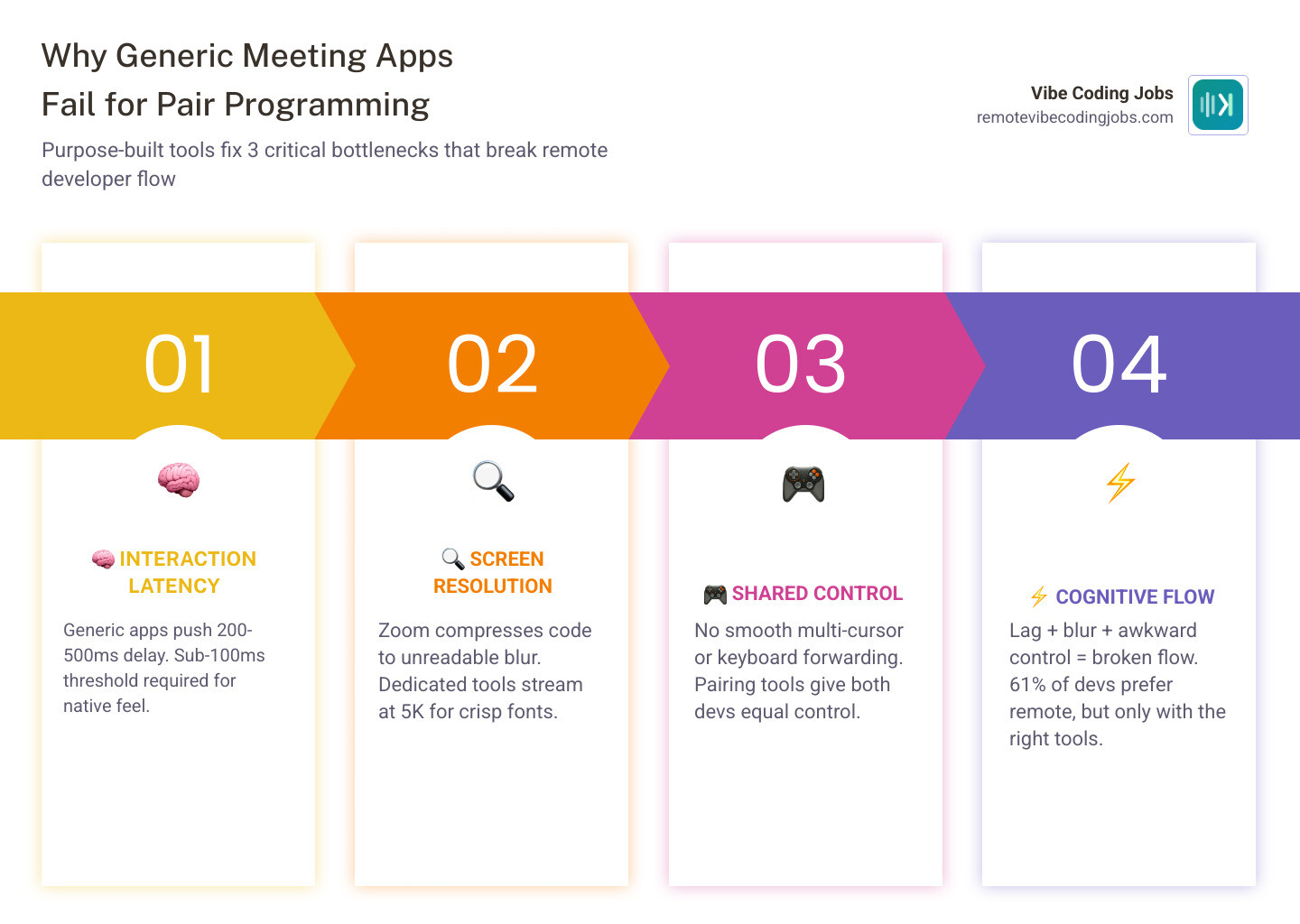
When we try to pair program over generic video conferencing apps, we immediately hit three major technical walls: latency, resolution, and control.
First, let’s talk about latency. According to Apple’s Human Interaction guidelines, interaction latency must remain below 100 milliseconds for remote control to feel local and native. When you click, type, or scroll, any delay above this threshold breaks your cognitive flow. Generic meeting apps are optimized for video stream compression and voice prioritization, regularly pushing latency up to 200 or 500 milliseconds. Purpose-built remote pairing tools target sub-100ms interaction latency, ensuring that typing on a teammate’s machine feels like typing on your own.
Second, text readability is paramount. Standard video tools compress screen sharing to save bandwidth, turning a 10-point coding font into a blurry soup of pixels. Dedicated pairing software streams in razor-sharp high resolution (up to 5K), allowing you to read tiny syntax details and subtle UI changes without straining your eyes.
Finally, generic tools handle control hand-offs poorly. They rely on a clunky “request control” prompt that freezes one user out while the other takes over. Modern pairing tools offer true multiplayer collaboration with multi-cursor support. Both developers can type, highlight, and navigate simultaneously with separate, color-coded cursors.
Choosing the right platform is about preserving your team’s mental energy. To see how these communication tools fit into a broader development stack, check out our Remote Work Tools for Developers Compared 2026 Guide.
The Four Main Categories of Collaborative Coding Software
To choose the right tool, we first need to understand the architectural landscape. Remote collaboration software generally falls into four distinct categories, each offering a different balance of control, resource usage, and flexibility.
| Category | How It Works | Key Advantage | Key Disadvantage |
|---|---|---|---|
| Screen Sharing & Desktop Control | Streams the host’s entire desktop or specific window with remote input. | Zero IDE setup; works with any desktop app or dashboard. | Higher bandwidth and CPU usage; requires reliable internet. |
| Editor Plugins & LSP Mirrors | Synchronizes file states and cursor positions directly inside the IDE. | Low bandwidth; allows personalized themes and local settings. | Confined strictly to the editor; cannot see terminal or browser. |
| Web-Based Editors | Runs a shared development environment entirely inside a browser. | Zero-install guest access; isolated sandboxed environments. | Vendor lock-in; forces developers out of their local setups. |
| Terminal-Based Sharing | Multiplexes a command-line session over SSH or a lightweight protocol. | Extremely fast; works over poor connections; zero GUI overhead. | Limited to text-only terminal applications and CLI editors. |
To build an efficient remote setup, you can explore how these categories align with other engineering utilities in our Remote Developer Tools Stack 2026.
Screen Sharing and Desktop Control Remote Pairing Tools
If your workflow frequently spills outside the text editor — such as checking database managers, inspecting browser developer tools, or reviewing API payloads — desktop-level screen sharing is the gold standard.
The undisputed leader in this category is Tuple: the best remote pair programming app on macOS and Windows . Built from the ground up on a natively compiled, cross-platform C++ engine, Tuple bypasses the heavy CPU and RAM footprint characteristic of Electron-based apps. It supports up to 5K resolution streaming, offers instantaneous one-click control swapping, and includes drawing tools for on-screen annotations.
Another powerful option is Drovio, which supports up to 10 participants simultaneously, each with their own mouse cursor. This makes it an exceptional choice for mob programming sessions and collaborative debugging. CoScreen also offers a unique window-centric approach, letting you share individual application windows on a joint virtual desktop rather than exposing your entire screen.
To protect developer privacy, premium tools in this space implement security features like App Veil, which automatically hides sensitive applications and incoming notifications from your pairing partner.
Editor Plugins and LSP-Based Remote Pairing Tools
If you prefer to keep your hands strictly inside your local development environment, editor-native plugins are the way to go. Instead of streaming video pixels, these tools transmit lightweight text diffs and cursor coordinates, allowing your partner to navigate your codebase using their own local theme, keybindings, and plugins.
Visual Studio Live Share is the most prominent tool in this space. It allows multiple developers to co-edit, share terminals, and debug collaboratively without forcing guests to clone the repository or install local SDKs.
For teams looking for an editor-agnostic approach, open-source projects like stevearc/pair-ls leverage the Language Server Protocol (LSP). By acting as an LSP-based file mirror, it allows one developer to stream their active workspace in a lightweight, read-only format to any peer, regardless of whether they use Neovim, VS Code, or Emacs. This approach is incredibly light on system resources and keeps the focus entirely on the code.
As software development increasingly incorporates machine learning, these editor-centric workflows tie directly into modern AI environments. Learn more about optimizing your local workspace with our guide on Remote Developer AI Tools.
Open-Source vs. Proprietary: Finding the Best Free Alternatives
While proprietary tools offer polished out-of-the-box experiences, the open-source community has delivered world-class, self-hostable alternatives that give engineering teams complete control over their data, security, and infrastructure.
A standout in the open-source ecosystem is Hopp: The best OSS remote pair programming app . Hopp is a high-performance, real-time pairing stack built on LiveKit’s network infrastructure and fine-tuned using libwebrtc. It supports up to 10 people in a single room with full multi-cursor control, crystal-clear audio, and screen annotations. Because it is open-source, teams can self-host the entire platform or utilize a Bring Your Own Keys (BYOK) model to eliminate licensing costs while maintaining absolute data privacy.
For teams requiring isolated development environments, GitHub – rawpair/rawpair at 79c34c4fc47534e77c5b929fb788c32eeb9350cb · GitHub offers an incredible self-hosted solution. RawPair spins up clean, containerized development environments on your own infrastructure. It combines an Elixir-powered Phoenix backend, a Monaco-based code editor, and the Yjs CRDT library for real-time collaborative editing. By running sessions in isolated Docker containers, RawPair ensures that guest developers can interact with a shared terminal and codebase without gaining access to the host’s physical machine.
Terminal-Based Pairing vs. IDE Collaborative Editing
For terminal purists and command-line enthusiasts, the debate between terminal-based multiplexing and IDE-native collaborative editing remains highly relevant.
The traditional terminal pairing setup relies on tmux and SSH. By hosting a tmux session on a shared server or local machine, multiple developers can attach their terminals to the same session.
This approach has distinct advantages:
- Zero Bandwidth Overhead: Because you are only transmitting text characters, it works flawlessly on slow or unstable internet connections.
- No Input Lag: Keystrokes register instantly, bypassing the video compression lag of screen sharing.
- Unified Environment: Both developers share the exact same shell, environment variables, and command history.
However, terminal multiplexing comes with challenges. It requires comfortable familiarity with command-line editors like Vim or Emacs, and mismatched keyboard layouts (such as an Azerty user pairing with a Qwerty user) can cause chaotic input issues.
In contrast, IDE-native tools like VS Code Live Share allow each developer to use their preferred keyboard layouts, themes, and local settings. The downside is that Live Share is confined to the editor; if you need to step outside to debug a Docker container, check a local dashboard, or run a CLI tool not shared in the workspace, the collaboration breaks down.
With the rise of agentic AI coding assistants, terminal-based pairing has evolved. A prime example is dxfrontier/Pair-Claude , which is designed specifically for teams pairing with Claude Code. Pair-Claude wraps your local terminal session and securely shares it over your private Tailscale network (Tailnet). This allows your teammate to join your terminal session in real-time, helping you steer AI prompts, review generated code, and debug output with zero video lag.
To understand how these command-line AI setups compare to traditional autocompletion tools, read our deep dive on Claude Code vs Copilot for Developers in 2026 A Deep Dive.
Integrating Pairing Tools into Modern Developer Workflows
Pairing shouldn’t feel like an administrative chore or a forced four-hour meeting. In an async-first engineering culture, pairing is a tactical tool used to unblock complex problems, run rapid code reviews, or onboard new team members.
To integrate pairing seamlessly into your daily routine, you can leverage automated event triggers. For example, premium tools like Tuple support programmable triggers that run arbitrary scripts when calls start, join, or end. You can use these triggers to write custom automations:
- Git Co-Author Scripting: Automatically append Co-Authored-By metadata with your partner’s name and email to your Git commit templates when they join your session.
- Do Not Disturb Automation: Set up a script that automatically pauses Spotify, mutes Slack notifications, and updates your team status to “Pairing” the moment a call initiates.
- Environment Setup: Automatically open the relevant repository and launch your local development server when a session starts.
Security must remain a primary consideration. When sharing your screen, always utilize privacy filters like Tuple’s App Veil to hide sensitive applications, personal chats, and password managers. Ensure your chosen tool utilizes end-to-end encryption for all audio, video, and keystroke data so that proprietary intellectual property never touches third-party servers.
For teams looking to balance synchronous pairing with deep, uninterrupted focus, we recommend reading about the Async First Remote Developer Jobs Workflow Productivity model.
Frequently Asked Questions about Remote Pairing
What are the best practices for remote pair programming sessions?
To keep sessions productive and prevent developer fatigue, we recommend adhering to these four core practices:
- Set a Clear Time Limit: Limit active pairing sessions to 45–90 minutes. Intense collaboration requires high cognitive load, and longer sessions quickly lead to diminishing returns.
- Switch Roles Frequently: Use the Pomodoro Technique (25 minutes of work followed by a 5-minute break) or swap roles on every green test in a Test-Driven Development (TDD) cycle. Frequent rotation ensures both developers remain active and engaged.
- Establish Clear Goals: Name your virtual pairing room or session after the specific ticket you are solving (e.g., “fix-429-retry”) to keep both minds focused on a single objective.
- Invest in Audio Quality: Clear audio is more important than high-definition video. Use high-quality dedicated microphones and headsets with active echo cancellation to prevent communication fatigue.
How do remote pairing tools handle security and privacy?
Different tools handle security based on their architecture. Desktop-level tools like Tuple encrypt all audio, video, and control data end-to-end, ensuring your code never leaves your local network. They also offer features like App Veil to selectively block specific applications from being streamed.
Self-hosted open-source options like RawPair isolate sessions inside secure Docker containers, protecting your host machine’s file system. Terminal-based tools like Pair-Claude rely on secure, private mesh networks like Tailscale, securing your data natively without complex SSL/TLS setup.
Can you use remote pairing tools for AI-assisted vibe coding?
Absolutely. “Vibe coding” — using natural language and AI assistants like Cursor, Claude Code, or Copilot to generate and iterate on code — is highly collaborative. Pairing with a human while driving an AI assistant allows one developer to focus on high-level architecture and prompt engineering (the navigator) while the other monitors the generated code, runs tests, and audits the AI’s output (the driver).
Using lightweight terminal-sharing tools like Pair-Claude lets both developers co-steer AI agents in real-time, combining human oversight with rapid AI generation. To learn more about setting up these workflows, read our guide on AI Coding Tools for Vibe Coding.
Conclusion
Remote pair programming is no longer about fighting lag, squinting at blurry fonts, or struggling to pass control back and forth. With the right remote pairing tools, collaborative engineering becomes a highly engaging, frictionless experience that keeps your team in a state of flow.
Whether you choose a native desktop client like Tuple, an open-source self-hosted powerhouse like Hopp, or a lightweight terminal-sharing utility like Pair-Claude, matching the tool to your team’s specific workflow is the key to unlocking better code quality and faster onboarding.
At RemoteVibeCodingJobs, we curate daily job listings at async-first companies that prioritize modern developer ergonomics, AI-assisted development, and elite engineering cultures. If you are looking for your next remote role where you can pair with sharp teammates and leverage cutting-edge AI tools, check out our curated listings at https://remotevibecodingjobs.com/answers/best-ai-tools-for-coding and find your next remote opportunity today.