How to Build a Pro Workflow with Free Vibe Coding Tools
Why Free Vibe Coding Tools Are Dominating Developer Workflows in 2026
The best free vibe coding tools available right now include:
| Tool | Best For | Free Tier Highlights |
|---|---|---|
| Google AI Studio | Unlimited AI access | No subscription, no prompt limits |
| Base44 | Beginners, full-stack apps | 25 messages/month, 100 integration credits |
| Bolt.new | Full-stack generation | 400,000 tokens/day, 2.5M tokens/month |
| Gemmit | Local, no lock-in | 1,000 Gemini calls/day, no API key needed |
| Windsurf | Agentic AI coding | 25 prompt credits/month, 1 deploy/day |
| Cursor | Code-assist for developers | 2,000 completions free |
| p5js AI Cloud IDE | Creative and generative coding | Free GPT-5.1, Claude 4.5, Gemini access |
| Omni IDE | Local/offline, Windows | Completely free, zero telemetry |
| massCode | Snippet management, offline | Free, open source, works offline |
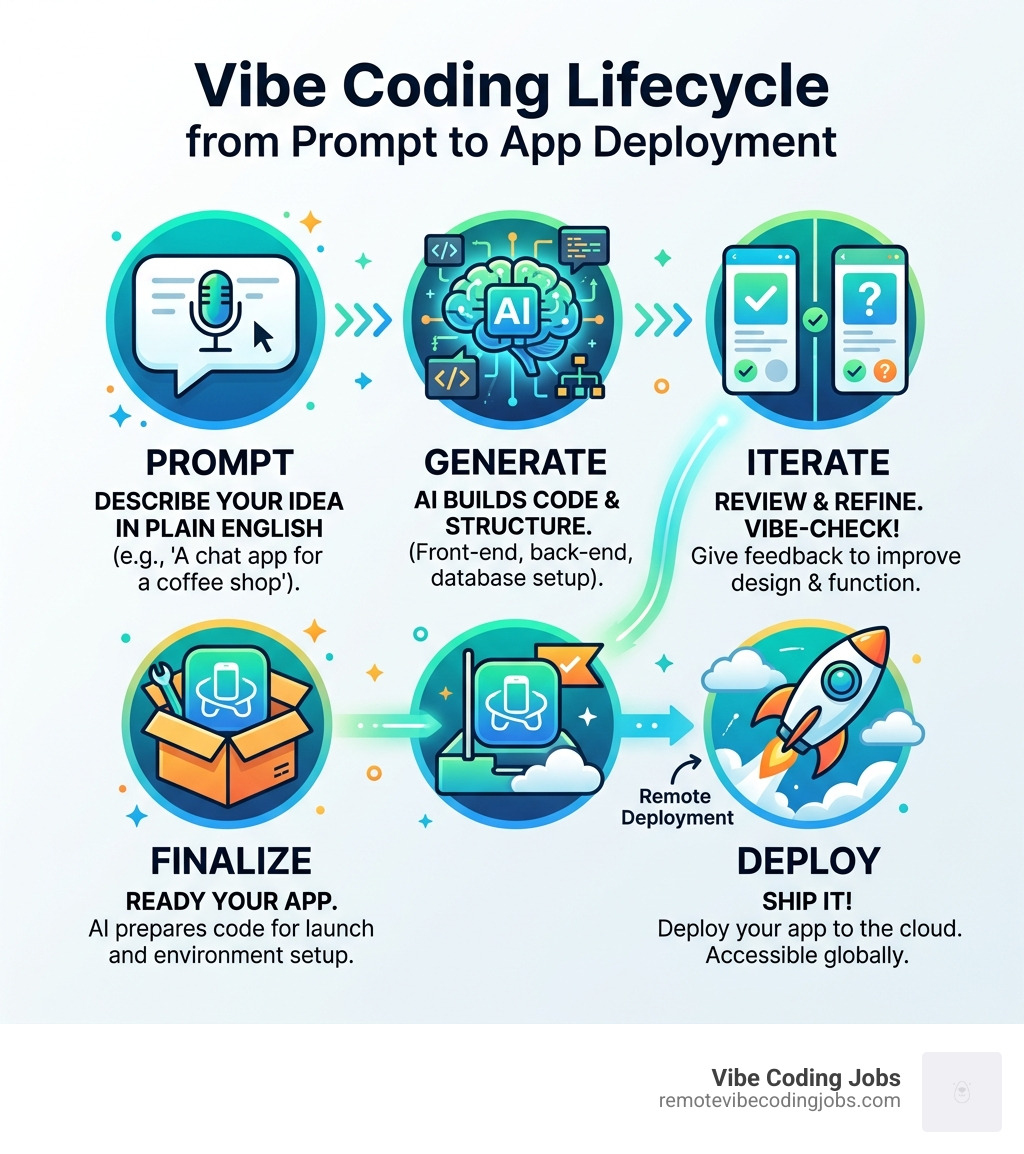
Vibe coding is simple to explain: instead of writing code line by line, you describe what you want in plain English and AI builds it for you. The term was coined by AI researcher Andrej Karpathy, and since then it has gone from a niche experiment to a mainstream development approach. Search interest alone jumped 6,700% in a single quarter in 2025 — and by 2026, roughly 41% of all new code is being written by AI.
For developers building remotely with AI-first workflows, the question is no longer whether to use these tools. It’s which ones are actually worth your time — especially when you don’t want to burn money on subscriptions before you’ve shipped anything.
The good news: the free tiers have gotten genuinely useful. Some tools, like Google AI Studio, offer unlimited access with no monthly fee at all. Others, like Base44, can generate a full-stack app — database, analytics, and all — from a single prompt on the free plan.
But free plans come with real limits: prompt caps, token quotas, deployment restrictions, and in some cases, no way to export your own code. Knowing the differences before you start building saves a lot of frustration.
We’ve done the testing and research so you don’t have to.
This guide is written by the RVCJ Editorial team at Remote Vibe Coding Jobs — covering AI-assisted development tools and remote workflows for engineers using Cursor, Claude, Copilot, Windsurf, Replit, and beyond. Our hands-on experience evaluating free vibe coding tools across real-world use cases means you get practical comparisons, not just spec sheets. Let’s get into the tools that are actually worth using.
Top-Rated Free Vibe Coding Tools for Beginners
If you are just starting your journey, the landscape of free vibe coding tools can feel like an “AI tasting board.” Some tools are designed for those with zero technical background, while others are essentially high-performance engines that require a bit of “driving” experience.
When I tested 5 vibe coding tools so you don’t have to, the results highlighted a massive “transparency gap.” Some platforms look beautiful but hide functional limitations, while others prioritize execution over marketing hype. For a beginner, the goal is “zero-friction” creation—building an app with plain English without worrying about the underlying logic or UI setup.
Best Free Vibe Coding Tools for Full-Stack Apps
For those who want to build more than just a pretty landing page, you need a tool that handles the “full stack”—meaning the frontend (what you see), the backend (the logic), and the database (where data lives).
- Base44: This is currently a top contender for the best free plan for beginners in 2026. It can generate fully functional apps, including analytics and databases, from a single prompt. The free tier is quite specific: you get 25 messages per month and 100 integration credits. It’s perfect for those who want a visual editor and a “one-shot” generation experience.
- Bolt.new: Powered by StackBlitz, this browser-based tool is a powerhouse for full-stack generation. According to Tech.co’s review of the best free vibe coding tools, Bolt.new offers a generous 400,000 tokens per day and 2.5 million tokens per month. It’s excellent for rapid prototyping, though non-coders should be careful—complex projects can burn through those tokens quickly if you aren’t specific with your prompts.
Frontend and Creative Coding Platforms
Sometimes the “vibe” is more about creativity and visuals than database management.
- p5js AI Cloud IDE: If you’re an artist or designer, this is your home. The p5js AI Cloud IDE is optimized specifically for creative coding. It offers free access to premium models like GPT-5.1 Mini and Claude 4.5 Sonnet. You can describe a “colorful particle system that follows the mouse,” and it writes the p5.js code instantly. It even includes dyslexia-friendly UI features, making it one of the most accessible free vibe coding tools available.
- v0 (by Vercel): This tool is the gold standard for generating production-ready React components. If you need a specific UI element—like a complex dashboard or a sleek navigation bar—v0 generates the code from a text description, which you can then drop into your project.
Maximizing Power with Google AI Studio and Open Source
If you want to move beyond the “walled gardens” of specific platforms, you can build a professional workflow using raw AI power and open-source flexibility.
- Google AI Studio: This is the “secret weapon” for many vibe coders. It provides completely free, unlimited access to Gemini 2.5 Flash. There are no monthly subscription fees or strict prompt limits mentioned for experimental use. It’s a “zero-friction” environment where you can describe an app, and Gemini writes the instructions, builds the UI, and sets up the logic.
- Gemmit: For those who hate vendor lock-in, Gemmit is a game-changer. It’s a free, open-source platform that runs locally on your machine. It uses the Gemini CLI to give you 1,000 free calls per day without requiring API keys or expensive hardware. Your code stays on your machine, which is a massive win for privacy.
Many developers on Reddit suggest that the best free vibe coding workflow often involves a “hybrid” approach: using Google AI Studio for the heavy lifting and then moving the code into a local editor.
Local and Offline Free Vibe Coding Tools
Privacy is a major concern in 2026. If you don’t want your code used to train future AI models, or if you need to work without an internet connection, local tools are essential.
- Omni IDE: This is a free AI code editor for Windows built on the VS Code core. It features a “hardened sandbox” that allows AI agents to autonomously run terminal commands and fix errors safely. It’s completely free, with no watermarks or telemetry.
- massCode: If you need a place to store all those AI-generated snippets, massCode is an open-source developer workspace that works entirely offline. It handles code snippets, markdown notes, and even natural-language math (like “time in Tokyo” or “$500 invested $1,500 returned”).
- Ollama: For the truly tech-savvy, running models like DeepSeek-Coder-V2 or Gemma 3 locally via Ollama allows for a completely free, private workflow that doesn’t depend on any third-party cloud provider.
Professional IDEs and Multi-Agent Workflows
As you grow, you might transition from “prompt-to-app” builders to professional Integrated Development Environments (IDEs).
- Visual Studio Code: The open-source AI code editor has evolved into a hub for “multi-agent development.” You can use free extensions to hand off tasks to AI agents that autonomously plan, make code changes, and run tests.
- Cursor & Windsurf: These are “AI-native” forks of VS Code. Cursor offers a free tier with 2,000 completions, while Windsurf provides 25 prompt credits per month and one app deployment per day. These tools are better for those who want an AI “pair programmer” rather than a tool that does everything for them.

Navigating Limitations: Credits, Tokens, and Deployment
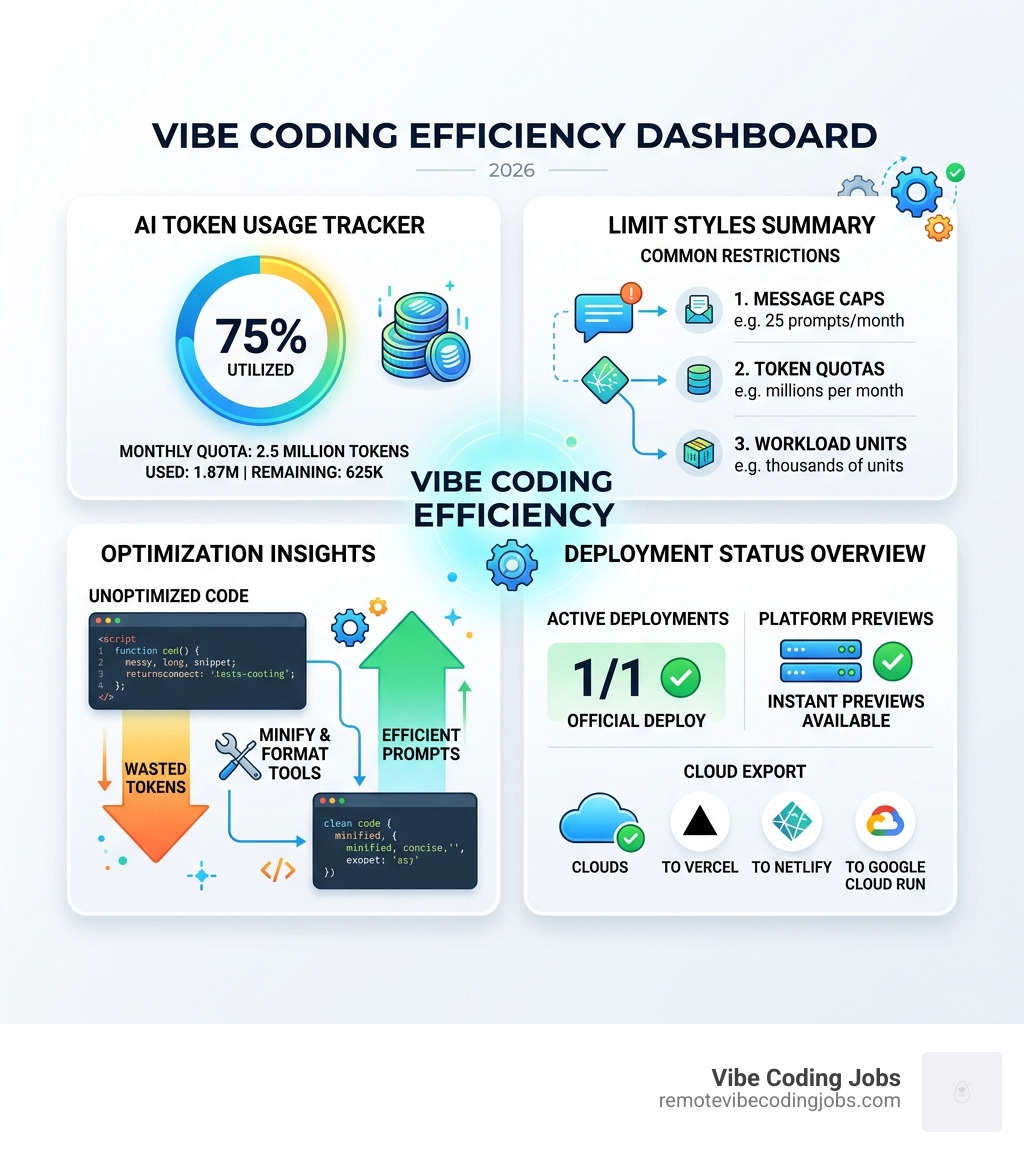
While the “vibe” is free, the computing power isn’t. Most free vibe coding tools use one of three limit styles:
- Message/Prompt Caps: (e.g., Base44’s 25 messages/month).
- Token Quotas: (e.g., Bolt.new’s 2.5M tokens/month).
- Integration/Workload Units: (e.g., Bubble’s 50,000 workload units).
To stay within these limits, we recommend using free developer tools from cod-ai.com to format and minify your code. Their suite of 55+ tools has processed over 1.5 million snippets. By keeping your code clean and validated locally, you avoid wasting precious AI prompts on simple syntax errors. These tools are WASM-powered, meaning they run at native speed in your browser with zero latency.
Another common restriction is deployment. While many tools let you build an app, “hosting” it so the world can see it often costs money. However, tools like Google AI Studio allow for one-click deployment to Google Cloud Run, and platforms like Bolt.new allow you to export code to Vercel or Netlify.
Frequently Asked Questions about Free Vibe Coding
Can I actually deploy and share apps for free?
Yes, but with caveats. Most free vibe coding tools allow you to “preview” your app instantly. For permanent hosting, you can often save your code to GitHub and use free tiers on Vercel or Netlify. Some tools, like Windsurf, allow one “official” deploy per day on their free plan. Google AI Studio is particularly generous here, allowing you to share drafts for feedback before a public launch.
Do I need to know how to code to use these tools?
In 2026, the answer is a resounding “No.” Vibe coding is specifically designed for “zero-friction” creation. You use plain English to describe your vision. However, having a basic understanding of how apps work (like knowing the difference between a button and a database) helps you write better prompts. If you hit a wall, you can usually just type “make the header blue” or “fix the login error,” and the AI handles the rest.
Which tool has the most generous free plan in 2026?
It depends on your goal. For unlimited raw AI power, Google AI Studio wins. For building a full-stack app with the least amount of effort, Base44 is the top-rated beginner choice. If you are a developer looking for a local, private workspace, Gemmit and Omni IDE offer the most freedom without monthly quotas.
Conclusion

Building a professional workflow with free vibe coding tools is entirely possible in 2026. The key is to match the tool to your skill level and your project’s needs. If you’re a complete beginner, start with Base44 or Google AI Studio. If you’re a designer, jump into the p5js AI Cloud IDE. And if you’re a developer looking for a more robust setup, Cursor or Omni IDE paired with massCode will give you a powerful, cost-effective stack.
As you outgrow free tiers, most of these platforms offer upgrade paths starting around $20/month. But for prototyping, learning, and shipping your first few “vibe-coded” projects, you don’t need to spend a dime.
At Remote Vibe Coding Jobs, we see the impact of these tools every day. The “vibe coding” revolution isn’t just about making coding easier; it’s about democratizing software creation so that anyone with a great idea can build it. Once you’ve mastered these tools and built a portfolio of AI-assisted projects, you’ll be ready for the next step.
Find remote vibe coding jobs and join the thousands of developers who are building the future of tech, one prompt at a time.