
Node.js Remote Async and the Single Thread Mystery
Why Node.js Remote Async Is the Foundation of Modern Backend Development
Node.js remote async execution is how Node.js runs commands on remote servers — over SSH or HTTP — without freezing your application while it waits for a response.
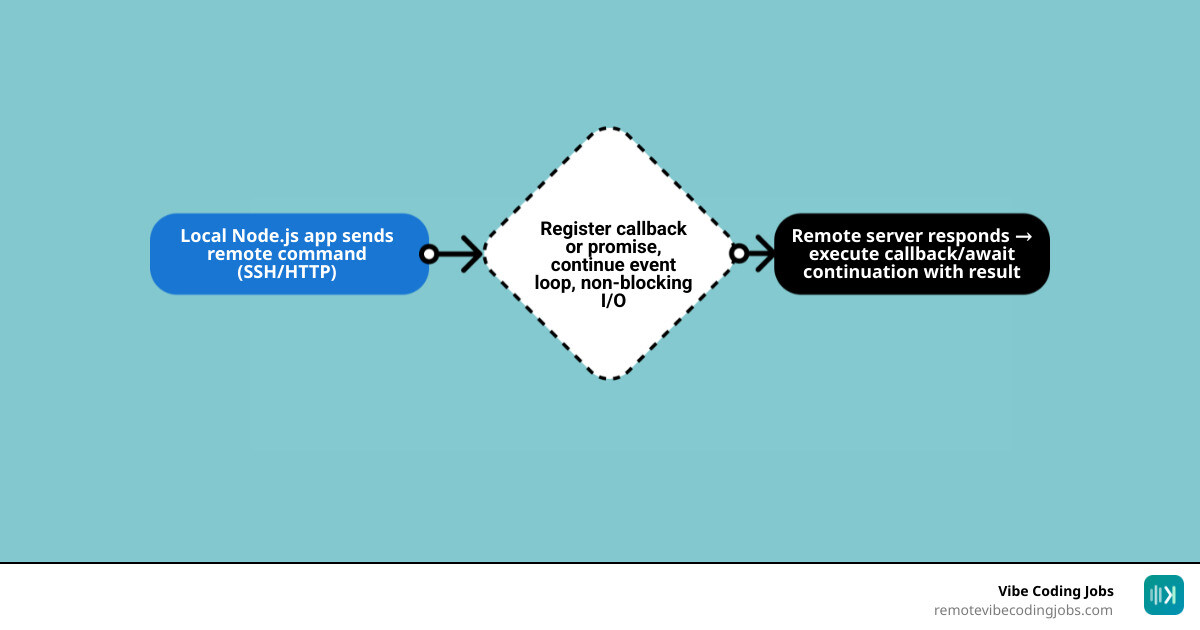
Quick answer — how Node.js remote async works:
- Your app sends a command to a remote server (via SSH, HTTP, or a child process)
- Node.js registers a callback and moves on — it does not wait
- The event loop keeps running other tasks in the meantime
- When the remote server responds, Node.js picks up the result and executes your callback, Promise, or
awaitcontinuation
Node.js is built around a single-threaded event loop. That sounds like a limitation — but it’s actually the reason Node.js can handle up to 10,000 concurrent connections on a single server. The secret is non-blocking I/O: instead of sitting idle while a remote server processes your request, Node.js keeps doing other work.
This matters a lot when you’re building tools that talk to remote machines — deployment scripts, SSH automation, API orchestration, or real-time data pipelines. Getting async patterns wrong here means slow apps, frozen servers, or worse: memory leaks that silently eat your resources.
Over 85% of Node.js developers now use async/await to handle these patterns — and for good reason. But raw async/await alone isn’t always enough when remote operations get complex.
This guide covers the full picture: from child_process and node-ssh to AbortController, control flow utilities, streaming, and security.
I’m RVCJ Editorial, the team behind Remote Vibe Coding Jobs — we cover async-first engineering workflows, AI-assisted development, and remote developer hiring, including the Node.js remote async patterns that show up most in real job requirements. We’ll keep this practical and skip the fluff.
The Core Mechanics of Remote Async Execution
To master node js remote async, we first have to understand the engine under the hood. Node.js operates on an event-driven architecture. When we talk about “remote” operations, we are essentially talking about I/O (Input/Output). Whether you are querying a database in another region or running a bash script on a Raspberry Pi, Node.js treats these as external events.
The heavy lifting for local-to-remote execution often starts with the child_process module. This built-in module allows us to spawn subprocesses that run independently of our main V8 instance.
spawn vs exec
According to the Child process | Node.js v19.9.0 Documentation, there are two primary ways to run commands:
spawn: This is the preferred method for long-running processes or those that return large amounts of data. It returns a stream, allowing us to process data in chunks without filling up our memory.exec: This buffers the entire output and passes it to a callback. It’s easier to use for small, quick commands, but it has a defaultmaxBufferof 1MB. If your remote command returns more than that, your app will crash.
From Callbacks to Async/Await
In the early days, we relied on callback patterns. You’d pass a function that would run “later.” This led to “callback hell,” where code became a nested mess of brackets. Modern developers have moved toward Promises and async/await. As noted in A Complete Guide to Asynchronous Programming in Node.js, async/await is essentially syntactic sugar over Promises, making asynchronous code look and behave like synchronous code without blocking the event loop.
| Feature | Synchronous Methods (spawnSync) |
Asynchronous Methods (spawn) |
|---|---|---|
| Event Loop | Blocks until the task is done | Remains free to handle other requests |
| Performance | Poor for high-concurrency | Excellent for scaling |
| Usage | CLI scripts where order is absolute | Web servers, APIs, and background jobs |
| Complexity | Low (linear logic) | Medium (requires Promise management) |
By utilizing an Async-First Remote Work Guide mindset, we can build systems that don’t just wait around. We trigger a task, let the “remote” handle the work, and react only when the data is ready.

Implementing node js remote async with SSH
While child_process is great for local commands, most node js remote async tasks involve connecting to a different machine via SSH. Doing this manually with spawn('ssh'...) is possible, but it’s prone to errors, especially regarding argument quoting.
A better way is using specialized libraries like node-ssh v13.2.1. This library is a lightweight Promise wrapper for the ssh2 protocol. It simplifies the connection process significantly:
- Establish Connection: Use
ssh.connect()with your host, username, and either a password or a private key. - Execute Commands: Use
ssh.execCommand(), which returns a Promise containingstdout,stderr, and the exit code.
For developers who need to run the same command across multiple servers simultaneously, remote-exec offers a way to parameterize commands using {{variable}} syntax. This is particularly useful in an Async-First Remote Developer Jobs Culture, where automation and infrastructure-as-code are standard.
When implementing these, always prefer private key authentication over passwords. It’s more secure and easier to automate in a CI/CD pipeline. Also, when you spawn a process on a remote host in NodeJS, you must handle the stream correctly. If you don’t listen to the data events, the remote process might hang because its output buffer is full.
Managing node js remote async with AbortController
What happens if a remote command takes too long? If you’ve triggered a node js remote async task that’s supposed to take 5 seconds but is still running 5 minutes later, you’re wasting server resources and potentially holding up a queue.
This is where the AbortController and AbortSignal APIs come in. These are standard Web APIs now available in Node.js that provide a uniform way to cancel asynchronous tasks.
AbortSignal.timeout(): This is a lifesaver. You can create a signal that automatically triggers an “abort” event after a specified number of milliseconds.- Graceful Cancellation: By passing the
signalto yourfetchrequests orchild_processoptions, Node.js will automatically kill the process or close the network socket if the signal is aborted.
As discussed in the guide on Managing Asynchronous Operations in Node.js with AbortController, using these tools prevents “zombie processes” on your remote servers. In Async-First Communication Workflows, where we often deal with distributed systems, being able to cleanly cancel a request is just as important as starting one.
Advanced Control Flows for node js remote async
When your application starts doing more than one thing at a time, you need a strategy. If you need to update 50 remote servers, do you do them one by one (series) or all at once (parallel)?
The async utility module is used by over 60% of Node.js developers for exactly this reason. It provides powerful patterns for managing complexity:
async.parallel: Runs multiple remote tasks at the same time. This is the fastest way to get things done but can overwhelm your network or the remote host if you don’t set a limit.async.series: Runs tasks one after the other. If one fails, you can stop the whole chain. This is perfect for deployment steps where Step B must wait for Step A.async.waterfall: Similar to series, but it passes the result of the first task as an argument to the next.
For those working in Async-First TypeScript Jobs, these utilities often come with strong type definitions, ensuring that the data being passed between “waterfall” steps is exactly what you expect.
Managing Asynchronous Communication for Remote Developers isn’t just about people; it’s about how our services talk to each other. Using a queue with a specific concurrency limit (e.g., only 5 remote SSH connections at a time) is a best practice that prevents your local machine from hitting file descriptor limits or being flagged as a DDoS attack by the remote firewall.

Security, Streaming, and Performance Optimization
Executing commands on a remote server is inherently risky. If you are building a tool where a user can input a “filename” that gets used in a remote command, you are one semicolon away from a disaster.
Security First
Never pass unsanitized user input into a shell command. If a user provides ; rm -rf /, and you concatenate that into your SSH string, your remote server is gone. Use libraries that handle argument escaping, or better yet, use execFile or spawn which don’t invoke a shell by default.
Streaming and Memory
When performing node js remote async operations, data can come back in massive quantities. If you use exec(), Node.js tries to put all that data into a single string in memory. This is a recipe for a memory leak.
Instead, use streams. You can pipe the stdout of a remote SSH command directly to a local file or even back to an HTTP response. This keeps your memory usage flat, regardless of whether the remote file is 10KB or 10GB.
Tools for the Job
node-scp: For moving files securely, node-scp v0.0.25 is an excellent choice. It’s built on Promises, making it easy toawaita file transfer.node-ssh: As mentioned, it’s the gold standard for command execution.
In Benefits of Async-First Remote Work, we value efficiency. Using the Best Async Communication Tools for Dev Teams often includes internal CLI tools built with these very libraries to automate repetitive remote tasks.
Frequently Asked Questions about Remote Async
How do I prevent memory leaks during high-concurrency remote tasks?
Memory leaks usually happen when you accumulate data in variables without clearing them, or when you don’t close your SSH connections. Always call ssh.dispose() or client.close() in a finally block. Additionally, use streams (spawn) instead of buffers (exec) to ensure data flows through your application rather than sitting in it.
What is the best way to handle errors in nested remote async calls?
The “Try-Catch” block is your best friend with async/await. However, when dealing with multiple remote calls, you might want to use Promise.allSettled(). Unlike Promise.all(), which fails if a single task fails, allSettled lets you see the result of every single remote command, allowing you to log the failures and proceed with the successes.
Can I stream remote command output without blocking the event loop?
Yes! This is exactly what Node.js is designed for. When you use ssh.exec() or child_process.spawn(), the stdout and stderr properties are Readable Streams. You can attach .on('data', ...) listeners to them. These listeners only fire when there is data to process, leaving the event loop free to handle other requests in the intervals between data chunks.
Conclusion
Mastering node js remote async is about more than just knowing the syntax; it’s about understanding the flow of data across the wire. By combining the power of the Node.js event loop with robust libraries like node-ssh and safety features like AbortController, you can build remote automation tools that are both fast and resilient.
As we move further into 2026, the way we write this code is changing. We’re seeing a massive shift toward “Vibe Coding”—using AI tools like Cursor and Claude to generate these complex async patterns. AI is particularly good at handling the boilerplate of SSH connections and control flow utilities, allowing developers to focus on the high-level logic of their systems.
At Remote Vibe Coding Jobs, we see this trend every day. Companies are looking for developers who can leverage AI to ship faster while maintaining the deep technical knowledge required to debug a stuck event loop or a remote memory leak.
Whether you’re looking for a Senior Full Stack Engineer (Node.js & AI) role or a Full Stack Software Developer (Node.js & React) position, understanding these async patterns is non-negotiable.
Ready to take your Node.js skills to an async-first company? Check out our curated Node.js Vibe Coding Jobs and join the next generation of developers who prioritize flow, speed, and location freedom.
Visit remotevibecodingjobs.com to find your next remote role today.